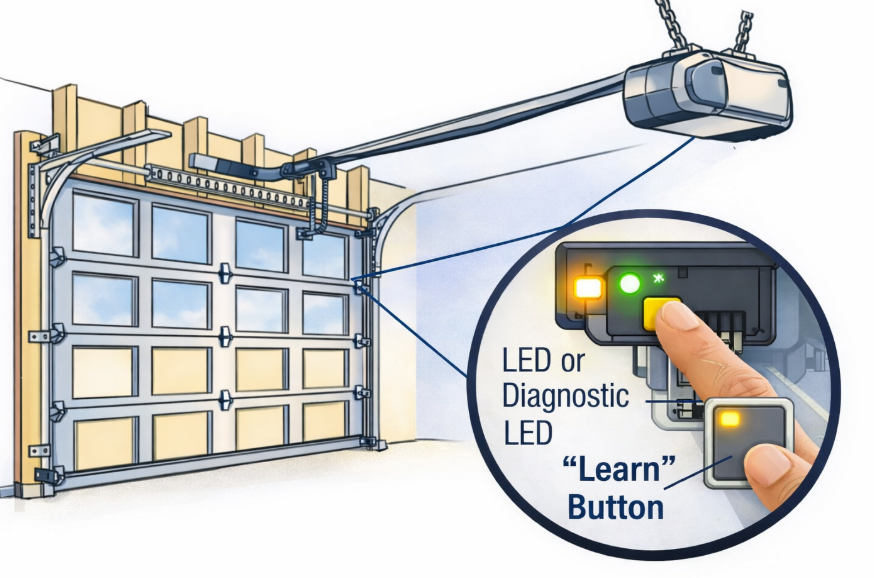
The learn button on a garage door opener is a small but critical control used to program remotes, keypads, vehicles, and smart systems. If you have ever wondered what is a learn button on a garage door opener, where it is located, or why it is not working, this guide explains everything in plain terms.
This article covers:
- What the learn button does
- Where to find it on different openers
- What the different colors mean
- What to do if your garage door opener has no learn button
- Common problems and fixes
- What Is a Learn Button on a Garage Door Opener?
- Where Is the Learn Button Located?
- Common Brands and Learn Button Locations
- Learn Button Colors and What They Mean
- 3 Buttons on Garage Door Opener – What Do They Do?
- What If Your Garage Door Opener Has No Learn Button?
- Learn Button Not Working – Common Problems
- Most Common Causes
- Learn Button on Specific Brands
- LiftMaster Learn Button
- Linear Garage Door Opener Learn Button
- Raynor Learn Button
- Phantom and Quantum Garage Door Openers
- How to Use the Learn Button (Basic Steps)
- When You Should NOT Use the Learn Button
- Final Thoughts
- Author
What Is a Learn Button on a Garage Door Opener?
The learn button is used to put the garage door opener into programming mode. When activated, the opener is ready to accept a new signal from:
- A remote control
- A wireless keypad
- A built-in car garage door opener (HomeLink)
- Some smart hubs
In simple terms, the learn button tells the opener: “I am ready to learn a new device.”
People often search:
- what is a learn button on a garage door opener
- what is the learn button on a garage door opener
- the learn button on the garage door opener
All of these refer to the same function.
Where Is the Learn Button Located?
The learn button on the garage door motor is usually found on the main opener unit mounted to the ceiling.
Typical locations:
- Under the light cover
- Behind a small access panel
- On the back or side of the motor housing
Common Brands and Learn Button Locations
| Brand | Learn Button Location |
|---|---|
| LiftMaster | Near antenna wire or under light cover |
| Chamberlain | Under the light lens |
| Linear | On the rear or side of the motor |
| Raynor | Near wiring terminals |
| Quantum | Inside the control panel |
| Phantom | Behind the light cover |
Searches like learn button on linear garage door opener or raynor garage door opener learn button location usually fail because users do not remove the light cover first.
Learn Button Colors and What They Mean
On many openers, especially LiftMaster and Chamberlain, the learn button color matters.
| Learn Button Color | System Type |
|---|---|
| Yellow | Security+ 2.0 (newer models) |
| Purple | Security+ |
| Red / Orange | Older rolling code |
| Green | Very old models |
If you see garage door opener learn button flashing, it usually means:
- The opener is in programming mode, or
- A programming step timed out
3 Buttons on Garage Door Opener – What Do They Do?
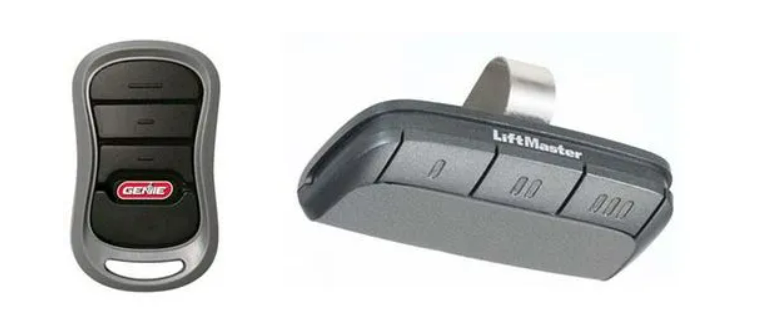
Some openers or wall stations have 3 buttons on garage door opener units.
Common functions:
- Open / Close door
- Program or Learn mode
- Light or lock function
This is often confused with 3 button garage door opener wiring, but the learn button itself is usually separate from wall controls.
What If Your Garage Door Opener Has No Learn Button?
If you are searching garage door opener no learn button, your opener is likely an older model that uses DIP switches instead of a learn button.
Signs:
- No colored button on the motor
- Small switches inside the remote and opener
- Manual matching of switch positions
In this case, remotes must be programmed by matching DIP switch patterns exactly.
Learn Button Not Working – Common Problems
If your garage door opener learn button not working, check the following.
Most Common Causes
| Problem | Solution |
|---|---|
| Opener not powered | Check outlet or breaker |
| Button does nothing | Hold for 2-3 seconds |
| Button flashes then stops | Retry programming quickly |
| Remote incompatible | Use correct frequency or brand |
| Control board issue | Reset or replace board |
Searches like learn button on garage door opener not working usually end up being a compatibility issue, not a broken button.
Learn Button on Specific Brands
LiftMaster Learn Button
Often yellow or purple. Used for:
- Remotes
- Keypads
- Vehicles
- myQ setup
Linear Garage Door Opener Learn Button
Usually recessed or inside the housing. Often missed at first glance.
Raynor Learn Button
Similar to LiftMaster but placement varies by model.
Phantom and Quantum Garage Door Openers
Learn button may be labeled differently or hidden inside the panel.
How to Use the Learn Button (Basic Steps)
- Press and release the learn button
- Indicator light turns on or flashes
- Press the remote or device button within 30 seconds
- Light blinks or clicks to confirm
That is all most systems require.
When You Should NOT Use the Learn Button
Do not press the learn button if:
- You only want to replace a battery
- Your opener uses DIP switches
- You are unsure and want to avoid clearing old remotes
Holding the button too long may erase all programmed devices.
Final Thoughts
The learn button on your garage door opener is simple, but misunderstandings cause most programming problems. Once you know where it is, what color it is, and what system your opener uses, programming becomes straightforward.
If your opener truly has no learn button, it is not broken – it is just older technology.
