A weak display, delayed response, warning, or failed command is useful evidence on Jeep Wrangler Garage Door Opener Programming; treat the symptom as the starting point rather than assuming the first replaceable part is at fault.
- Before You Press the Learn Button
- Follow the Controls, Not the Guesswork
- Overview
- Step 3: Sync With the Garage Door Opener Motor (Rolling Code)
- Common Wrangler-Specific Issues
- Programming Without the Original Remote
- Buttons, Crown, or Touchscreen?
- Step 1: Clear Existing HomeLink Codes (Recommended)
- Step 2: Program HomeLink Using the Original Remote
- Match the Case, Module, or Generation First: Jeep Wrangler Garage Door Opener Programming
- When Power Returns but the Device Does Not
- Author
Before You Press the Learn Button
To avoid programming issues, make sure the following conditions are met:
- You have the original garage door remote
- The vehicle is parked outside the garage
- The garage door opener motor has power
- The Jeep ignition is in the ON position
- If the vehicle was previously owned, clear existing HomeLink codes first
Most failures happen because the rolling-code sync step is skipped.
Follow the Controls, Not the Guesswork
Overview
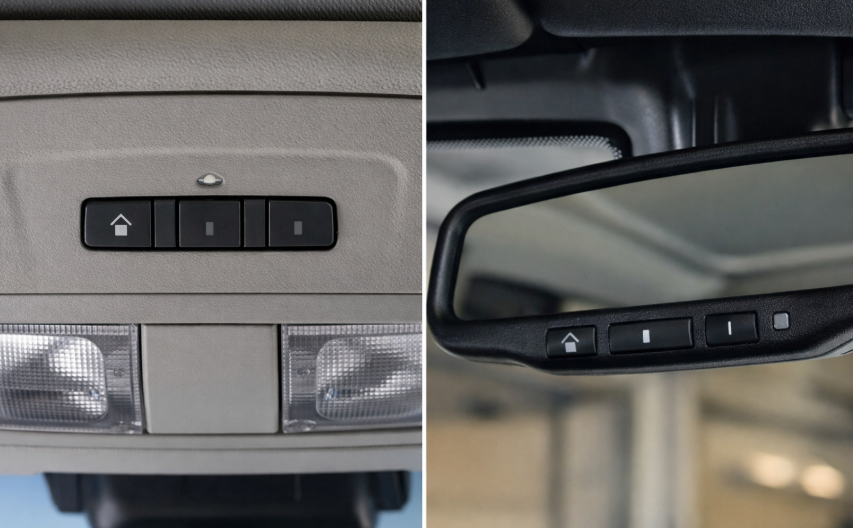
Most Jeep Wrangler models are equipped with HomeLink, a factory-installed universal garage door opener system. HomeLink allows you to open and close your garage door without using a handheld remote.
Depending on the year and trim level, HomeLink buttons in a Wrangler are usually located:
- On the overhead console (most common)
- Occasionally integrated into the rearview mirror on higher trims
This guide covers all Wrangler generations, including JK and JL, and explains the correct programming method for modern rolling-code garage door openers.
Step 3: Sync With the Garage Door Opener Motor (Rolling Code)
Most garage door openers made after 1996 use rolling-code security and require pairing at the motor.
- Locate the LEARN / PROGRAM button on the garage door opener motor
- Press the button once
(You now have about 30 seconds) - Return to the Jeep
- Press the programmed HomeLink button for 2 seconds, then release
- Repeat this press-and-release action 2-3 times
- Stop once the garage door moves
HomeLink should now operate the garage door normally.
Common Wrangler-Specific Issues
Garage door only works while holding the button
- Rolling-code sync was not completed
- Repeat Step 3 at the garage motor
Nothing happens after programming
- Weak battery in the original remote
- Remote held too far from HomeLink
- Learn mode timed out before syncing
Replace the remote battery and retry from Step 1.
Short range or intermittent operation
Common causes:Common causes:
- LED garage door opener bulbs
- RF interference in the garage
- Programming performed too far from the motor
Reprogram closer to the garage door opener or switch to a standard incandescent bulb.
Programming Without the Original Remote
In most cases, you cannot program HomeLink in a Jeep Wrangler without the original garage remote.
Limited exceptions:
- Some LiftMaster or Chamberlain units allow direct pairing at the motor
- This depends on the opener model and is not guaranteed
Dealer diagnostic tools cannot program HomeLink.
Buttons, Crown, or Touchscreen?
Step 1: Clear Existing HomeLink Codes (Recommended)
Always start with a reset, especially on used vehicles.
- Turn the ignition to ON
- Press and hold the two outer HomeLink buttons
- Hold for about 20 seconds
- Release when the indicator light starts flashing rapidly
This clears all previously stored garage door signals.
Step 2: Program HomeLink Using the Original Remote
This step teaches HomeLink the signal from your garage door remote.
- Hold the garage remote 1-3 inches from the HomeLink buttons
- Press and hold the desired HomeLink button
- While holding it, press and hold the button on the garage remote
- Watch the indicator light:
- Slow blinking = learning
- Rapid blinking = signal stored
- Release both buttons
At this point, HomeLink is programmed, but most modern systems still will not work until Step 3 is completed.
Match the Case, Module, or Generation First: Jeep Wrangler Garage Door Opener Programming

When Power Returns but the Device Does Not
- Always reset HomeLink before troubleshooting
- Try a different HomeLink button if one fails
- Soft-top Wranglers may require closer range during setup
- HomeLink issues are almost never caused by vehicle wiring
A technician handoff for Jeep Wrangler Garage Door Opener Programming is worthwhile when the correct part and procedure do not change the symptom, because the remaining fault is no longer a routine user adjustment.
