- How to use the Car Key Fob Battery Finder
- Key Fob Battery Replacement – A Simple Step-by-Step Guide
- Before You Open the Key
- How to Replace a Key Fob Battery
- 1. Remove the Emergency Key
- 2. Open the Case
- 3. Replace the Battery
- 4. Reassemble the Key
- 5. Test Everything
- When It’s Better to Leave It to a Professional
- A Few Things Worth Remembering
- How to Dispose of an Old Key Fob Battery
- Author
How to use the Car Key Fob Battery Finder
- Type your make, model, and year (e.g., Aufi a4 b9 / Ford F-150 2018).
- The table instantly shows the correct battery type and your car’s generation/body.
- Click the battery code (CR2032, CR2450, etc.) to open an Amazon search.
- Toggle Exact model match if your model name is long or has trims.
- Tip: If your year spans a range, enter it as 2015-2018.
| Make | Model | Years | Body/Generation | Battery |
|---|
Key Fob Battery Replacement – A Simple Step-by-Step Guide
Replacing a key fob battery is one of the easiest maintenance jobs you can do yourself. In most cases, the entire process takes less than five minutes and requires nothing more than a small plastic pry tool or even a coin.
If your remote suddenly has a shorter operating range, only works after several button presses, or your car displays a “Key Not Detected” warning, a weak battery is usually the first thing to check.
Before You Open the Key
Take a minute to confirm which battery your key actually uses.
Many key fobs look almost identical on the outside but require different batteries inside. Common types include CR2032, CR2450, CR2025, CR2016, and several others.
If you’re not sure, use our Car Key Fob Battery Finder or check your owner’s manual before buying a replacement.
A few more tips before getting started:
- Work on a clean, well-lit surface where small parts won’t get lost.
- Touch a metal object first to discharge static electricity before handling the circuit board.
- If your key is designed to be water resistant, inspect the rubber gasket when opening the case. A damaged seal can allow moisture inside the key later.
- Some BMW, Mercedes-Benz and other premium models use rechargeable VL-series batteries that may be soldered to the circuit board rather than simply clipped into place. Those keys are usually better left to a professional.
How to Replace a Key Fob Battery
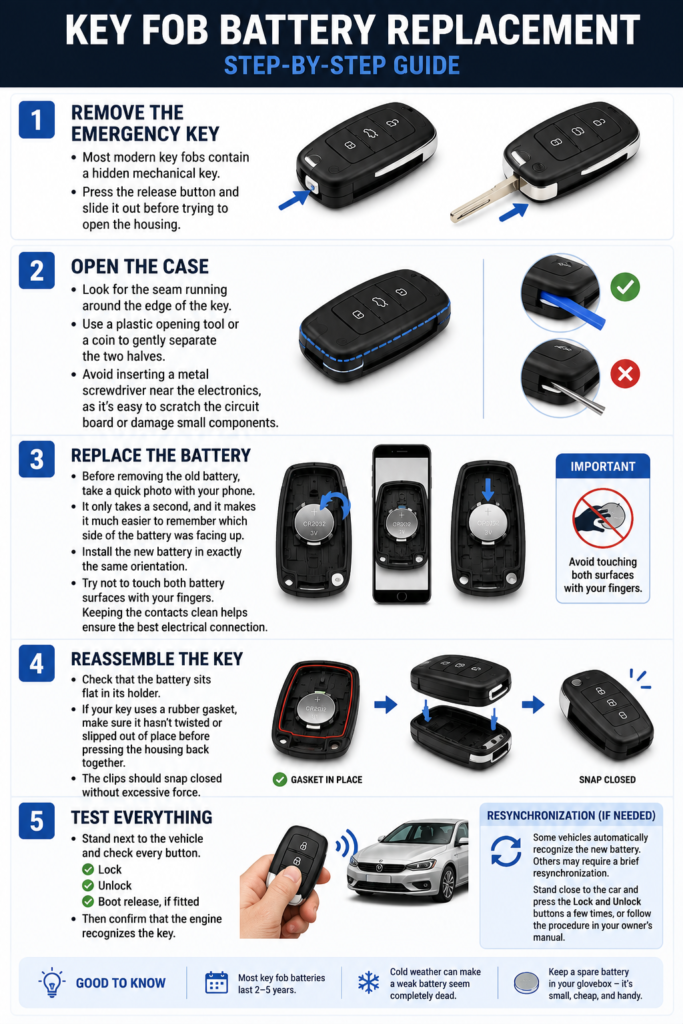
Although every manufacturer uses a slightly different design, the basic process is remarkably similar.
1. Remove the Emergency Key
Most modern key fobs contain a hidden mechanical key.
Press the release button and slide it out before trying to open the housing.
2. Open the Case
Look for the seam running around the edge of the key.
Use a plastic opening tool or a coin to gently separate the two halves.
Avoid inserting a metal screwdriver near the electronics, as it’s surprisingly easy to scratch the circuit board or damage small components.
3. Replace the Battery
Before removing the old battery, take a quick photo with your phone.
It only takes a second, and it makes it much easier to remember which side of the battery was facing up.
Install the new battery in exactly the same orientation.
Try not to touch both battery surfaces with your fingers. While it’s unlikely to cause immediate problems, keeping the contacts clean helps ensure the best electrical connection.
4. Reassemble the Key
Check that the battery sits flat in its holder.
If your key uses a rubber gasket, make sure it hasn’t twisted or slipped out of place before pressing the housing back together.
The clips should snap closed without excessive force.
5. Test Everything
Stand next to the vehicle and check every button.
Lock.
Unlock.
Boot release, if fitted.
Then confirm that the engine recognizes the key.
Some vehicles automatically recognize the new battery straight away, while others may require a brief resynchronization. If the remote doesn’t respond immediately, stand close to the car and press the Lock and Unlock buttons a few times, or follow the procedure described in your owner’s manual.
When It’s Better to Leave It to a Professional
Not every key is designed for easy battery replacement.
Professional service is usually the safer choice if:
- the case is glued or ultrasonically welded;
- the battery is marked VL, ML, or another rechargeable type;
- the car still displays “Key Not Detected” after installing a fresh battery;
- the key has signs of water damage;
- buttons have stopped clicking or the housing no longer closes properly.
Replacing the battery won’t solve problems caused by a damaged circuit board or worn switches.
A Few Things Worth Remembering
Most key fob batteries last two to five years, depending on how often the remote is used.
Cold weather can make a weak battery appear completely dead even though it still has a small amount of charge left.
If you own more than one key, it’s often worth replacing both batteries around the same time. The second key is usually close to the same age as the first, so it may not be far behind.
Keeping one spare CR2032 or the correct battery for your key in the glovebox is also a good idea. They’re inexpensive, take up almost no space and can save an unexpected trip to the store.
How to Dispose of an Old Key Fob Battery
Coin-cell batteries should never be thrown into household rubbish.
Instead, take the old battery to a battery recycling bin, an electronics retailer, or your local recycling center.
Many supermarkets and hardware stores also provide dedicated collection boxes for used batteries.
Finally, remember that button batteries can be extremely dangerous if swallowed. Store both new and used batteries out of reach of children and pets, and recycle old batteries as soon as possible rather than leaving them in a drawer.
How to Dispose of Old Batteries the Right Way
