Diesel watches are known for their bold design, oversized cases, and industrial style. Most models use analog quartz movements, but some Diesel watches also include digital displays or hybrid layouts.
Because of this variety, the method for setting the time on a Diesel watch depends on the type of model you have. However, the basic principle remains simple once you understand how the controls work.
This guide explains how to set the time on a Diesel watch, including analog, digital, and special models such as 3 BAR and 10 BAR watches.
- How to Set Time on a Diesel Watch (Analog Models)
- Step-by-step instructions
- How to Set Time on a Diesel Digital Watch
- Steps
- How to Set the Time on a Diesel Watch (Quick Guide)
- Quick Answer
- How to Set Time on a Diesel 3 BAR and 10 BAR Watch
- Steps
- How to Change Time on a Diesel Watch
- Diesel Watch Setting Instructions
- Crown positions (analog watches)
- Popular Diesel Watches and Time Adjustment
- Common Problems When Setting Time on a Diesel Watch
- The crown does not pull out
- The digital time does not change
- The watch shows the wrong time period
- Final Thoughts
- Author
How to Set Time on a Diesel Watch (Analog Models)
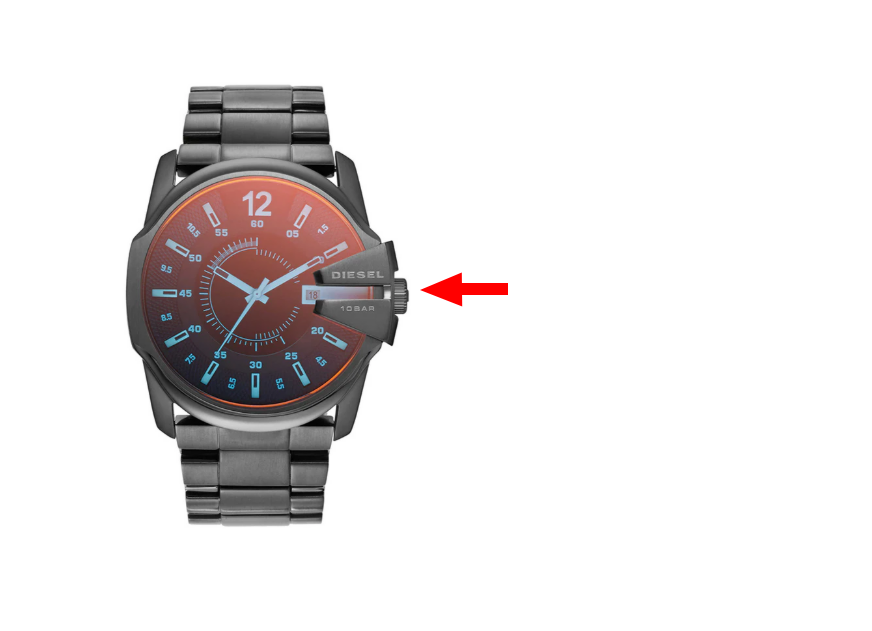
Most Diesel watches use a standard crown system.
Step-by-step instructions
- Locate the crown on the side of the watch case
- Pull the crown outward to the second position
- Rotate the crown to adjust the hour and minute hands
- Push the crown back into place
This method works for most Diesel analog watches.
How to Set Time on a Diesel Digital Watch
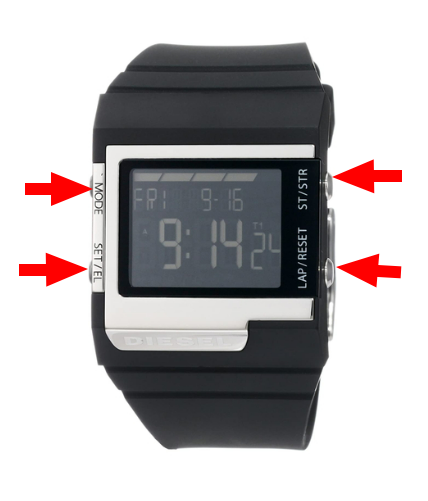
Some Diesel watches include a digital display with button controls.
Typical buttons:
- MODE
- SET
- START / STOP
- LIGHT
Steps
- Press MODE until the time screen appears
- Hold SET until the digits start flashing
- Press MODE to switch between hours and minutes
- Use START / STOP to adjust the numbers
- Press SET again to save
This applies to most Diesel digital watches.
How to Set the Time on a Diesel Watch (Quick Guide)
Quick Answer
To set the time on a Diesel watch:
- Analog watch: pull the crown, rotate to adjust time, push it back
- Digital watch: press MODE, hold SET, adjust with buttons, press SET to save
How to Set Time on a Diesel 3 BAR and 10 BAR Watch
Diesel watches often include water resistance ratings such as 3 BAR or 10 BAR.
These ratings do not affect how you set the time.
Steps
- Pull the crown out
- Rotate to adjust the time
- Push the crown back
Important: always ensure the crown is fully pushed in to maintain water resistance.
How to Change Time on a Diesel Watch
To update the time:
- Pull the crown (analog) or enter setting mode (digital)
- Adjust the time
- Confirm by pushing the crown back or pressing SET
Diesel Watch Setting Instructions
Crown positions (analog watches)
| Position | Function |
|---|---|
| Position 0 | Normal operation |
| Position 1 | Date adjustment (if available) |
| Position 2 | Time adjustment |
Popular Diesel Watches and Time Adjustment
| Model | Type | Time Setting Method |
|---|---|---|
| Diesel Mega Chief | Analog | Crown adjustment |
| Diesel Mr. Daddy | Multi-dial analog | Crown + subdials |
| Diesel Overflow | Analog | Crown adjustment |
| Diesel Digital Models | Digital | Button-based |
| Diesel DZ Series (e.g. DZ1923) | Digital / hybrid | Button controls |
Common Problems When Setting Time on a Diesel Watch
The crown does not pull out
Some models may feel tight – pull gently but firmly.
The digital time does not change
Make sure you hold the SET button long enough.
The watch shows the wrong time period
Rotate the hands through a full 12-hour cycle.
Final Thoughts
Setting the time on a Diesel watch is straightforward once you identify whether your model is analog or digital. Most Diesel watches use a crown-based system, while digital models rely on button controls.
With just a few simple steps, you can easily set or adjust the time and keep your watch accurate.
