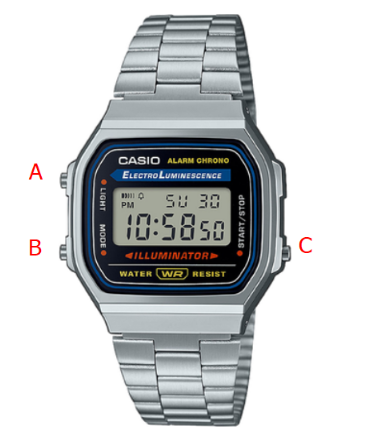
If you just picked up an A168, F-91W, A159, or one of the many similar Casio digitals, the button logic can feel oddly hidden the first time you try it — there’s no obvious “settings” label anywhere on the case. Once you’ve done it once, though, the whole process takes about a minute, and the same button sequence carries across nearly every classic Casio digital of this style.
- The Button Layout First
- First: the basic button layout on A168, F-91W, A159
- How to set time on Casio vintage watch (the universal method)
- Casio watch adjusting time when you are only off by an hour
- How to change Casio watch time from 24 hour to 12 hour
- Option A: Toggle from the main time screen
- Option B: Toggle inside settings
- Setting date Casio watch (and fixing the day display)
- Watches With a Simpler Two-Button Layout
- Casio vintage watch settings: timer and basic modes
- Using the Other Modes: Alarm, Stopwatch, and Timer
- Adjusting the Bracelet
- The Short Version
- Author
The Button Layout First
Most of these watches share the same three-button arrangement: one button top-left (usually doubles as the light and the settings/adjust button), one bottom-left (Mode), and one on the right side (Start/Stop, which becomes your value-adjust button once you’re in settings). The exact labels printed on the buttons vary a bit between models, but the logic underneath is consistent — Mode moves you between fields, the top-left button gets you in and out of settings, and the right button changes whatever’s currently flashing.
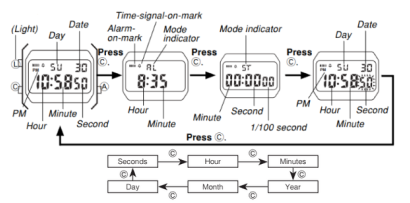
First: the basic button layout on A168, F-91W, A159
Most classic Casio models use three buttons:
- one button on the top-left (often used for light, but also acts as the “adjust”/enter button on many models)
- one button on the bottom-left (mode)
- one button on the right side (start/stop)
The labels can vary slightly, which is why people search how to set time on casio watch with 3 buttons or how to set a casio watch with 3 buttons. The logic stays the same: Mode moves you around, Adjust gets you into settings, and Start/Stop changes values.
How to set time on Casio vintage watch (the universal method)
- Press Mode until you’re back on the plain time display — not stopwatch, not alarm.
- Hold the top-left button for two to three seconds. The digits will start flashing once you’re in.
- Tap Mode to step through the fields. The order is typically seconds, then hours, then minutes, then month, then date.
- Use the right-side button to adjust whatever’s flashing — hold it down and it’ll scroll faster instead of clicking through one at a time.
- Once everything’s correct, press the top-left button once more to save and drop back to the normal time screen.
That’s the whole process, and it’s the same flow whether you’re correcting a watch that’s a few minutes off or setting one up from scratch after a battery change.
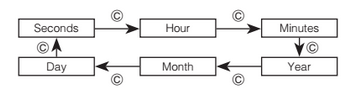
This is the simplest answer for how to set the time in casio vintage watch and casio vintage set time across A168, F-91W, A159 and most similar designs.
Casio watch adjusting time when you are only off by an hour
A lot of people google how to change time on casio vintage watch because the watch is exactly one hour off. That usually happens for one of these reasons:
- the watch was switched between 12-hour and 24-hour format
- the hour was set incorrectly during travel or daylight savings
- the watch is 12 hours off (AM/PM confusion)
The fix is still the same: enter settings, jump to hours, and correct it.
How to change Casio watch time from 24 hour to 12 hour
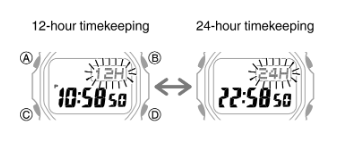
If you are trying how to change casio watch time from 24 hour or how to set 12 hour time in casio vintage watch, here are the two common ways it works on vintage Casio models:
Option A: Toggle from the main time screen
On many models, pressing the right-side button while on the time screen switches between 12/24.
Option B: Toggle inside settings
If pressing the right-side button does nothing:
- enter settings (hold top-left)
- press Mode until you reach the hour field
- try pressing the right-side button and watch for 12/24 switching behavior
- save and exit (top-left)
If the display shows a small “PM” indicator in 12-hour mode, that is normal.
Setting date Casio watch (and fixing the day display)
If you searched setting date casio watch or casio watch how to set date, you will set it in the same settings mode:
- enter settings (hold top-left on the time screen)
- press Mode until month flashes
- adjust month with the right-side button
- press Mode until date flashes
- adjust date with the right-side button
- save with the top-left button
This is also the core of how to set date and time in casio vintage watch and how to set time and date in casio vintage watch.
If your watch shows the wrong day of the week, it is almost always because the month/date is wrong. Correct the date first and the day usually fixes itself automatically.
Watches With a Simpler Two-Button Layout
Some models in this style trim things down to two buttons instead of three, which combines a couple of functions onto the same button. One button handles cycling through modes and fields; the other adjusts values. Getting into settings usually just means holding one of the two buttons down on the main time screen for a few seconds. If nothing happens at first, try holding the other button instead — one of the two will get the digits flashing, and once they are, you’re following the same steps as above.
Casio vintage watch settings: timer and basic modes
People also look up casio vintage watch settings because they want to use features like the stopwatch, alarm, or timer. On most classic models:
- Mode cycles: time -> alarm -> stopwatch (and sometimes timer)
- Start/Stop begins and stops counting
- the top-left button often resets in stopwatch mode or toggles light
If you are specifically searching how to set timer on casio watch, you need a model that includes a timer mode. Many classic A168/F-91W style watches focus on alarm and stopwatch, while some similar models include a countdown timer. If you do not see a timer screen while cycling Mode, your model likely does not have that function.
Using the Other Modes: Alarm, Stopwatch, and Timer
Pressing Mode repeatedly cycles you through the watch’s other functions — typically time, then alarm, then stopwatch, and on some models a countdown timer as well. Start/Stop does exactly what it says in stopwatch mode, and the top-left button usually resets the count (or just toggles the light, depending on which mode you’re in).
Not every watch in this family includes a timer — the classic A168 and F-91W generally stick to alarm and stopwatch only, while some closely related models add a countdown function on top. If you cycle through Mode and never see a timer screen, your specific watch simply doesn’t have one; that’s a hardware limitation, not something you’re missing in the settings.
Adjusting the Bracelet
The metal bracelets on watches like the A168 and A159 usually offer two ways to change the fit. For small adjustments, check the clasp itself first — many of these have a built-in micro-adjustment range that covers a size or two without touching the links at all. For a bigger change, you’ll need to actually remove links, which is easiest with a simple watch-link removal tool (cheap, and worth owning if you adjust bracelets more than once). If you’re doing it yourself, work over a table or a tray so you don’t lose the small pins, and take out one link at a time rather than guessing at how many you’ll need — it’s much easier to remove one more than to put one back in.
The Short Version
Get to the plain time display, hold the top-left button until the numbers flash, step through the fields with Mode, adjust each one with the right-side button, and press the top-left button again to lock it in and exit. That single sequence covers time, date, and the 12/24-hour toggle on nearly every classic Casio digital built in this style — A168, F-91W, A159, and the many watches that share their internals.
