Chamberlain wireless keypads are designed to operate outdoors, often in extreme temperatures. They illuminate when a button is pressed, scan for PIN entry, and send a higher-power signal to the opener compared to handheld remotes. Because of this, keypad batteries must supply more energy.
Keypads do not use CR2032 coin cells.
They rely on either a CR123A lithium battery or a 9V alkaline battery, depending on the model.

Why Keypads Require Larger Batteries
Unlike remotes, keypads must:
- light up the keypad at night
- detect user input reliably
- compensate for outdoor temperature swings
- transmit a stronger signal across larger distances
All of this requires significantly more power, which is why coin cells are not suitable.
Keypad Battery Types
CR123A Lithium Battery (3V)
Modern Chamberlain keypads use the CR123A battery because:
- it handles cold weather extremely well
- it provides strong, stable voltage
- it lasts longer in outdoor conditions
- it supports keypad backlighting
9V Alkaline Battery
Legacy Chamberlain keypads rely on a standard 9V battery.
These are easy to replace and widely available.
Keypad Battery Table
| Model | Device Type | Battery Type | Voltage | Notes |
|---|---|---|---|---|
| 940EV / 940EV-P2 | Wireless keypad | CR123A lithium | 3V | Current-generation keypad with strong cold-weather performance. |
| 940D | Wireless keypad | 9V alkaline | 9V | Older design with simple front-access compartment. |
| 747 Series | Early keypad | 9V alkaline | 9V | Frequently found in older garages; durable but power-hungry. |
How to Replace a Chamberlain Keypad Battery
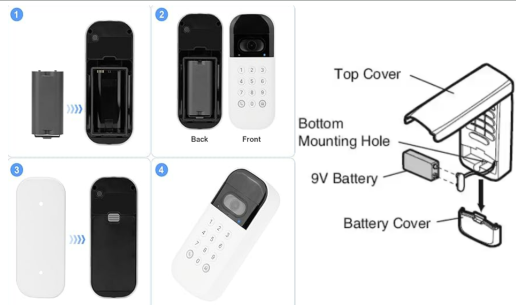
How to Replace a Chamberlain Keypad Battery
- Open the keypad cover or remove the front plate.
- Remove the old battery and inspect for corrosion.
- Insert the new battery with correct polarity.
- Verify that the keypad lights up.
- Enter your PIN to confirm successful replacement.
If the keypad still does not respond, continue to the Backup Guide below.
Keypad Backup Guide (Troubleshooting After Battery Replacement)
1. Keypad doesn’t light up at all
Re-seat the battery firmly or clean the contacts.
2. Keypad lights up but doesn’t activate the opener
Re-enter your PIN slowly — low battery levels before replacement sometimes cause temporary memory issues.
3. Buttons feel unresponsive
Dirt or moisture may block the contacts. Clean gently with a dry cloth.
4. Keypad works in warm weather but fails in cold
Replace with a fresh CR123A. Alkaline batteries perform poorly in winter.
5. Keypad intermittently works
Loose battery clips or worn internal pads are common in older units.
Changing a Chamberlain keypad battery only takes a moment: open the front cover, remove the old battery, and insert the new CR123A or 9-volt cell. When the keypad lights up after pressing a button, it’s ready for normal use again.
FAQ
What battery does a Chamberlain wireless keypad use?
Most newer Chamberlain keypads use a CR123A lithium battery, while older models rely on a standard 9V alkaline battery. The correct type is normally printed on the back of the keypad or inside the battery compartment.
How long does a Chamberlain keypad battery usually last?
Depending on climate and how often the keypad is used, a fresh battery typically lasts between six months and a year. Heavy use and very cold weather can shorten this interval.
My keypad stopped working after I changed the battery. What should I check?
First, make sure the battery is the correct type and fully seated in the compartment with the polarity aligned correctly. If it still does not respond, remove the battery for 30 seconds, reinstall it, and test the keypad again.
Do I need to reprogram my Chamberlain keypad after replacing the battery?
Most keypads keep their PIN and programming when the battery is changed. If the opener does not respond, re-enter your PIN carefully and, if necessary, repeat the pairing process according to the opener’s instructions.
Does cold weather affect keypad performance?
Yes. Very low temperatures can reduce battery output and make the keypad slow or unresponsive. Lithium CR123A batteries generally handle cold weather better than alkaline 9V batteries.
The keypad light is very dim. Is that normal?
A dim backlight is usually a sign of a weakening battery. Replacing the battery with a fresh CR123A or 9V cell almost always restores normal brightness and responsiveness.
Can I use any brand of battery in my Chamberlain keypad?
You can use any reputable brand as long as the battery type and voltage match the original. High-quality lithium or alkaline batteries provide better performance and longer life than very cheap generic cells.
