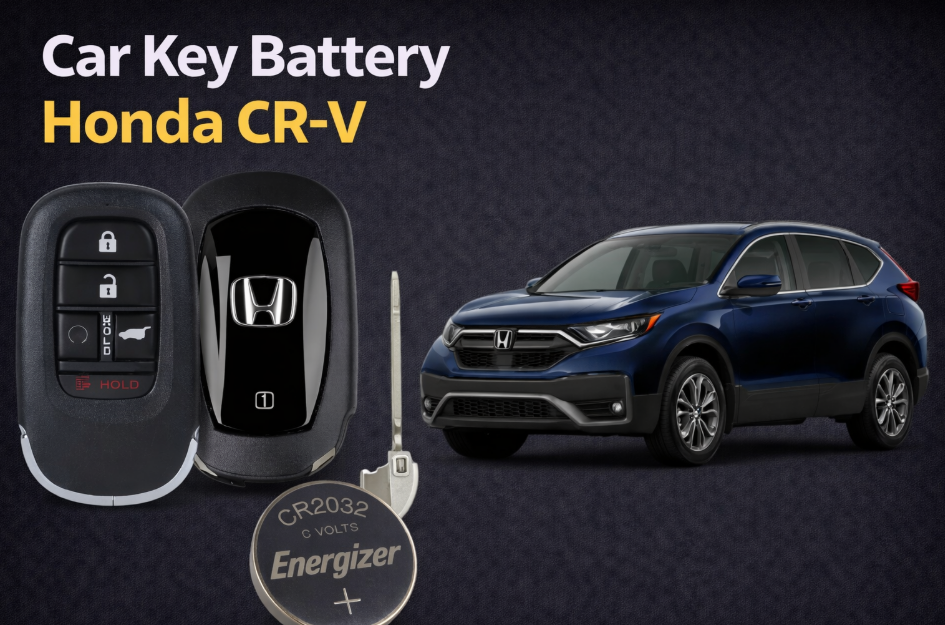
If your Honda CR-V key fob is not responding, has weak range, or shows a warning on the dashboard, the battery is usually the issue. Honda CR-V car key battery replacement is quick, inexpensive, and something you can easily do yourself in a few minutes.
Most Honda CR-V key fobs use CR2032 or CR1616 coin batteries depending on the year and key design. Because Honda has used different key types across generations, always open your key and check the battery before replacing it.
- Quick Answer
- Honda CR-V Key Battery by Year
- How to Change Car Key Battery Honda CR-V
- Step 1: Remove the emergency key
- Step 2: Open the key fob
- Step 3: Remove the old battery
- Step 4: Insert the new battery
- Step 5: Close the key fob
- Step 6: Test the key
- What Battery Does a Honda CR-V Key Fob Take?
- Honda CR-V Key Battery Low – What It Means
- 2007 Honda CR-V Key Battery Replacement
- 2015 Honda CR-V Car Key Battery
- 2016 Honda CR-V Key Battery
- 2019 Honda CR-V Key Battery Replacement
- Opening a Honda CR-V Key Fob
- What to Do When Honda Key Battery Is Low
- Honda CR-V Key Battery Dead – How to Start the Car
- Car Key Battery Near Me – Where to Buy
- Common Mistakes
- Using the wrong battery
- Installing incorrectly
- Damaging the key
- Not checking compatibility
- FAQ
- What battery does a Honda CR-V key fob use?
- How do I know what battery my car key needs?
- How to replace Honda CR-V key battery?
- Why is my CR-V key not working after battery replacement?
- How long does a Honda CR-V key battery last?
- Final Thoughts
- Author
Quick Answer
For most Honda CR-V key battery replacement:
- CR2032 – modern smart keys (most common)
- CR1616 / CR1620 – older remote or flip keys
Always confirm the battery type printed on your old battery.
Honda CR-V Key Battery by Year
| Year | Key Type | Battery Type | Notes |
|---|---|---|---|
| 2002-2006 Honda CR-V | Remote key | CR1616 | 2006 Honda CRV key battery replacement |
| 2007 Honda CR-V key battery | Remote / flip key | CR1616 or CR1620 | Very common |
| 2007 Honda CR-V key fob battery replacement | Remote | CR1616 | Verify before replacing |
| 2008-2011 Honda CR-V | Flip key | CR1616 | Same generation |
| 2012 Honda CR-V | Smart / remote | CR1616 or CR2032 | Transition |
| 2013 Honda CR-V car key battery | Smart key | CR2032 | Newer system |
| 2014 Honda CR-V car key battery | Smart key | CR2032 | Standard |
| 2015 Honda CR-V car key battery | Smart key | CR2032 | Very common |
| 2016 Honda CR-V car key battery | Smart key | CR2032 | Same platform |
| 2017 Honda CR-V | Smart key | CR2032 | New generation |
| 2018 Honda CR-V car key battery | Smart key | CR2032 | Consistent |
| 2019 Honda CR-V car key battery | Smart key | CR2032 | Updated design |
| 2020-2022 Honda CR-V | Smart key | CR2032 | Modern keys |
| 2023-2025 Honda CR-V | Smart key | CR2032 | Placeholder – verify |
Note: Even within the same year, there may be different key fob versions. Always check inside your key.
How to Change Car Key Battery Honda CR-V
If you’re searching how to change car key battery Honda CRV, follow these steps.
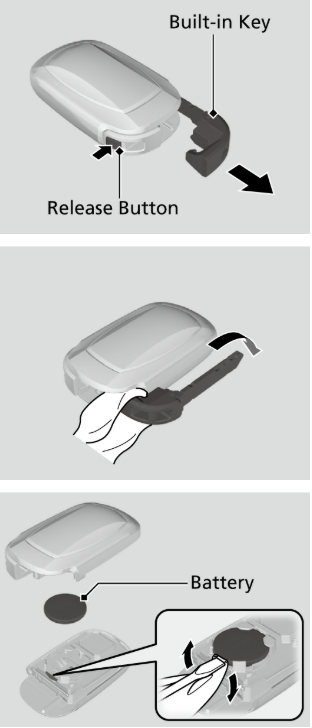
Step 1: Remove the emergency key
Slide the release button and pull out the metal key.
Step 2: Open the key fob
Insert a flat tool into the slot or seam and gently twist.
Step 3: Remove the old battery
Take out the battery and note the orientation.
Step 4: Insert the new battery
Install the new CR2032 or CR1616 battery in the same position.
Step 5: Close the key fob
Snap the case back together.
Step 6: Test the key
Check lock, unlock, and push-button start.
What Battery Does a Honda CR-V Key Fob Take?
A common question is: what battery does a Honda CR-V key fob take?
Most common options:
- CR2032 – smart keys
- CR1616 / CR1620 – older keys
If you’re unsure what battery your car key needs, open the key and check the label.
Honda CR-V Key Battery Low – What It Means
If you see a warning like key battery low Honda CRV, it means the battery is almost empty.
Typical signs:
- Reduced remote range
- Delayed response
- Push start issues
- Dashboard warning
Replace the battery before it completely dies.
2007 Honda CR-V Key Battery Replacement
For 2007 Honda CR-V key battery replacement, most keys use CR1616.
Because this was a transitional generation, some variations may exist.
2015 Honda CR-V Car Key Battery
For 2015 Honda CR-V car key battery replacement, CR2032 is the most common.
This applies to most smart key versions.
2016 Honda CR-V Key Battery
For 2016 Honda CR-V key battery replacement, CR2032 is standard across most trims.
2019 Honda CR-V Key Battery Replacement
If you’re searching how to change car key battery Honda CRV 2019, most models use CR2032 and follow the same replacement process.
Opening a Honda CR-V Key Fob
If you’re unsure about opening a Honda CR-V key fob:
- Use the emergency key slot
- Insert a flat tool carefully
- Twist gently – do not force
Avoid damaging clips inside the key.
What to Do When Honda Key Battery Is Low
If your Honda CR-V key battery is low:
- Replace the battery as soon as possible
- Keep a spare battery if needed
- Avoid waiting until it stops working completely
Honda CR-V Key Battery Dead – How to Start the Car
If your key battery is dead:
- Use the emergency key to unlock the door
- Hold the key fob close to the start button
- Start the car using backup detection
This works even with a completely dead battery.
Car Key Battery Near Me – Where to Buy
If you’re searching car key battery near me, you can find them at:
- Supermarkets
- Electronics stores
- Auto parts shops
- Gas stations
- Online marketplaces
Choose a reliable brand for longer battery life.
Common Mistakes
Using the wrong battery
CR2032 and CR1616 are different sizes.
Installing incorrectly
Wrong polarity prevents the key from working.
Damaging the key
Opening too aggressively can break clips.
Not checking compatibility
Different CR-V years may use different keys.
FAQ
What battery does a Honda CR-V key fob use?
Usually CR2032 or CR1616 depending on the year.
How do I know what battery my car key needs?
Open the key and check the printed number.
How to replace Honda CR-V key battery?
Remove emergency key, open the fob, replace battery, close it.
Why is my CR-V key not working after battery replacement?
Possible causes include wrong battery type, incorrect installation, or damaged contacts.
How long does a Honda CR-V key battery last?
Typically 2 to 4 years.
Final Thoughts
Honda CR-V car key battery replacement is one of the easiest fixes you can do yourself. Whether your key is slow, unresponsive, or completely dead, replacing the battery is usually all it takes.
The most important rule is simple: always check the battery inside your key before replacing it. This ensures proper fit, reliable performance, and avoids unnecessary frustration.
