Start with the identifying number on Toyota Camry Car Key Battery Replacement. A familiar product name can cover different modules, fobs, locks, or opener systems that do not share the same procedure.
If your Toyota Camry key fob is no longer responding like it used to, the battery is usually the reason. A weak battery can cause reduced range, delayed unlocking, or even prevent the push-button start system from recognizing your key.
The good news is that Toyota Camry car key battery replacement is quick, cheap, and something you can do yourself in just a few minutes.
Most Toyota Camry key fobs use CR2032 or CR2016 coin batteries depending on the generation and key type. Because Toyota used different key designs across years, the safest approach is always to open your key and check the battery inside.

- Start With the Failure You Can Observe
- Open the Fob and Replace the Cell
- How to Change Toyota Camry Key Battery
- Step 1: Remove the emergency key
- Step 2: Open the key fob
- Step 3: Remove the old battery
- Step 4: Insert the new battery
- Step 5: Close the key
- Step 6: Test the key
- 2007 Toyota Camry Key Battery Replacement
- 2012 Toyota Camry Car Key Battery Replacement
- What Happens If Your Car Key Battery Dies While Driving?
- Toyota Camry Key Battery Dead – What to Do
- How to Check Car Key Battery
- Common Mistakes
- Using the wrong battery
- Installing incorrectly
- Breaking the key fob
- Assuming all years are the same
- The Signal That Tells You It Worked
- Match the Case, Module, or Generation First
- Toyota Camry Key Battery by Year and Generation
- What Battery Does a Toyota Camry Key Fob Take?
- 2011 Toyota Camry Key Battery Replacement
- 2016 Toyota Camry Car Key Battery
- What Shortens the Expected Run Time
- Author
Start With the Failure You Can Observe
If you see Toyota Camry key battery low, it means the battery is close to empty.
Common symptoms:
- Reduced key range
- Delayed response
- Push start issues
- Dashboard warning
Replacing the battery early prevents complete failure.
Open the Fob and Replace the Cell
How to Change Toyota Camry Key Battery
If you’re searching how to change battery of Toyota Camry car key, the process is simple.
Step 1: Remove the emergency key
Slide the release button and pull out the metal key.
Step 2: Open the key fob
Insert a flat tool into the slot or seam and gently twist to open the case.
Step 3: Remove the old battery
Take out the battery and note the orientation.
Step 4: Insert the new battery
Install the new CR2032 or CR2016 battery in the same position.
Step 5: Close the key
Snap the key fob back together.
Step 6: Test the key
Check lock, unlock, trunk, and push start functions.
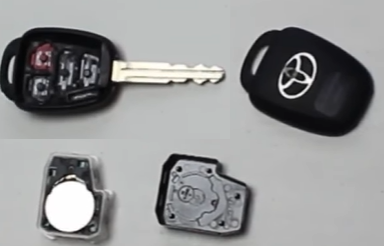
2007 Toyota Camry Key Battery Replacement
For 2007 Toyota Camry key battery replacement, the battery type can vary depending on whether you have a standard remote or a smart key.
Many 2007 models use CR2016 or CR1632, so it is important to verify before buying a replacement.
2012 Toyota Camry Car Key Battery Replacement
From 2012 onward, Toyota standardized more toward CR2032 batteries in smart keys.
If you’re searching how to change car key battery Toyota Camry 2012, the process is identical to newer models.
What Happens If Your Car Key Battery Dies While Driving?
If your key battery dies while driving, nothing critical happens.
- The car will continue running normally
- You may not be able to restart the engine after turning it off
- Remote functions will stop working
Always replace the battery as soon as you notice issues.
Toyota Camry Key Battery Dead – What to Do
If your Toyota Camry key fob battery is dead:
- Use the emergency key to unlock the door
- Hold the key close to the start button
- Start the vehicle using backup detection
Then replace the battery immediately.
How to Check Car Key Battery
If you’re unsure whether the battery is the problem:
- Check if range decreased
- Try a spare key
- Look for warning messages
- Replace battery as a test (fast and inexpensive)
Common Mistakes
Using the wrong battery
CR2032, CR2016, and CR1632 are not interchangeable.
Installing incorrectly
Wrong polarity prevents the key from working.
Breaking the key fob
Opening too aggressively can damage clips.
Assuming all years are the same
Toyota Camry key battery replacement varies by generation.
The Signal That Tells You It Worked
For most Toyota Camry key fob battery replacement:
- CR2032 is the most common (especially newer smart keys)
- CR2016 is used in older or slimmer remotes
Always confirm the battery type printed on your old battery before replacing it.
Match the Case, Module, or Generation First
Toyota Camry Key Battery by Year and Generation
| Generation | Years | Key Type | Battery Type | Notes |
|---|---|---|---|---|
| XV20 | 1997-2001 | Basic key / remote | CR2016 | Early remote systems |
| XV30 | 2002-2006 | Remote key | CR2016 | Separate fob common |
| XV40 | 2007-2011 | Smart key / remote | CR1632 / CR2016 | 2007 Toyota Camry car key battery varies |
| XV40 Hybrid | 2007-2011 | Smart key | CR1632 | Hybrid versions may differ |
| XV50 | 2012-2014 | Smart key | CR2032 | Newer intelligent key system |
| XV50 Facelift | 2015-2017 | Smart key | CR2032 | 2015 Toyota Camry car key battery typically CR2032 |
| XV50 (specific years) | 2011 Toyota Camry car key battery | Smart key | CR2032 | Common for this year |
| XV50 | 2012 Toyota Camry car key battery | Smart key | CR2032 | Widely used |
| XV50 | 2014 Toyota Camry car key battery | Smart key | CR2032 | Same platform |
| XV50 | 2016 Toyota Camry car key battery | Smart key | CR2032 | 2016 Toyota Camry car key battery standard |
| XV50 | 2017 Toyota Camry car key battery | Smart key | CR2032 | Final years of this gen |
| XV70 | 2018-2023 | Smart key | CR2032 | Modern design |
| XV80 | 2024-2025 | Smart key | CR2032 | Modern design |
Note: Even within the same generation, different key fob designs may exist. Always verify the battery inside your key.
What Battery Does a Toyota Camry Key Fob Take?
A very common question is: what battery does a Toyota Camry key fob take?
Most answers:
- CR2032 – used in most modern Camry smart keys
- CR2016 or CR1632 – used in older generations
If you’re unsure what battery your car key needs, simply open the key and read the label.
2011 Toyota Camry Key Battery Replacement
The 2011 Toyota Camry car key battery is often CR2032 in smart key versions, but some trims may differ.
If you’re doing a Toyota Camry key battery replacement 2011, always check inside the key fob first.
2016 Toyota Camry Car Key Battery
For 2016 Toyota Camry car key battery replacement, CR2032 is the most common choice.
This applies to most trims and hybrid versions as well, but still verify before replacing.
What Shortens the Expected Run Time
Most Toyota Camry key batteries last:
- 2 to 4 years on average
Heavy usage or cheap batteries may reduce lifespan.
Finish by testing every function you disturbed on Toyota Camry Car Key Battery Replacement, not just the first button, display, lock, or door movement that returns.
