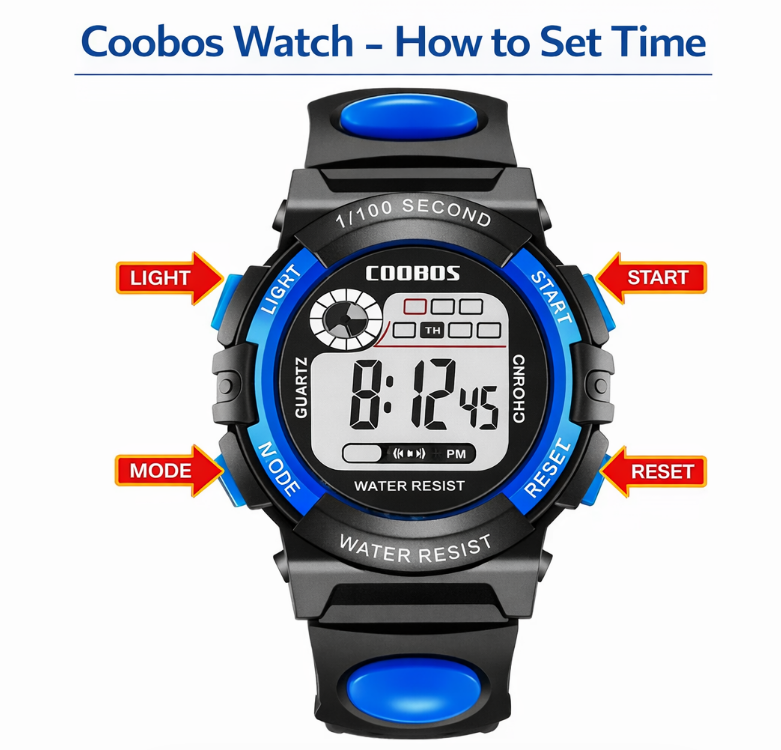
Coobos watches are simple digital or analog-digital watches designed for everyday use. Most models feature a basic interface with buttons or a crown, making them easy to adjust once you understand how the controls work.
Because Coobos watches come in different designs, the exact steps to set the time may vary slightly. However, most models follow a similar pattern.
This guide explains how to set the time on a Coobos watch, including digital models and basic analog watches.
- How to Set Time on a Coobos Watch
- Step-by-step instructions
- Coobos Watch Instructions (Digital Models)
- How to Adjust Watch Time on a Coobos Watch
- How to Set Time on a Coobos Analog Watch
- Steps
- Coobos Watch Manual (Quick Guide)
- Quick Answer
- Common Problems When Setting Time on a Coobos Watch
- The numbers do not flash
- The watch does not respond
- The time resets
- Popular Coobos Watch Types
- Final Thoughts
- Author
How to Set Time on a Coobos Watch
Most Coobos digital watches use a standard button-based system.
Step-by-step instructions
- Press the MODE button until the time screen appears
- Hold the SET or RESET button until the numbers start flashing
- Press MODE to switch between hours and minutes
- Use another button (often labeled START or ADJUST) to change the numbers
- Press SET or RESET again to save the time
This method works for most Coobos watches.
Coobos Watch Instructions (Digital Models)
Typical Coobos watches include 3-4 buttons:
- MODE – switch between functions
- SET / RESET – enter settings
- START / ADJUST – change numbers
- LIGHT – backlight
Understanding these buttons makes time adjustment much easier.
How to Adjust Watch Time on a Coobos Watch
If you need to change the time later, the process is the same:
- Enter time mode using MODE
- Hold SET until the digits flash
- Adjust using START
- Confirm with SET
This applies to most Coobos digital watches.
How to Set Time on a Coobos Analog Watch
Some Coobos watches use a traditional crown system.
Steps
- Pull the crown outward
- Rotate the crown to adjust the time
- Push the crown back into place
This is the same method used in most analog watches.
Coobos Watch Manual (Quick Guide)
Quick Answer
To set the time on a Coobos watch:
- Press MODE until the time screen appears
- Hold SET until numbers flash
- Press MODE to switch between settings
- Use another button to adjust the numbers
- Press SET again to save
Common Problems When Setting Time on a Coobos Watch
The numbers do not flash
Make sure you hold the SET button long enough.
The watch does not respond
Check if the watch is in stopwatch or alarm mode.
The time resets
This may indicate a low battery.
Popular Coobos Watch Types
| Model Type | Time Setting Method |
|---|---|
| Digital Coobos Watch | Mode + Set buttons |
| Analog Coobos Watch | Crown adjustment |
| Sport Coobos Watch | Standard digital controls |
Final Thoughts
Setting the time on a Coobos watch is simple once you understand the controls. Most models use a standard digital system where you enter settings, adjust the numbers, and confirm the changes.
Even without a manual, you can quickly set the correct time by following these basic steps.
