Before spending money on K-Sport Watch – How to Set Time, separate the inexpensive service item from the failure that actually needs a replacement or professional repair.
K-Sport watches are simple digital watches designed for everyday use and sports activities. Most models include features like alarm, stopwatch, and backlight, and use a basic button layout.
Because K-Sport watches are often produced under different variations (including Lasika K-Sport models), the interface may look slightly different, but the time-setting process is almost always the same.
This guide explains how to set the time on a K-Sport watch quickly and correctly.
- The Control Layout Determines the Method
- How to Set Time on a K-Sport Watch
- Step-by-step instructions
- Common Problems When Setting Time on a K-Sport Watch
- The numbers do not flash
- The time does not change
- Buttons are not working
- A Clean Start-to-Finish Procedure
- Quick Answer
- The Settings That Commonly Look Like a Time Error
- If the First Attempt Does Not Work
- A Reference for the Next Service
- Confirm the Watch Left Setting Mode
- How to Change Time on a K-Sport Watch
- How to Set Time on a Lasika K-Sport Watch
- Steps
- Author
The Control Layout Determines the Method
How to Set Time on a K-Sport Watch
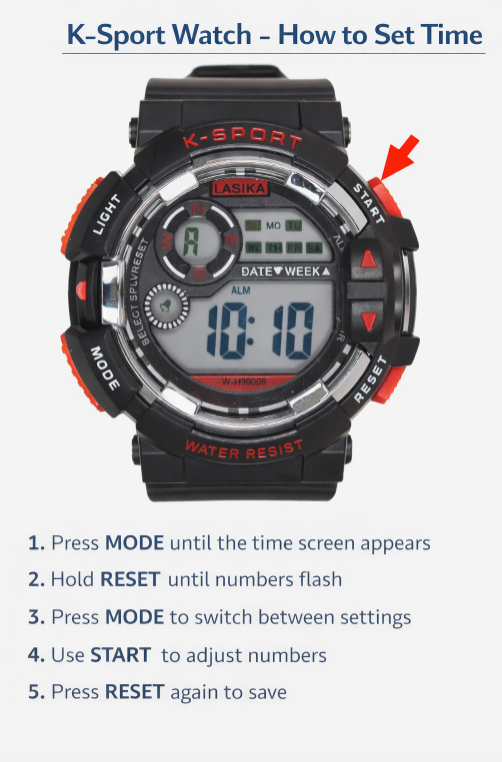
Most K-Sport watches use four buttons:
- MODE
- RESET
- START
- LIGHT
Step-by-step instructions
- Press the MODE button until the main time display appears
- Hold the RESET button for 2-3 seconds until the digits start flashing
- Press MODE to switch between seconds, hour, and minutes
- Use the START button to adjust the numbers
- Press RESET again to save the time
This method works for most K-Sport digital watches.
Common Problems When Setting Time on a K-Sport Watch
The numbers do not flash
Make sure you hold the RESET button long enough.
The time does not change
Check that you are in the correct time mode, not stopwatch.
Buttons are not working
The watch may need a battery replacement.
A Clean Start-to-Finish Procedure
Quick Answer
To set the time on a K-Sport watch:
- Press MODE until the time screen appears
- Hold RESET until numbers flash
- Press MODE to switch settings
- Use START to adjust numbers
- Press RESET again to save
The Settings That Commonly Look Like a Time Error
When using your watch for the first time:
- Set the time using the steps above
- Adjust the date if needed
- Check alarm and stopwatch functions
- Test the backlight
This ensures the watch is ready for everyday use.
If the First Attempt Does Not Work
A Reference for the Next Service
Confirm the Watch Left Setting Mode
How to Change Time on a K-Sport Watch
To change the time later, follow the same steps:
- Enter time mode
- Hold RESET until the display flashes
- Adjust using START
- Confirm with RESET
How to Set Time on a Lasika K-Sport Watch
Lasika K-Sport watches use the same system as standard K-Sport models.
Steps
- Hold RESET until the numbers flash
- Press MODE to switch between settings
- Use START to adjust values
- Press RESET to confirm
Even though branding may differ, the internal logic is identical.