The headline specification tells only part of the story with Coobos Watch – How to Set Time; the version and the way it is used often matter more than the label on the front.
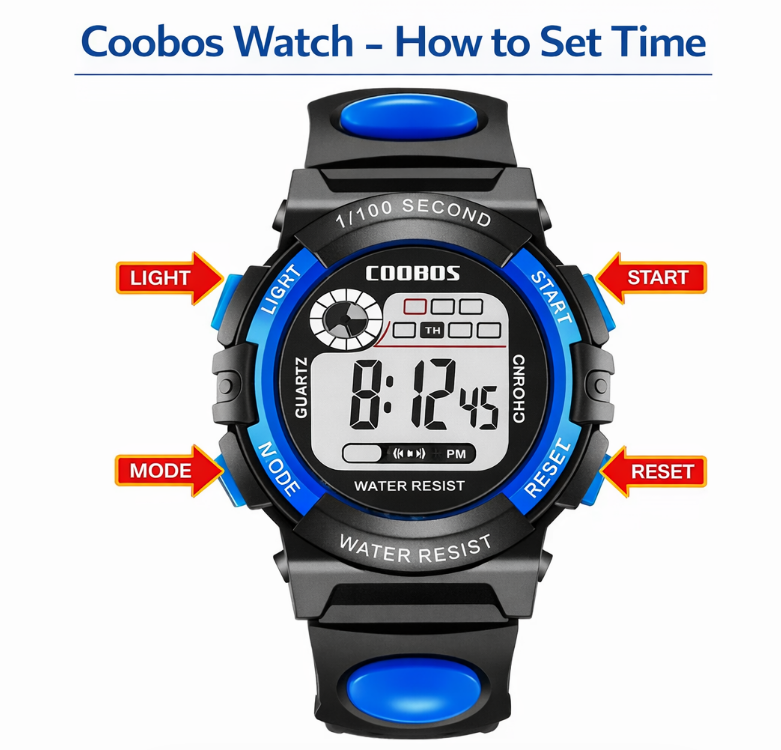
Coobos watches are simple digital or analog-digital watches designed for everyday use. Most models feature a basic interface with buttons or a crown, making them easy to adjust once you understand how the controls work.
Because Coobos watches come in different designs, the exact steps to set the time may vary slightly. However, most models follow a similar pattern.
This guide explains how to set the time on a Coobos watch, including digital models and basic analog watches.
- Follow the Controls, Not the Guesswork
- How to Set Time on a Coobos Watch
- Step-by-step instructions
- How to Set Time on a Coobos Analog Watch
- Steps
- Buttons, Crown, or Touchscreen?
- The Settings That Commonly Look Like a Time Error
- The numbers do not flash
- The watch does not respond
- The time resets
- The Numbers Worth Writing Down
- Coobos Watch Manual (Quick Guide)
- Quick Answer
- Popular Coobos Watch Types
- How to Know the Setting Was Saved
- Author
Follow the Controls, Not the Guesswork
How to Set Time on a Coobos Watch
Most Coobos digital watches use a standard button-based system.
Step-by-step instructions
- Press the MODE button until the time screen appears
- Hold the SET or RESET button until the numbers start flashing
- Press MODE to switch between hours and minutes
- Use another button (often labeled START or ADJUST) to change the numbers
- Press SET or RESET again to save the time
This method works for most Coobos watches.
How to Set Time on a Coobos Analog Watch
Some Coobos watches use a traditional crown system.
Steps
- Pull the crown outward
- Rotate the crown to adjust the time
- Push the crown back into place
This is the same method used in most analog watches.
Buttons, Crown, or Touchscreen?
Typical Coobos watches include 3-4 buttons:
- MODE – switch between functions
- SET / RESET – enter settings
- START / ADJUST – change numbers
- LIGHT – backlight
Understanding these buttons makes time adjustment much easier.
The Settings That Commonly Look Like a Time Error
The numbers do not flash
Make sure you hold the SET button long enough.
The watch does not respond
Check if the watch is in stopwatch or alarm mode.
The time resets
This may indicate a low battery.
The Numbers Worth Writing Down
Coobos Watch Manual (Quick Guide)
Quick Answer
To set the time on a Coobos watch:
- Press MODE until the time screen appears
- Hold SET until numbers flash
- Press MODE to switch between settings
- Use another button to adjust the numbers
- Press SET again to save
Popular Coobos Watch Types
How to Know the Setting Was Saved
If you need to change the time later, the process is the same:
- Enter time mode using MODE
- Hold SET until the digits flash
- Adjust using START
- Confirm with SET
This applies to most Coobos digital watches.
Record the model, module, battery, or receiver information you confirmed for Coobos Watch – How to Set Time; that note will make the next service faster than repeating the lookup.