SKMEI watches are popular because they are affordable, durable, and often packed with features such as alarms, dual time, stopwatch, and LED displays. However, many owners quickly realize that setting the time on a SKMEI watch is not always obvious.
Different models may use three or four buttons, while others combine digital and analog displays. Because of this, the exact steps can vary slightly depending on the model.
In this guide, you will learn how to set the time on a SKMEI watch, including digital models, LED watches, and dual time versions.
- Understanding SKMEI Watch Buttons
- How to Set Time on a SKMEI Digital Watch
- Step 1 – Enter the Time Setting Mode
- Step 2 – Adjust the Seconds
- Step 3 – Set the Hour
- Step 4 – Set the Minutes
- Step 5 – Save the Settings
- How to Set Time and Date on a SKMEI Watch
- How to Set Time on a SKMEI Watch With 3 Buttons
- How to Set Dual Time on a SKMEI Watch
- How to Set Time on a SKMEI LED Watch
- How to Reset Time on a SKMEI Watch
- Common Problems When Setting a SKMEI Watch
- The time will not change
- The watch switches between AM and PM
- The buttons do nothing
- Quick Tips for SKMEI Watch Owners
- Final Thoughts
- Author
Understanding SKMEI Watch Buttons
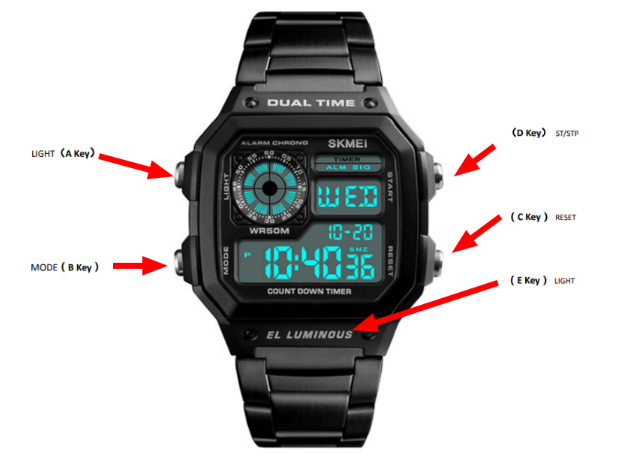
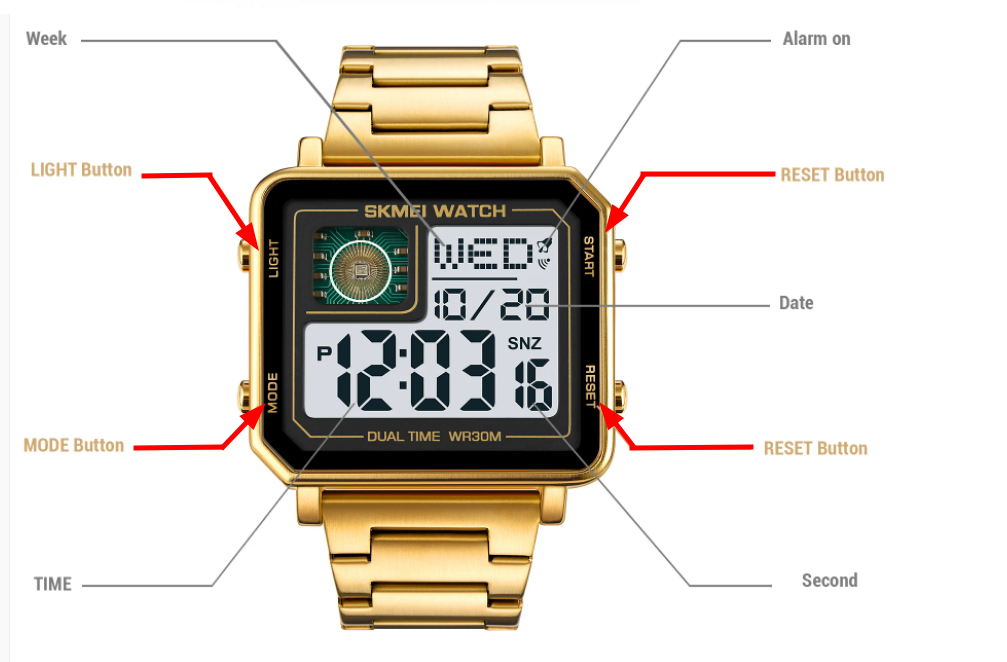
Most SKMEI digital watches use four buttons located on the sides of the case. They are typically labeled like this:
- LIGHT – activates the backlight
- MODE – switches between watch functions
- START (or UP) – increases numbers
- RESET (or SET) – enters the setting mode
Some SKMEI models only have three buttons, but the general principle remains the same.Some SKMEI models only have three buttons, but the general principle remains the same.
How to Set Time on a SKMEI Digital Watch
Follow these steps to set the time on most SKMEI digital watches.
Step 1 – Enter the Time Setting Mode
Press and hold the RESET button for about 2-3 seconds until the seconds start flashing on the screen.
When the numbers begin blinking, it means the watch is now in time adjustment mode.
Step 2 – Adjust the Seconds
Press the START button to reset the seconds to zero.
In many SKMEI watches this step simply synchronizes the seconds with the current minute.
Step 3 – Set the Hour
Press the MODE button once. The hour digits will begin to flash.
Use the START button to increase the hour until the correct time appears.
Some SKMEI watches switch between 12-hour and 24-hour format during this step.
Step 4 – Set the Minutes
Press the MODE button again to move to minutes.
Press START repeatedly until the correct minute appears.
Step 5 – Save the Settings
Once the correct time is displayed, press RESET to confirm and exit the setting mode.
Your SKMEI watch should now show the correct time.
How to Set Time and Date on a SKMEI Watch
Many SKMEI watches also allow you to adjust the date and day of the week.
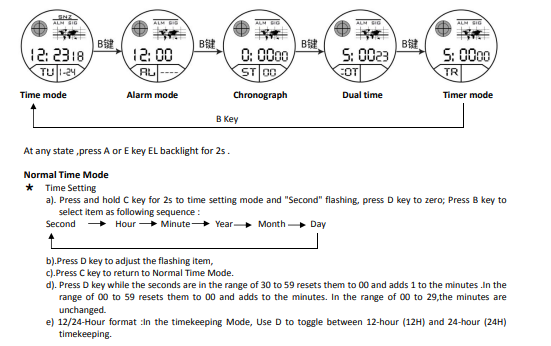
After entering the setting mode, press the MODE button to cycle through these options:
- Seconds
- Hour
- Minutes
- Month
- Date
- Day of the week
Use the START button to change the values.
Once finished, press RESET again to save everything.
How to Set Time on a SKMEI Watch With 3 Buttons
Some SKMEI watches use a simplified 3-button layout. The buttons usually function like this:
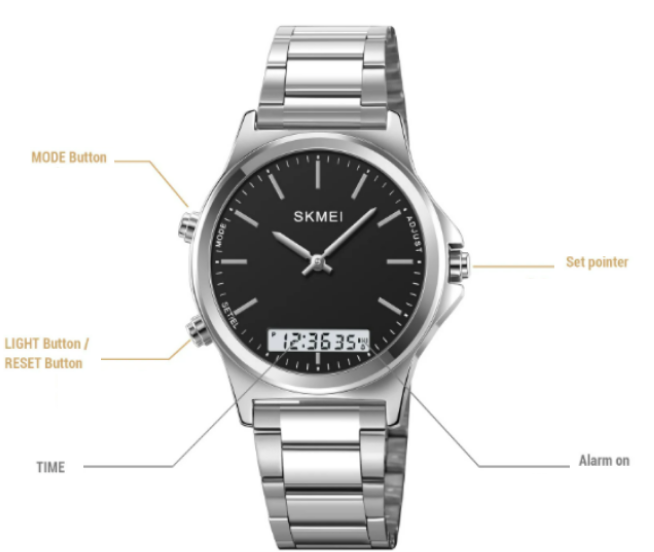
- MODE – change function
- SET – enter settings
- ADJUST – change numbers
To set the time:
- Press and hold SET until the numbers start flashing
- Press MODE to switch between hour and minutes
- Use ADJUST to change the numbers
- Press SET again to save
This setup is common on simpler SKMEI sports watches.
How to Set Dual Time on a SKMEI Watch
Some SKMEI models support dual time, meaning they can display two time zones.
To adjust dual time:
- Press MODE until you reach the Dual Time screen
- Hold RESET to enter settings
- Use START to adjust the second time zone
- Press RESET again to save
Dual time is useful when traveling or tracking another city.
How to Set Time on a SKMEI LED Watch
LED SKMEI watches usually have fewer buttons and a slightly different process.
Typical steps:
- Press the main button to display the time
- Hold the button until the hour starts blinking
- Tap the button to increase the hour
- Wait a few seconds until minutes begin blinking
- Tap again to adjust minutes
After a few seconds of inactivity the watch automatically saves the new time.
How to Reset Time on a SKMEI Watch
If your watch behaves strangely or shows the wrong format, you can reset the time settings.
To do this:
- Hold RESET for several seconds
- Wait until all numbers flash
- Reconfigure the time and date again
In most cases, a simple time reset solves synchronization issues.
Common Problems When Setting a SKMEI Watch
The time will not change
Make sure you hold the RESET button long enough to enter the setting mode.
The watch switches between AM and PM
This means the watch is using 12-hour format.
The buttons do nothing
Check if the watch is currently in stopwatch mode. Press MODE until the normal time screen appears.
Quick Tips for SKMEI Watch Owners
- If the display is dim, the battery may be low
- Avoid pressing multiple buttons underwater
- Keep the buttons clean to prevent them from sticking
- Always exit setting mode after adjustments
Final Thoughts
Setting the time on a SKMEI watch becomes simple once you understand how the buttons work. While the exact steps may vary slightly between models, most SKMEI digital watches follow the same pattern: enter the setting mode, adjust the numbers, and confirm the changes.
If you own multiple SKMEI watches, learning this process once will make it easy to adjust time, date, and dual time settings whenever needed.
