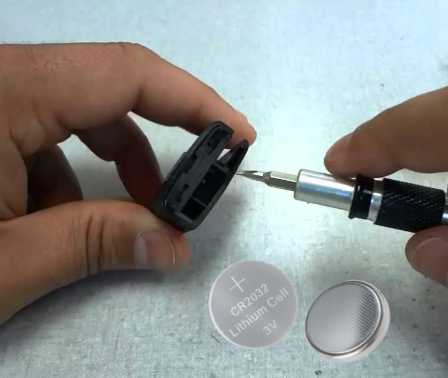
Replacing the battery in your Mazda 3 key fob is one of the easiest DIY maintenance tasks you can do. Whether you’re looking for a Mazda 3 key fob battery replacement, a Mazda 3 key battery replacement, or even a step-by-step guide on how to replace the battery in a Mazda 3 key fob, everything you need is here.
This guide covers all generations of the Mazda 3 key fob:
- Gen 1: 2004 to 2009
- Gen 2: 2010 to 2013
- Gen 3: 2014 to 2018
- Gen 4: 2019 to present
Each generation uses a slightly different key design, but the replacement process remains simple and requires no programming after the battery swap.
- Quick Replacement Summary
- Mazda 3 Key Fob Battery Table by Generation
- ✅ Mazda 3 Key Fob Battery Type by Year (Perfectly Structured)
- Symptoms That You Need to Replace Your Mazda 3 Key Battery
- How to Replace the Battery in Mazda 3 Key Fob
- Step 1 – Remove the emergency key
- Step 2 – Open the key fob
- Step 3 – Take out the old battery
- Step 4 – Insert the new CR2025 or CR2032
- Step 5 – Close the key fob
- Step 6 – Test the key
- Troubleshooting After Your Mazda 3 Battery Replacement
- How to Start a Mazda 3 With a Dead Key Battery
- Mazda Key Battery Replacement Cost
- OEM Notes for Mazda 3 Key Fobs
- FAQ
- Author
Quick Replacement Summary
- Difficulty: very easy
- Tools needed: none or a small plastic tool
- Reprogramming: not required
- Works for all models including 2010 Mazda 3 key fob battery replacement, 2011, 2012, 2013, 2015, and newer
- Fixes issues like Mazda 3 key battery low warnings or unresponsive buttons
Mazda 3 Key Fob Battery Table by Generation
✅ Mazda 3 Key Fob Battery Type by Year (Perfectly Structured)
| Year | Generation | Key Style | Battery Type | Notes |
|---|---|---|---|---|
2004 | Gen 1 | Flip key | CR1620 | Simple flip key design, case opens by prying at the seam |
| 2005 | Gen 1 | Flip key | CR1620 | Simple flip key design, case opens by prying at the seam |
| 2006 | Gen 1 | Flip key | CR1620 | Simple flip key design, case opens by prying at the seam |
| 2007 | Gen 1 | Flip key | CR1620 | Simple flip key design, case opens by prying at the seam |
| 2008 | Gen 1 | Flip key | CR1620 | Simple flip key design, case opens by prying at the seam |
| 2009 | Gen 1 | Flip key | CR1620 | Simple flip key design, case opens by prying at the seam |
| 2010 | Gen 2 | Smart key | CR2025 | Case opens using the mechanical key, no tools or programming required |
| 2011 | Gen 2 | Smart key | CR2025 | Case opens using the mechanical key, no tools or programming required |
| 2012 | Gen 2 | Smart key | CR2025 | Case opens using the mechanical key, no tools or programming required |
| 2013 | Gen 2 | Smart key | CR2025 | Case opens using the mechanical key, no tools or programming required |
| 2014 | Gen 3 | Smart key | CR2032 | Two piece smart key, opens at side notch, battery replacement is tool free |
| 2015 | Gen 3 | Smart key | CR2032 | Two piece smart key, opens at side notch, battery replacement is tool free |
| 2016 | Gen 3 | Smart key | CR2032 | Two piece smart key, opens at side notch, battery replacement is tool free |
| 2017 | Gen 3 | Smart key | CR2032 | Two piece smart key, opens at side notch, battery replacement is tool free |
| 2018 | Gen 3 | Smart key | CR2032 | Two piece smart key, opens at side notch, battery replacement is tool free |
| 2019 | Gen 4 | Proximity key | CR2032 | Slim proximity key, designed for very easy tool free battery replacement |
| 2020 | Gen 4 | Proximity key | CR2032 | Slim proximity key, designed for very easy tool free battery replacement |
| 2021 | Gen 4 | Proximity key | CR2032 | Slim proximity key, designed for very easy tool free battery replacement |
| 2022 | Gen 4 | Proximity key | CR2032 | Slim proximity key, designed for very easy tool free battery replacement |
| 2023 | Gen 4 | Proximity key | CR2032 | Slim proximity key, designed for very easy tool free battery replacement |
| 2024 | Gen 4 | Proximity key | CR2032 | Slim proximity key, designed for very easy tool free battery replacement |
| 2025 | Gen 4 | Proximity key | CR2032 | Slim proximity key, designed for very easy tool free battery replacement |
This table helps determine the correct battery before starting your Mazda 3 car key battery replacement.
Symptoms That You Need to Replace Your Mazda 3 Key Battery
If you are searching for Mazda 3 remote key battery replacement or Mazda 3 smart key fob battery replacement DIY, chances are you’re seeing at least one of these signs:
- Key fob works only at short distances
- Slow button response
- Engine start does not detect the key reliably
- Dashboard alerts like “Key Battery Low”
- Mazda 3 key battery dead unexpectedly
If these symptoms match your situation, it’s time to replace the battery Mazda 3 key fob uses.
How to Replace the Battery in Mazda 3 Key Fob
Works for all listed keywords, including:
how to replace battery Mazda 3 key fob, replace Mazda 3 key battery, Mazda 3 replace battery in key, Mazda 3 SP25 key battery replacement and more.
Step 1 – Remove the emergency key
Slide the release switch and remove the metal key.
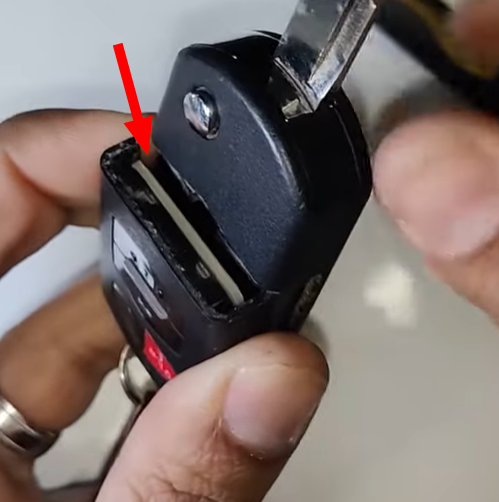
Step 2 – Open the key fob
Use the key blade or your fingers to separate the case. Avoid twisting.
Step 3 – Take out the old battery
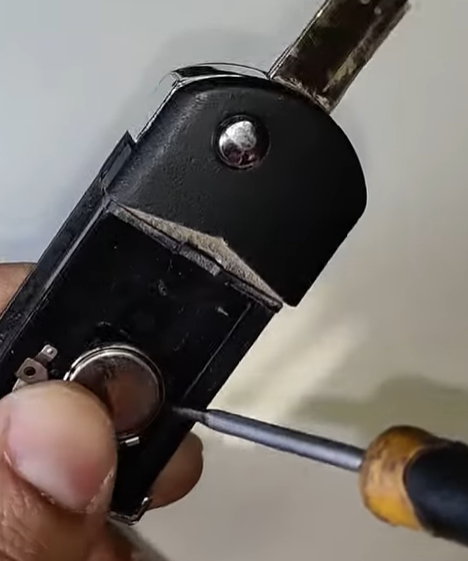
Lift it gently without using metal tools.
Step 4 – Insert the new CR2025 or CR2032
Positive side faces up. Make sure it sits tightly under the clips.
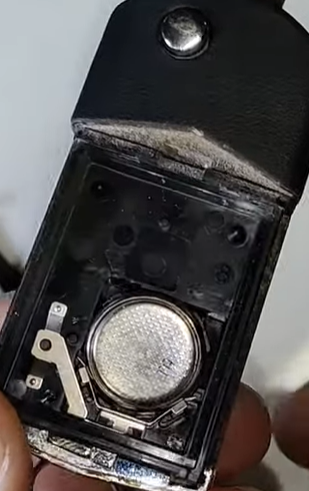
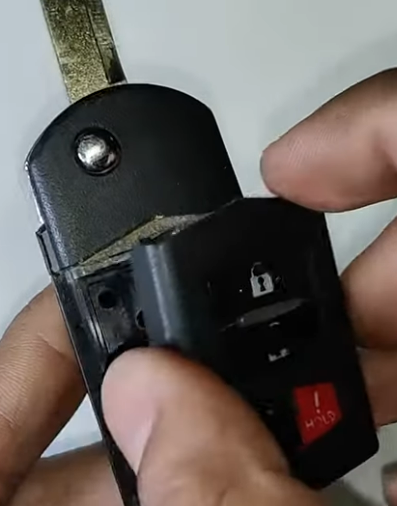
Snap the halves together until they click.
Step 5 – Close the key fob
Step 6 – Test the key
Try locking, unlocking and starting the car.
This process covers all queries such as Mazda 3 key fob battery replacement 2010, Mazda 3 key fob battery replacement 2011, Mazda 3 key fob battery replacement 2012, Mazda 3 key fob battery replacement 2013 and Mazda 3 key fob battery replacement 2015, plus all newer models.
Troubleshooting After Your Mazda 3 Battery Replacement
If your Mazda 3 battery replacement key procedure is complete but the key still does not work:
- Make sure the battery is facing the correct direction
- Double check that the case is fully closed
- Try a new battery from a different brand
- Remove the battery for 10 seconds to reset the fob
- Clean contact points
- Try starting the engine by holding the fob directly to the Start button
If nothing helps, the internal circuit board might be failing.
How to Start a Mazda 3 With a Dead Key Battery
If your Mazda 3 key battery dead situation happens unexpectedly:
- Press the brake
- Hold the key fob against the Start button
- Press Start
Mazda’s RFID chip works even with a dead battery, so this bypasses the issue.
Mazda Key Battery Replacement Cost
Most Mazda key battery replacement cost estimates fall within these ranges:
| Replacement method | Cost |
|---|---|
| DIY | 2 to 6 USD |
| Auto parts stores | 5 to 10 USD |
| Dealership | 15 to 35 USD |
DIY is the most efficient and cost effective approach.
OEM Notes for Mazda 3 Key Fobs
Mazda uses several OEM part numbers across all Mazda 3 generations. Despite design differences, the battery type remains consistent within each generation and no reprogramming is required for battery replacement.
FAQ
This usually happens because the battery is installed upside down, the case is not closed tightly or the battery is too weak.
No, Mazda fobs do not require programming after a battery swap.
Most Mazda 3 key fob batteries last 1 to 2 years.
Earlier generations use CR2025, while newer smart keys use CR2032.
This means the battery voltage has dropped and should be replaced soon.
Yes, the SP25 trim uses the same key fob design as its model year.
