When your Mazda CX-5 begins showing a Key Battery Low message, the remote stops unlocking the car from a distance, or the push-button start becomes unresponsive, it is time for a Mazda CX-5 key fob battery replacement.
This guide covers battery types, years, generations, and exact steps for every CX-5 model from launch to 2025.
Below is the full reference table for Mazda CX-5 key fob battery type by year.
| Model Year | Generation | Key Style | Battery Type | Notes |
|---|---|---|---|---|
| Mazda CX-5 2013 | Gen 1 | Smart key | CR2025 | First generation CX-5 smart key with a mechanical key release and a simple, easy to understand internal layout |
| Mazda CX-5 2014 | Gen 1 | Smart key | CR2025 | First generation CX-5 smart key with a mechanical key release and a simple, easy to understand internal layout |
| Mazda CX-5 2015 | Gen 1 | Smart key | CR2025 | First generation CX-5 smart key with a mechanical key release and a simple, easy to understand internal layout |
| Mazda CX-5 2016 | Gen 1 | Smart key | CR2025 | First generation CX-5 smart key with a mechanical key release and a simple, easy to understand internal layout |
| Mazda CX-5 2017 | Gen 2 | Smart key | CR2025 | Second generation smart key with a revised housing and organized internal structure that is easy to handle during battery work |
| Mazda CX-5 2018 | Gen 2 | Smart key | CR2025 | Second generation smart key with a revised housing and organized internal structure that is easy to handle during battery work |
| Mazda CX-5 2019 | Gen 2 | Smart key | CR2025 | Second generation smart key with a revised housing and organized internal structure that is easy to handle during battery work |
| Mazda CX-5 2020 | Gen 2 | Proximity key | CR2032* | Modern proximity style key fob designed for stable signal performance and quick access to the internal coin cell holder |
| Mazda CX-5 2021 | Gen 2 | Proximity key | CR2032* | Modern proximity style key fob designed for stable signal performance and quick access to the internal coin cell holder |
| Mazda CX-5 2022 | Gen 2 | Proximity key | CR2032* | Modern proximity style key fob designed for stable signal performance and quick access to the internal coin cell holder |
| Mazda CX-5 2023 | Gen 2 | Proximity key | CR2032* | Modern proximity style key fob designed for stable signal performance and quick access to the internal coin cell holder |
| Mazda CX-5 2024 | Gen 2 | Proximity key | CR2032* | Modern proximity style key fob designed for stable signal performance and quick access to the internal coin cell holder |
| Mazda CX-5 2025 | Gen 2 | Proximity key | CR2032* | Modern proximity style key fob designed for stable signal performance and quick access to the internal coin cell holder |
*Some late-2019 to early-2020 units may contain CR2025 from the factory, but Mazda officially shifted CX-5 proximity keys to CR2032.
What you need for Mazda CX-5 key fob battery replacement
You only need:
- A new CR2025 or CR2032 coin cell (depending on model year)
- A small flat tool or plastic pry tool
- Your physical emergency key (built inside the fob)
How to Replace Mazda CX-5 Key Fob Battery (Step-by-Step)
These steps apply to all CX-5 smart and proximity keys.
1. Release the emergency key
Press the small latch on the back of the fob and slide out the mechanical key.
2. Separate the fob housing
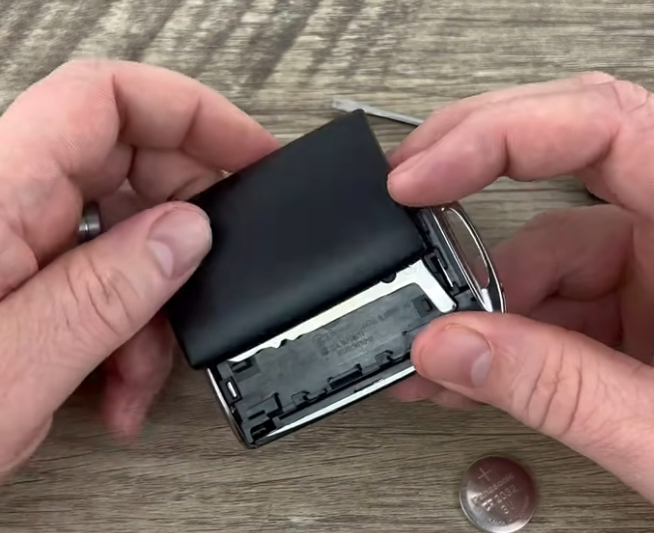
Use the metal key or a plastic pry tool to gently open the seam on the side.
The case will split into two halves.
3. Remove the old battery
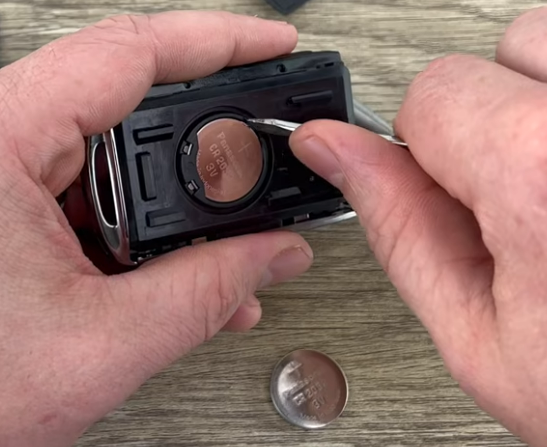
Lift the battery out of the tray.
Check the marking: CR2025 or CR2032.
4. Install the new battery
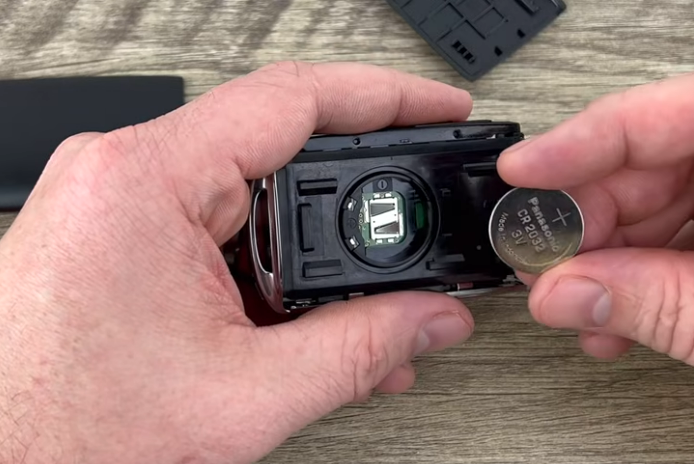
Insert the new coin cell with the positive side facing up.
5. Snap the case together
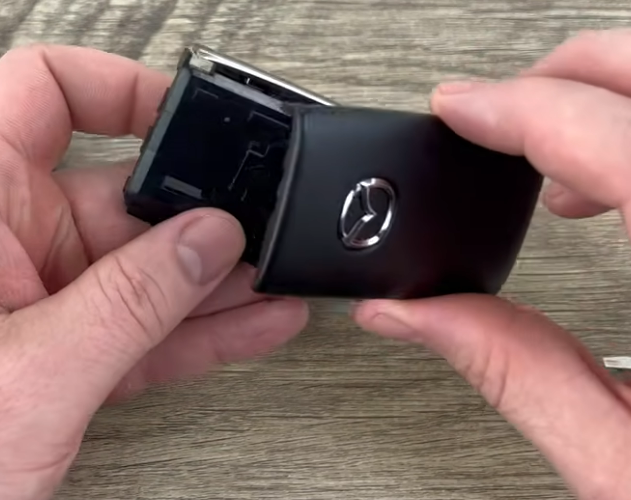
Press the halves back into place until they click.
Reinsert the emergency key.
Your Mazda CX-5 key fob should now work immediately.
Mazda CX-5 Key Battery Replacement Cost
Most Mazda CX-5 replacements cost:
- $3 – $8 for a high quality CR2025 or CR2032
- $0 if replacing yourself
- $20 – $50 if replaced at a dealer
- $10 – $25 at locksmiths or battery shops
DIY replacement is almost always the best option.
Common Mazda CX-5 key fob issues after battery replacement
- Key still shows Key Battery Low
- Try resetting by locking/unlocking manually
- Car doesn’t detect key
- Weak or defective battery (common with cheap brands)
- Buttons work but push-button start doesn’t
- Hold the key against the start button to initialize pairing
- Smart functions not working after replacement
- Make sure the battery is seated firmly in the tray
FAQ
Most first and second generation Mazda CX-5 smart keys use a CR2025 coin cell, while newer proximity style fobs typically use a CR2032 battery. The exact type can be confirmed by opening the fob and reading the marking on the original cell.
Yes. The Mazda CX-5 key fob is designed so that owners can service the battery themselves. You only need a new CR2025 or CR2032 cell and the built in mechanical key to open the housing. No special tools or dealer equipment are required.
Common signs include a Key Battery Low message on the dashboard, reduced remote range, the need to stand closer to the vehicle for the buttons to work, or occasional failure of the push button start to recognize the fob on the first try.
No. The Mazda CX-5 key fob stores pairing data in non volatile memory, so it does not lose its coding when the coin cell is removed. After installing a fresh battery, the fob should work normally without any reprogramming.
If you do the work yourself, the cost is usually between 3 and 8 dollars for a quality CR2025 or CR2032 cell. Dealers and locksmiths may charge between 20 and 50 dollars for the same service, mainly for labor and convenience.
First, make sure the coin cell is installed with the positive side facing up and seated firmly in the holder. Then try locking and unlocking the car several times. If the car still does not detect the fob, try holding the key directly against the start button to help the system recognize it.
It is best to use well known battery brands to avoid voltage drops and signal issues. Cheap low quality cells can cause short battery life, intermittent key detection or repeated Key Battery Low warnings even after installation.
