Nixon watches are known for their modern design and surf-inspired style. The brand produces both analog and digital watches, so the exact method for setting the time can vary depending on the model.
Most Nixon watches use either a crown adjustment system (for analog watches) or button controls (for digital models). Once you understand how these controls work, adjusting the time takes only a few seconds.
This guide explains how to set the time on a Nixon watch, including analog models like the Nixon Time Teller and 51-30 Chrono, as well as digital watches like the Nixon Regulus and Re-Run.
- How to Set Time on a Nixon Watch (Analog Models)
- Step 1 – Locate the Crown
- Step 2 – Pull the Crown Out
- Step 3 – Rotate the Crown
- Step 4 – Push the Crown Back
- How to Change Time on a Nixon Digital Watch
- Steps
- How to Set Time on a Nixon Regulus Watch
- How to Set Time on a Nixon 51-30 Watch
- Steps
- How to Change Date on a Nixon Watch
- Steps
- Nixon Watch Button Functions (Digital Models)
- Popular Nixon Watches and Time Adjustment
- Common Problems When Setting Time on a Nixon Watch
- The crown will not move
- The digital watch buttons do not respond
- The second hand is not moving
- Final Thoughts
- Author
How to Set Time on a Nixon Watch (Analog Models)
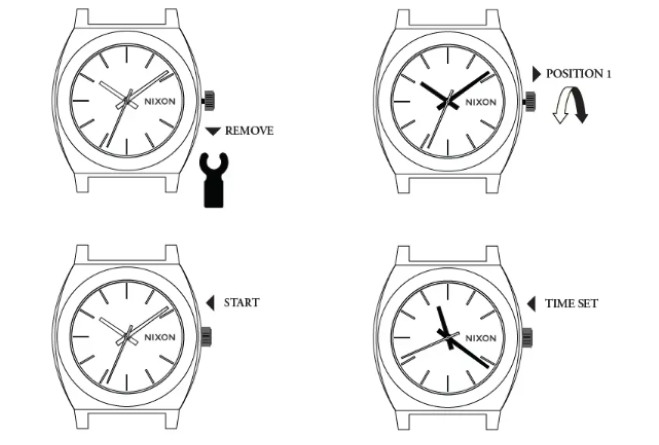
Most Nixon analog watches use a two-position crown.
Step 1 – Locate the Crown
The crown is the small knob on the side of the watch case, usually positioned at 3 o’clock.
Step 2 – Pull the Crown Out
Gently pull the crown outward until you feel a click.
This activates the time adjustment mode.
Step 3 – Rotate the Crown
Turn the crown clockwise or counterclockwise to move the hour and minute hands.
Continue rotating until the watch displays the correct time.
Step 4 – Push the Crown Back
Push the crown back into the case to return the watch to normal operation.
Your Nixon watch should now display the correct time.
How to Change Time on a Nixon Digital Watch
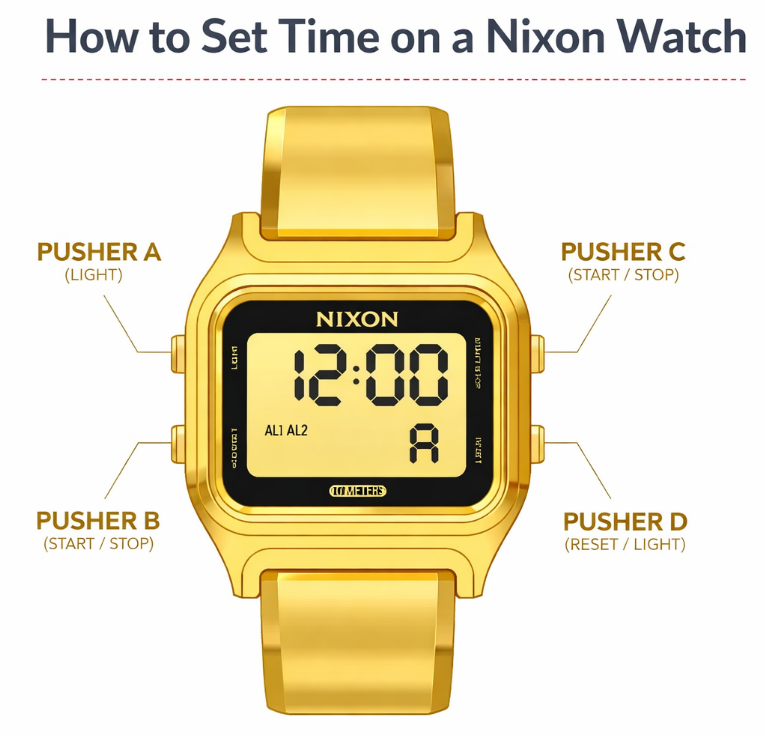
Digital Nixon watches use buttons instead of a crown.
Most digital Nixon watches include buttons labeled:
- MODE
- SET
- START
- LIGHT
Steps
- Press MODE until the time display appears
- Hold the SET button until the digits start flashing
- Press MODE to switch between hours and minutes
- Use START to adjust the numbers
- Press SET again to save the settings
This method works for most Nixon digital watches.
How to Set Time on a Nixon Regulus Watch
The Nixon Regulus is a popular digital model designed for durability and military-inspired use.
To set the time:
- Hold the MODE button to enter the settings menu
- Press START to adjust the hour
- Press MODE to move to minutes
- Use START again to adjust the minutes
- Press SET to confirm
How to Set Time on a Nixon 51-30 Watch
The Nixon 51-30 Chrono is one of the brand’s most recognizable watches.
The time setting process is simple.
Steps
- Pull the crown to the second position
- Rotate the crown to adjust the time
- Push the crown back in
The chronograph pushers control the stopwatch functions and do not affect the main time.
How to Change Date on a Nixon Watch
Many Nixon watches include a date window.
Steps
- Pull the crown to the first position
- Rotate the crown until the correct date appears
- Push the crown back in
Tip: avoid adjusting the date between 9 PM and 3 AM, because the internal calendar mechanism may be active.
Nixon Watch Button Functions (Digital Models)
| Button | Function |
|---|---|
| MODE | Switch between time, alarm, and stopwatch |
| SET | Enter or exit settings |
| START | Adjust numbers |
| LIGHT | Activate backlight |
Understanding these buttons makes it much easier to adjust the time.
Popular Nixon Watches and Time Adjustment
| Model | Watch Type | Time Setting Method |
|---|---|---|
| Nixon Time Teller | Analog | Crown adjustment |
| Nixon 51-30 Chrono | Chronograph | Crown + pushers |
| Nixon Regulus | Digital | Button adjustment |
| Nixon Re-Run | Retro digital | Mode + Set buttons |
| Nixon Base Tide Pro | Surf watch | Button-based adjustment |
Common Problems When Setting Time on a Nixon Watch
The crown will not move
Your watch may have a screw-down crown. Try rotating it counterclockwise first.
The digital watch buttons do not respond
The watch may be in stopwatch mode. Press MODE until the main time display appears.
The second hand is not moving
This may indicate a low battery, which is common in quartz watches.
Final Thoughts
Setting the time on a Nixon watch is simple once you understand the controls. Analog Nixon watches use a crown adjustment system, while digital models rely on button navigation. With the correct steps, you can adjust the time in seconds and keep your watch running accurately.
