SMAEL watches are rugged digital or analog-digital watches designed for sports and outdoor use. Most models include features such as dual time, alarm, stopwatch, and LED backlight, which makes them popular among military-style and tactical watch enthusiasts.
Because many SMAEL watches use a four-button digital interface, setting the time may seem confusing at first. However, once you understand the button layout, adjusting the time becomes simple.
This guide explains how to set the time on a SMAEL watch, including digital and analog-digital models.
- How to Set Time on a SMAEL Watch
- Step 1 – Enter Time Setting Mode
- Step 2 – Activate Settings
- Step 3 – Adjust the Hour
- Step 4 – Adjust the Minutes
- Step 5 – Save the Settings
- How to Set Date on a SMAEL Watch
- How to Set Digital Time on a SMAEL Watch
- How to Change Time Format (12h / 24h)
- SMAEL Watch Button Functions
- Popular SMAEL Watches and Time Adjustment
- Common Problems When Setting Time on a SMAEL Watch
- The numbers do not flash
- The time is incorrect after adjustment
- Buttons are not responding
- Final Thoughts
- Author
How to Set Time on a SMAEL Watch
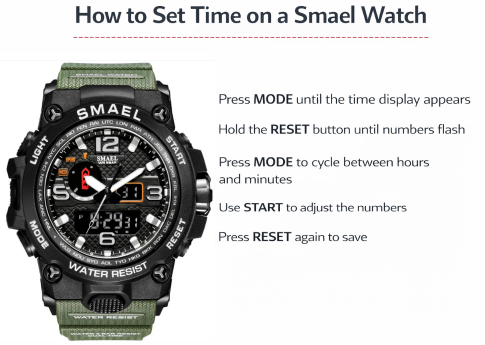
Most SMAEL watches have four buttons:
- MODE
- RESET
- START
- LIGHT
These buttons control the different functions of the watch.
Step 1 – Enter Time Setting Mode
Press the MODE button until the main time display appears.
Step 2 – Activate Settings
Hold the RESET button for about two seconds.
The digits on the screen will begin flashing, indicating the watch has entered time adjustment mode.
Step 3 – Adjust the Hour
Press the MODE button once.
The hour digits will start flashing.
Press the START button to change the hour.
Step 4 – Adjust the Minutes
Press MODE again to move to minutes.
Use START to adjust the minute value.
Step 5 – Save the Settings
Press the RESET button again to confirm the changes.
Your SMAEL watch will return to the normal time display.
How to Set Date on a SMAEL Watch
Most SMAEL watches allow you to adjust the date along with the time.
After entering the setting mode:
- Press MODE repeatedly until the month or date flashes
- Use START to change the value
- Continue pressing MODE to move through settings
- Press RESET to save
How to Set Digital Time on a SMAEL Watch
Digital SMAEL watches follow the same general process:
- Press MODE until the time screen appears
- Hold RESET until numbers flash
- Press MODE to switch between settings
- Use START to change numbers
- Press RESET to confirm
This method works for most SMAEL digital watches.
How to Change Time Format (12h / 24h)
Some SMAEL watches support both 12-hour and military (24-hour) time formats.
To change the format:
- Enter the time setting mode
- Navigate to the hour setting
- Continue pressing START until the display switches between 12H and 24H
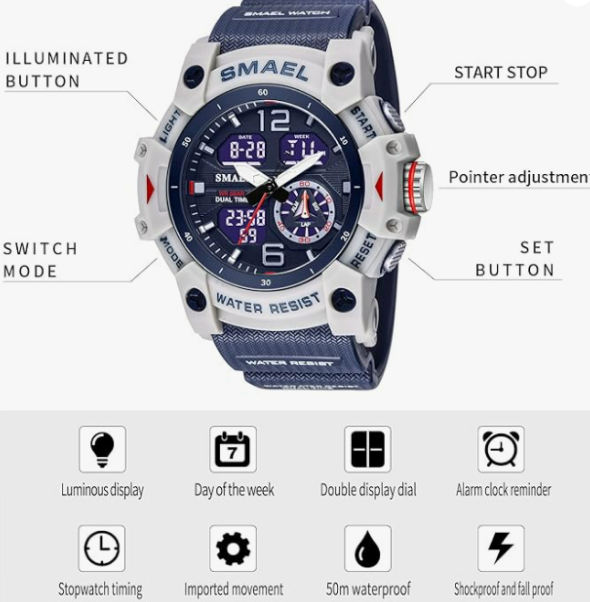
SMAEL Watch Button Functions
| Button | Function |
|---|---|
| MODE | Switch between time, alarm, stopwatch |
| RESET | Enter or exit settings |
| START | Adjust numbers |
| LIGHT | Activate backlight |
Understanding these buttons makes it easier to adjust time and other settings.
Popular SMAEL Watches and Time Adjustment
| Model | Watch Type | Time Setting Method |
|---|---|---|
| SMAEL Sport Watch | Digital | Mode + Reset buttons |
| SMAEL Tactical Watch | Analog-digital | Crown + button controls |
| SMAEL Military Watch | Dual display | Button adjustment |
| SMAEL Outdoor Watch | Digital sports | Standard digital settings |
Common Problems When Setting Time on a SMAEL Watch
The numbers do not flash
Make sure you hold the RESET button long enough to activate the settings.
The time is incorrect after adjustment
Check whether the watch is set to 12-hour or 24-hour format.
Buttons are not responding
The watch may be in stopwatch mode. Press MODE until the normal time screen appears.
Final Thoughts
Setting the time on a SMAEL watch is straightforward once you understand the button layout. Most SMAEL digital watches follow the same pattern: enter the settings mode, adjust the numbers using the START button, and confirm the changes with RESET.
Whether you use your SMAEL watch for sports, outdoor activities, or daily wear, keeping the time correctly set ensures the watch remains accurate and reliable.
