Timeure watches are simple digital watches often designed with additional features like a pedometer, step counter, and fitness tracking. Because of these features, they are commonly used as budget activity watches.
Most Timeure watches use a button-based system, and even pedometer models follow a similar setup process. Once you understand how the buttons work, setting the time becomes quick and straightforward.
This guide explains how to set the time on a Timeure watch, including pedometer and digital models.
- How to Set Time on a Timeure Watch
- Step-by-step instructions
- Timeure Watch Instructions (Quick Guide)
- Quick Answer
- How to Set Time on a Timeure Pedometer Watch
- Steps
- Timeure Watch Instructions – Change Time
- Timeure Watch Button Functions
- Common Problems When Setting Time on a Timeure Watch
- The numbers do not flash
- The watch shows incorrect time
- The watch is not responding
- Timeure Watch Setup (First Use)
- Popular Timeure Watch Types
- Final Thoughts
- Author
How to Set Time on a Timeure Watch
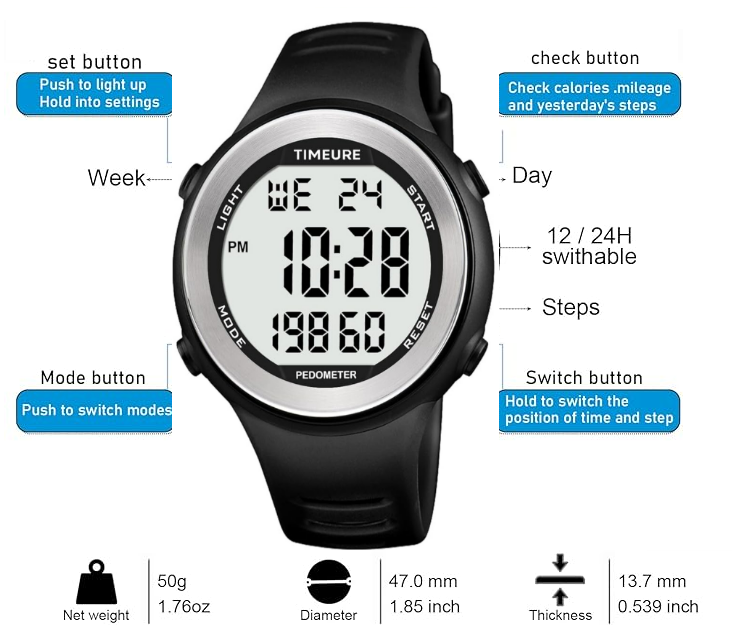
Most Timeure watches have buttons such as:
- MODE
- SET
- START
- RESET
Step-by-step instructions
- Press the MODE button until the time screen appears
- Hold the SET button for 2-3 seconds until the digits start flashing
- Press MODE to switch between hours, minutes, and other settings
- Use START to adjust the numbers
- Press SET again to save the time
This method works for most Timeure digital watches.
Timeure Watch Instructions (Quick Guide)
Quick Answer
To set the time on a Timeure watch:
- Press MODE until the time display appears
- Hold SET until the numbers flash
- Press MODE to switch settings
- Use START to adjust numbers
- Press SET again to confirm
How to Set Time on a Timeure Pedometer Watch
Timeure pedometer watches include extra features like step tracking, but the time setting process remains similar.
Steps
- Press MODE until you see the time screen
- Hold SET until the display starts flashing
- Press MODE to move between hour and minute settings
- Use START to adjust values
- Press SET to save
Some pedometer models may also include additional setup steps such as height, weight, and stride length, but these do not affect the time setting.
Timeure Watch Instructions – Change Time
If you need to update the time:
- Enter time mode
- Hold SET until numbers flash
- Adjust using START
- Press SET to confirm
The process is the same whether you are setting the time for the first time or updating it later.
Timeure Watch Button Functions
| Button | Function |
|---|---|
| MODE | Switch between functions (time, pedometer, settings) |
| SET | Enter or exit settings |
| START | Adjust numbers |
| RESET | Additional functions or reset values |
Common Problems When Setting Time on a Timeure Watch
The numbers do not flash
Make sure you hold the SET button long enough.
The watch shows incorrect time
Check whether the watch is set to 12-hour or 24-hour format.
The watch is not responding
Try replacing the battery or resetting the watch.
Timeure Watch Setup (First Use)
When setting up your Timeure watch for the first time:
- Set the correct time
- Configure pedometer settings (if available)
- Check alarm and step counter
- Test buttons and display
Popular Timeure Watch Types
| Model Type | Time Setting Method |
|---|---|
| Timeure Digital Watch | Mode + Set buttons |
| Timeure Pedometer Watch | Same system with extra settings |
| Timeure Fitness Watch | Button-based interface |
Final Thoughts
Setting the time on a Timeure watch is simple once you understand the button layout. Even though pedometer models include additional features, the time-setting process remains the same across most devices.
By following the steps above, you can quickly set or change the time and keep your watch working accurately.
