The most important fact comes before the recommendations: a non-Apple watch can pair with an iPhone, but it cannot become an Apple Watch in disguise.
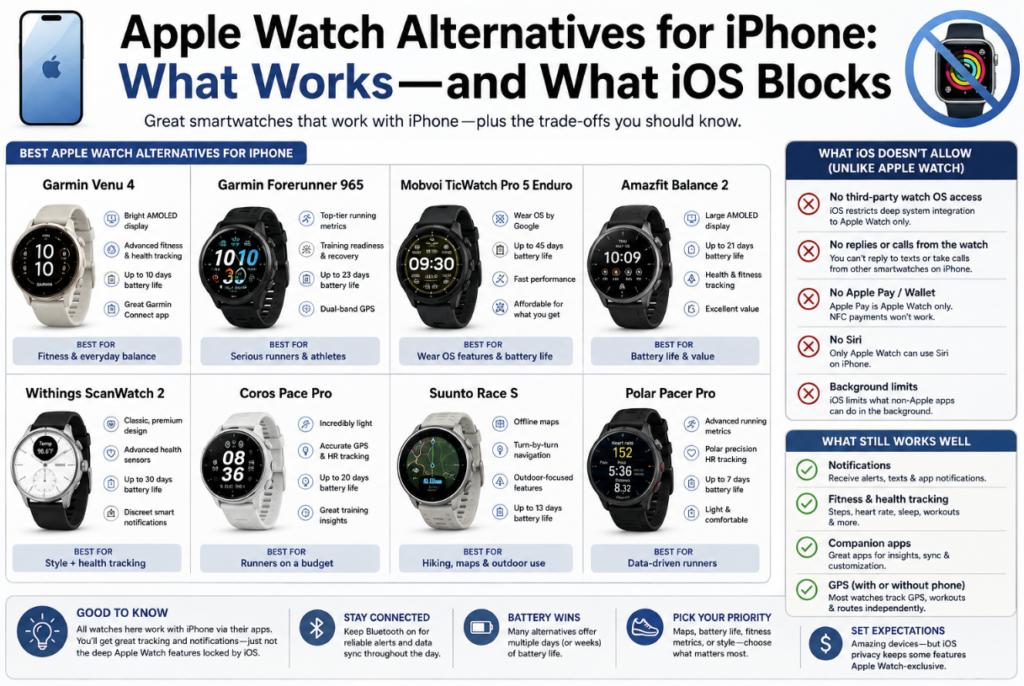
iOS allows Garmin, Fitbit, Amazfit, Withings, COROS, Suunto and other watches to display many notifications. It does not give them the same control over Messages, Apple Pay, apps or cellular service. Garmin’s official support documentation says text-message replies are unavailable through iOS. Fitbit says quick replies to ordinary messages are an Android feature; an iPhone-paired Fitbit can only reply inside Fitbit’s own social notifications.
If replying to iMessage, using Apple Pay or leaving your phone behind with a cellular watch is non-negotiable, buy an Apple Watch. If battery life, sports data or a normal watch design matters more, several alternatives are worth the trade.
⚠️ Compatibility changes with app and iOS updates. This guide was checked in August 2026 against current manufacturer support pages. Confirm any one feature you cannot live without before buying.
- The iPhone Compatibility Grid
- Garmin Venu 4: The Best Overall Compromise
- Withings ScanWatch 2: The Watch-Looking Choice
- Amazfit Balance 2 or Active 2: The Value Route
- Fitbit Charge 6: Better When You Want Less on Your Wrist
- COROS and Suunto: Sports Tools With Notification Mirrors
- Payments, Music and Calls Are Three Separate Problems
- Who Should Stay With Apple Watch
- The Best Compromise for Each Kind of iPhone Owner
- Specific Questions iPhone Buyers Ask
- Can a Garmin reply to iPhone text messages?
- Can a non-Apple watch use Apple Pay?
- Will workouts appear in Apple Health?
- Author
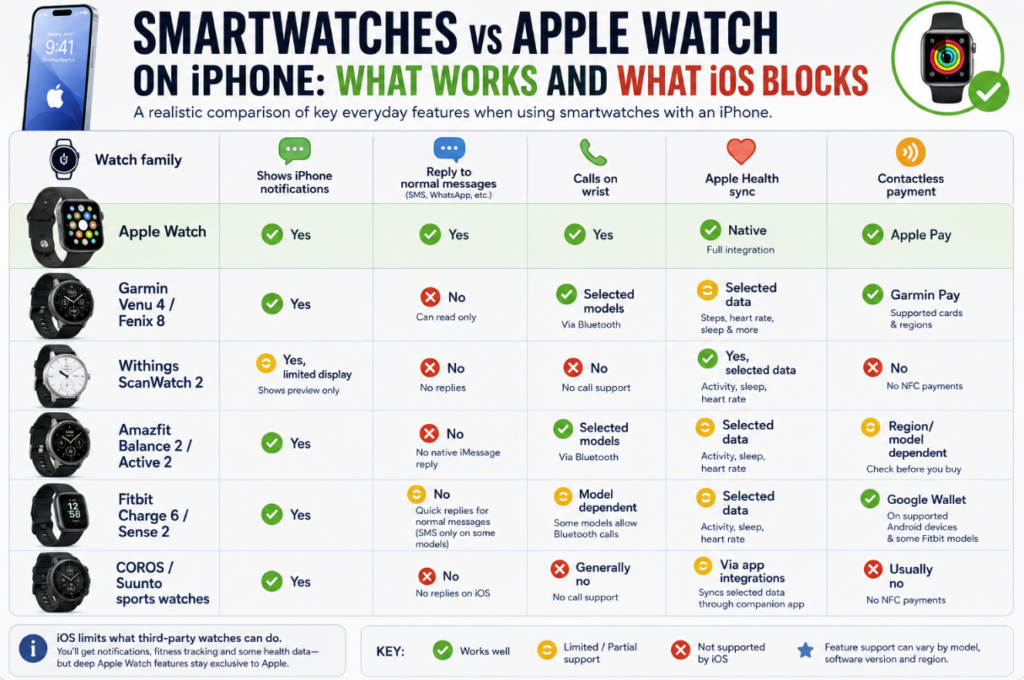
The iPhone Compatibility Grid
| Watch family | Shows iPhone notifications | Reply to normal messages | Calls on wrist | Apple Health sync | Contactless payment |
|---|---|---|---|---|---|
| Apple Watch | Yes | Yes | Yes | Native | Apple Pay |
| Garmin Venu 4 / Fenix 8 | Yes | No | Selected models | Selected data | Garmin Pay |
| Withings ScanWatch 2 | Yes, limited display | No | No | Yes, selected data | No |
| Amazfit Balance 2 / Active 2 | Yes | No native iMessage reply | Selected models | Selected data | Region/model dependent |
| Fitbit Charge 6 / Sense 2 | Yes | No normal-message quick replies | Model dependent | Selected data | Google Wallet on supported devices |
| COROS / Suunto sports watches | Yes | No on iOS | Generally no | Via app integrations | Usually no |
This table is about the normal, supported experience. Voice-assistant workarounds and third-party notification bridges exist, but I would not base a purchase on a workaround that an app update can break.
Garmin Venu 4: The Best Overall Compromise
The Venu 4 is my first recommendation for an iPhone owner leaving Apple Watch because of battery anxiety. Depending on size, Garmin rates it for up to 10 or 12 days in smartwatch mode. It offers a bright touchscreen, structured workouts, sleep and recovery data, onboard GPS, music support and the Garmin Connect ecosystem.
Notifications arrive reliably when iOS permissions are configured correctly. You cannot type or send a normal text reply from the watch. On models with a speaker and microphone, call behavior is better, but the phone still matters and the experience is not equivalent to Apple’s cellular integration.
Apple Health syncing is useful rather than perfect. Garmin Connect can write supported categories into Health, but Apple and Garmin calculate some metrics differently, and not every field moves cleanly in both directions. Think of Garmin as the primary training record and Apple Health as the shared summary.
Best for: workouts, health trends and long battery life.
Avoid if: wrist-based messaging is one of your top three needs.
Withings ScanWatch 2: The Watch-Looking Choice
The ScanWatch 2 is for the person who likes an iPhone but does not want another bright app surface. Its analog hands, compact information display and extended battery life make it behave more like a watch with health sensors than a smartwatch with a watch face.
Withings can pass supported health information into Apple Health. Notifications are glanceable, not interactive. That limitation feels less frustrating here because the product never pretends to replace your phone.
What would bother me is buying it for rich workout screens or navigation; that is not its job. Buy it for passive tracking, sleep, a discreet design and fewer charging sessions.
Amazfit Balance 2 or Active 2: The Value Route
Amazfit offers far more screen and battery per dollar than Apple. Current models can mirror notifications, track a wide range of activities and, on selected hardware, handle Bluetooth calls when the iPhone is nearby.
Message replies are the trap. Some community posts describe Siri or third-party workarounds, but native iMessage interaction is not the normal supported experience. Payment availability also varies by model, bank and region. If a product page says “NFC,” do not assume that means your US bank card will work.
I would choose Amazfit for low cost, good battery life and a bright interface. I would not choose it to replace Apple services.
Fitbit Charge 6: Better When You Want Less on Your Wrist
Fitbit can show calls, texts, calendar events and app notifications from a nearby iPhone. Google’s support pages are explicit that quick replies for ordinary messages are Android-only. The narrow Charge 6 screen also makes reading long text feel like peeking through a mail slot.
As a tracker, though, it is light, relatively inexpensive and easy to sleep in. If your Apple Watch mostly counted steps and reminded you to move, a Charge 6 may solve the problem without pretending to be a full watch replacement.
Fitbit-to-Apple Health integration deserves a careful check at purchase time. Supported syncing has changed over the years, and third-party bridges may still be necessary for particular data types.
COROS and Suunto: Sports Tools With Notification Mirrors
COROS PACE Pro and Suunto Race S are better thought of as training computers. Both can show iPhone notifications. Neither should be bought for messaging, app breadth or mobile payments.
COROS makes the stronger case for a runner who values battery life, simple training tools and a light case. Suunto is attractive for offline map presentation and route navigation. Once a workout starts, both can feel more purposeful than an Apple Watch. Once a conversation starts, your iPhone comes out of your pocket.
Payments, Music and Calls Are Three Separate Problems
Do not treat “works with iPhone” as a single checkbox.
Payments: Apple Pay does not transfer to a Garmin or Fitbit. A watch may offer Garmin Pay or Google Wallet, but your bank must support that separate service.
Music: media controls are common. Offline playlists are not. Spotify, Amazon Music or local-file support varies by platform and sometimes requires a paid subscription.
Calls: seeing an incoming call, accepting it on the watch and conducting the entire conversation are different capabilities. Some watches only tell the nearby iPhone to answer.
This is why a compatibility table is more useful than a list of “best” devices.
Who Should Stay With Apple Watch
Stay with Apple Watch if you regularly reply to messages, rely on Apple Pay, use Apple-specific health or accessibility features, control HomeKit devices, want seamless AirPods switching, or need a cellular watch that can function away from the phone.
The current Apple Watch Series 11 and Ultra 3 require an iPhone 11 or later running iOS 26 or newer. Apple’s own battery figures remain shorter than the multi-day claims from Garmin or COROS, but that shorter battery buys deep system access no third party currently matches.
Our broader guide to the best Apple Watch alternatives includes Android-only options. Do not buy a Pixel Watch 4 or Galaxy Watch8 for an iPhone; those belong in a different ecosystem.
The Best Compromise for Each Kind of iPhone Owner
Choose Garmin Venu 4 for the most balanced move away from Apple. Choose Withings ScanWatch 2 when you want a real dial and passive health tracking. Choose COROS PACE Pro for running value or Suunto Race S for outdoor maps. Choose Fitbit Charge 6 when a small tracker is enough. Choose Amazfit when price and battery outweigh long-term ecosystem confidence.
And choose Apple Watch again if messages, payments and phone-like apps caused you to buy a smartwatch in the first place. That is not brand loyalty. It is an honest reading of the compatibility rules.
Specific Questions iPhone Buyers Ask
Can a Garmin reply to iPhone text messages?
No. Garmin’s official support documentation states that replying to text messages from the watch is not available through iOS.
Can a non-Apple watch use Apple Pay?
No. It may provide another payment service, such as Garmin Pay or Google Wallet, if the model, region and issuing bank are supported.
Will workouts appear in Apple Health?
Many companion apps can share selected categories with Apple Health after permission is granted. Coverage varies, and proprietary training metrics usually remain inside the manufacturer’s app.