The headline specification tells only part of the story with Batteries for Chamberlain Wireless Keypads; the version and the way it is used often matter more than the label on the front.
Chamberlain wireless keypads are designed to operate outdoors, often in extreme temperatures. They illuminate when a button is pressed, scan for PIN entry, and send a higher-power signal to the opener compared to handheld remotes. Because of this, keypad batteries must supply more energy.
Keypads do not use CR2032 coin cells.
They rely on either a CR123A lithium battery or a 9V alkaline battery, depending on the model.

- Match the Case, Module, or Generation First: Batteries for Chamberlain Wireless Keypads
- Replace the Cell Without Disturbing Pairing
- How to Replace a Chamberlain Keypad Battery
- Keypad Backup Guide (Troubleshooting After Battery Replacement)
- A Reference for the Next Service
- Keypad Battery Types
- CR123A Lithium Battery (3V)
- 9V Alkaline Battery
- Keypad Battery Table
- The Signal That Tells You It Worked
- Author
Match the Case, Module, or Generation First: Batteries for Chamberlain Wireless Keypads
Unlike remotes, keypads must:
- light up the keypad at night
- detect user input reliably
- compensate for outdoor temperature swings
- transmit a stronger signal across larger distances
All of this requires significantly more power, which is why coin cells are not suitable.
Replace the Cell Without Disturbing Pairing
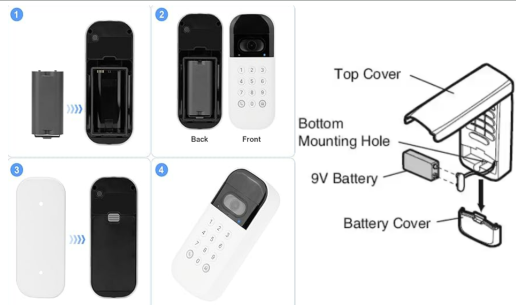
How to Replace a Chamberlain Keypad Battery
Keypad Backup Guide (Troubleshooting After Battery Replacement)
1. Keypad doesn’t light up at all
Re-seat the battery firmly or clean the contacts.
2. Keypad lights up but doesn’t activate the opener
Re-enter your PIN slowly — low battery levels before replacement sometimes cause temporary memory issues.
3. Buttons feel unresponsive
Dirt or moisture may block the contacts. Clean gently with a dry cloth.
4. Keypad works in warm weather but fails in cold
Replace with a fresh CR123A. Alkaline batteries perform poorly in winter.
5. Keypad intermittently works
Loose battery clips or worn internal pads are common in older units.
Changing a Chamberlain keypad battery only takes a moment: open the front cover, remove the old battery, and insert the new CR123A or 9-volt cell. When the keypad lights up after pressing a button, it’s ready for normal use again.
A Reference for the Next Service
Keypad Battery Types
CR123A Lithium Battery (3V)
Modern Chamberlain keypads use the CR123A battery because:
- it handles cold weather extremely well
- it provides strong, stable voltage
- it lasts longer in outdoor conditions
- it supports keypad backlighting
9V Alkaline Battery
Legacy Chamberlain keypads rely on a standard 9V battery.
These are easy to replace and widely available.
Keypad Battery Table
The Signal That Tells You It Worked
- Open the keypad cover or remove the front plate.
- Remove the old battery and inspect for corrosion.
- Insert the new battery with correct polarity.
- Verify that the keypad lights up.
- Enter your PIN to confirm successful replacement.
If the keypad still does not respond, continue to the Backup Guide below.
If Batteries for Chamberlain Wireless Keypads still behaves the same after the matching test and a known-good power source, stop repeating the replacement and diagnose the device or receiver instead.
