The headline specification tells only part of the story with Garage Door Opener Learn Button Explained; the version and the way it is used often matter more than the label on the front.
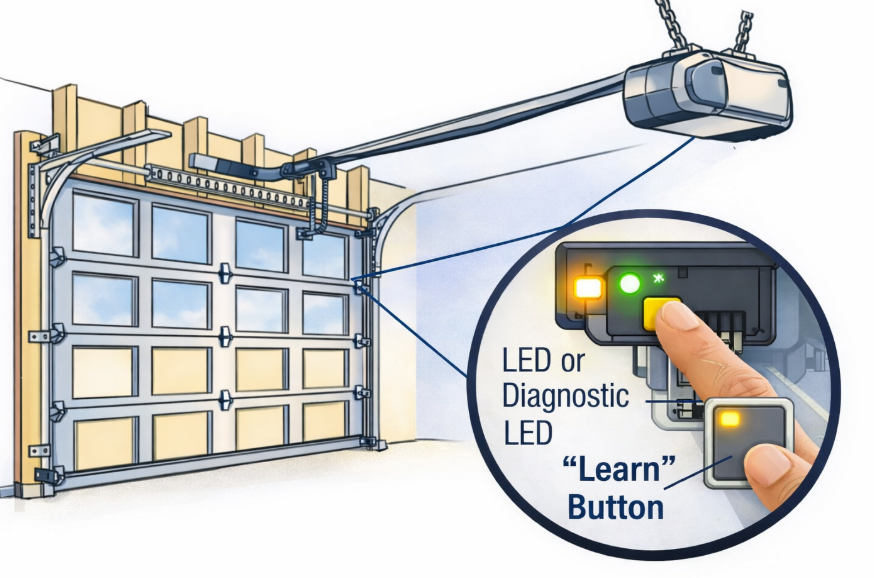
The learn button on a garage door opener is a small but critical control used to program remotes, keypads, vehicles, and smart systems. If you have ever wondered what is a learn button on a garage door opener, where it is located, or why it is not working, this guide explains everything in plain terms.
This article covers:
- What the learn button does
- Where to find it on different openers
- What the different colors mean
- What to do if your garage door opener has no learn button
- Common problems and fixes
- Do the Job in This Order
- What Is a Learn Button on a Garage Door Opener?
- Learn Button Colors and What They Mean
- When You Should NOT Use the Learn Button
- What Successful Pairing Looks Like
- Look Here Before Opening the Motor Unit
- Common Brands and Learn Button Locations
- Map the Controls Before Entering Setting Mode
- The Numbers Worth Writing Down
- Read the Symptom Before Replacing Parts
- Most Common Causes
- Programming Paths by Opener System
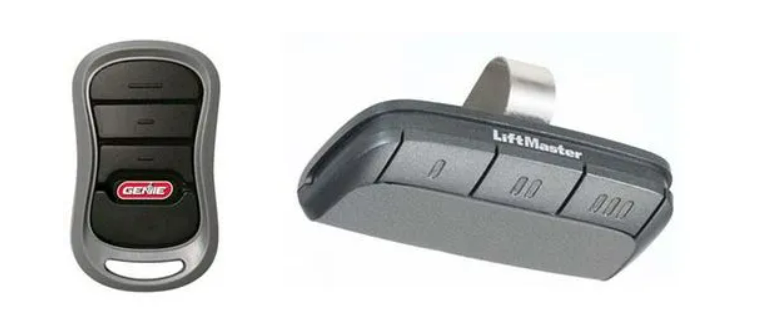
- LiftMaster Learn Button
- Linear Garage Door Opener Learn Button
- Raynor Learn Button
- Phantom and Quantum Garage Door Openers
- Author
Do the Job in This Order
What Is a Learn Button on a Garage Door Opener?
The learn button is used to put the garage door opener into programming mode. When activated, the opener is ready to accept a new signal from:
- A remote control
- A wireless keypad
- A built-in car garage door opener (HomeLink)
- Some smart hubs
In simple terms, the learn button tells the opener: “I am ready to learn a new device.”
People often search:
- what is a learn button on a garage door opener
- what is the learn button on a garage door opener
- the learn button on the garage door opener
All of these refer to the same function.
Learn Button Colors and What They Mean
On many openers, especially LiftMaster and Chamberlain, the learn button color matters.
If you see garage door opener learn button flashing, it usually means:
- The opener is in programming mode, or
- A programming step timed out
When You Should NOT Use the Learn Button
Do not press the learn button if:
- You only want to replace a battery
- Your opener uses DIP switches
- You are unsure and want to avoid clearing old remotes
Holding the button too long may erase all programmed devices.
What Successful Pairing Looks Like
- Press and release the learn button
- Indicator light turns on or flashes
- Press the remote or device button within 30 seconds
- Light blinks or clicks to confirm
That is all most systems require.
Look Here Before Opening the Motor Unit
The learn button on the garage door motor is usually found on the main opener unit mounted to the ceiling.
Typical locations:
- Under the light cover
- Behind a small access panel
- On the back or side of the motor housing
Common Brands and Learn Button Locations
| Brand | Learn Button Location |
|---|---|
| LiftMaster | Near antenna wire or under light cover |
| Chamberlain | Under the light lens |
| Linear | On the rear or side of the motor |
| Raynor | Near wiring terminals |
| Quantum | Inside the control panel |
| Phantom | Behind the light cover |
Searches like learn button on linear garage door opener or raynor garage door opener learn button location usually fail because users do not remove the light cover first.
Map the Controls Before Entering Setting Mode
Some openers or wall stations have 3 buttons on garage door opener units.
Common functions:
- Open / Close door
- Program or Learn mode
- Light or lock function
This is often confused with 3 button garage door opener wiring, but the learn button itself is usually separate from wall controls.
The Numbers Worth Writing Down
If you are searching garage door opener no learn button, your opener is likely an older model that uses DIP switches instead of a learn button.
Signs:
- No colored button on the motor
- Small switches inside the remote and opener
- Manual matching of switch positions
In this case, remotes must be programmed by matching DIP switch patterns exactly.
Read the Symptom Before Replacing Parts
If your garage door opener learn button not working, check the following.
Most Common Causes
Searches like learn button on garage door opener not working usually end up being a compatibility issue, not a broken button.
Programming Paths by Opener System
LiftMaster Learn Button
Often yellow or purple. Used for:
- Remotes
- Keypads
- Vehicles
- myQ setup
Linear Garage Door Opener Learn Button
Usually recessed or inside the housing. Often missed at first glance.
Raynor Learn Button
Similar to LiftMaster but placement varies by model.
Phantom and Quantum Garage Door Openers
Learn button may be labeled differently or hidden inside the panel.
