Before spending money on Garage Door Opener Battery Location by Model, separate the inexpensive service item from the failure that actually needs a replacement or professional repair.
Knowing the exact garage door opener battery location can save you time, frustration, and unnecessary service calls. Battery placement varies by brand and model, especially for popular systems like Chamberlain and LiftMaster.
This guide explains where the battery is located on the most common garage door openers, how to access it, and when it needs replacement.
- The Battery Location Depends on the Device
- Garage Door Opener Battery Location – Quick Overview
- LiftMaster Garage Door Opener Battery Location
- Ceiling-Mounted LiftMaster Models
- Wall-Mounted (Jackshaft) LiftMaster Models
- Chamberlain Garage Door Opener Battery Location
- Chamberlain Ceiling-Mounted Openers
- Chamberlain Wall-Mounted Openers
- Chamberlain Garage Door Battery Location (Keypads & Accessories)
- Replace the Cell Without Disturbing Pairing
- Why Battery Location Matters
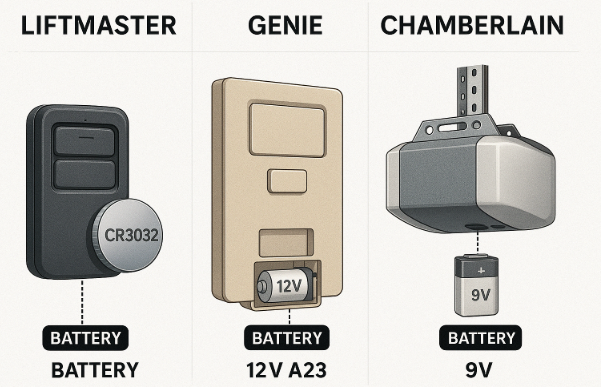
- Common Battery Types Used
- Signs the Battery Needs Replacement
- Where to Buy Replacement Batteries
- Match the Case, Module, or Generation First: Garage Door Opener Battery Location by Model
- Author
The Battery Location Depends on the Device
Garage Door Opener Battery Location – Quick Overview
| Brand / System | Battery Location | Access Method |
|---|---|---|
| LiftMaster (Ceiling Mount) | Front or side panel | Snap-open or slide cover |
| LiftMaster (Wall / Jackshaft) | Bottom or side | Hinged battery door |
| Chamberlain (Ceiling Mount) | Front panel | Pop-out battery tray |
| Chamberlain (Wall Mount) | Lower side | Removable cover |
| Universal Openers | Varies | Manual required |
LiftMaster Garage Door Opener Battery Location
Most modern LiftMaster garage door openers include a backup battery.
Ceiling-Mounted LiftMaster Models
- Battery is usually behind the front light cover
- Look for a rectangular battery compartment
- Battery type: 12V backup battery
Steps to locate it:
- Turn off power to the opener
- Remove the front or side cover
- Pull out the battery tray
Wall-Mounted (Jackshaft) LiftMaster Models
- Battery is located on the lower side or bottom
- Often marked with a battery icon
- Easy tool-free access
This applies to models like the 8500, 8500W, and similar.
Chamberlain Garage Door Opener Battery Location
Chamberlain and LiftMaster share similar internal designs.
Chamberlain Ceiling-Mounted Openers
- Battery is located behind the front panel
- Usually next to the LED or diagnostic light
- Battery slides out in a plastic tray
Chamberlain Wall-Mounted Openers
- Battery is typically on the lower right side
- Accessed through a hinged door
If you are searching specifically for chamberlain garage door opener battery location, this is the most common setup.
Chamberlain Garage Door Battery Location (Keypads & Accessories)
Many Chamberlain systems also use batteries in:
- Outdoor keypads (usually 9V)
- Wall control panels
- Wireless remotes
Keypad batteries are typically located behind the keypad faceplate.
Replace the Cell Without Disturbing Pairing
Why Battery Location Matters
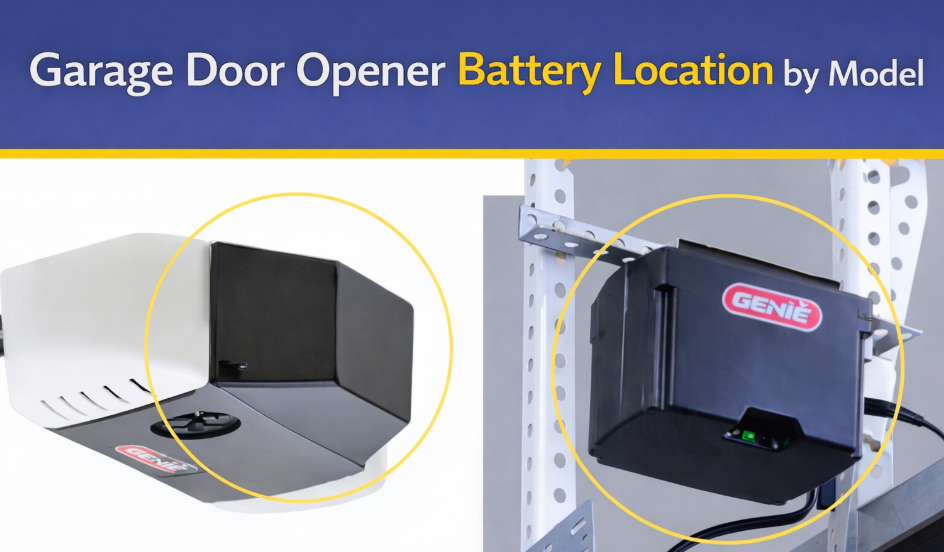
Garage door opener batteries are usually installed for:
- Backup power during outages
- Wireless keypads
- Wall control panels
- Smart features (myQ, Wi-Fi)
If you cannot find the battery quickly, your opener may stop working when power is lost.
Common Battery Types Used
Signs the Battery Needs Replacement
- Beeping sound every 30 seconds
- Flashing LED on opener
- Opener works only when plugged in
- Keypad becomes unresponsive
If you experience any of these, the garage door opener battery location should be your first check.
Where to Buy Replacement Batteries
You can buy compatible batteries from:
- Chamberlain or LiftMaster official stores
- Home improvement stores
- Online retailers (Amazon, hardware sites)
Always match voltage and connector type.
Match the Case, Module, or Generation First: Garage Door Opener Battery Location by Model
Before opening anything, check:
- The label on the opener housing
- The owner’s manual
- The Chamberlain or LiftMaster website
Knowing the exact model ensures you use the correct battery type.
A technician handoff for Garage Door Opener Battery Location by Model is worthwhile when the correct part and procedure do not change the symptom, because the remaining fault is no longer a routine user adjustment.
