Programming a GMC garage door opener without the original remote is possible in most cases, as long as your vehicle is equipped with a built-in HomeLink system and the garage door opener itself supports learning mode.
This guide explains when programming without a remote works, when it does not, and what exact steps you should follow to avoid common mistakes.
- Can You Program a GMC Garage Door Opener Without a Remote?
- GMC Vehicles That Support This Method
- What You Need Before You Start
- Step-by-Step: Programming GMC Garage Door Opener Without Remote
- Step 1: Clear Existing HomeLink Codes
- Step 2: Put the Garage Door Opener Into Learn Mode
- Step 3: Program HomeLink From the Vehicle
- If the Garage Door Does Not Respond
- Programming Specific GMC Models Without a Remote
- Common Issues and Fixes
- Garage Door Opener Does Not Enter Learn Mode
- HomeLink Light Blinks But Door Does Not Move
- Programming Works but Stops Later
- Can You Program a GMC Garage Door Opener Without Any Access to the Opener?
- Safety Notes
- Final Thoughts
- Author
Can You Program a GMC Garage Door Opener Without a Remote?
In short – sometimes.
You can program a GMC garage door opener without a remote if:
- Your GMC has HomeLink buttons built into the vehicle
- You have physical access to the garage door opener motor unit
- The opener supports learn or program mode
You cannot complete the process if:
- The garage door opener does not have a learn button
- The opener uses rolling-code technology and you cannot access the motor unit
- The HomeLink system in the vehicle is not compatible with the opener frequency
In most modern setups, accessing the opener motor is enough to replace the need for a handheld remote.
GMC Vehicles That Support This Method
The procedure below applies to GMC vehicles equipped with factory HomeLink. While exact button placement may vary, the programming logic remains the same.
| GMC Model | HomeLink Support |
|---|---|
| GMC Sierra | Yes |
| GMC Yukon | Yes |
| GMC Acadia | Yes |
| GMC Terrain | Yes |
| GMC Canyon | Yes |
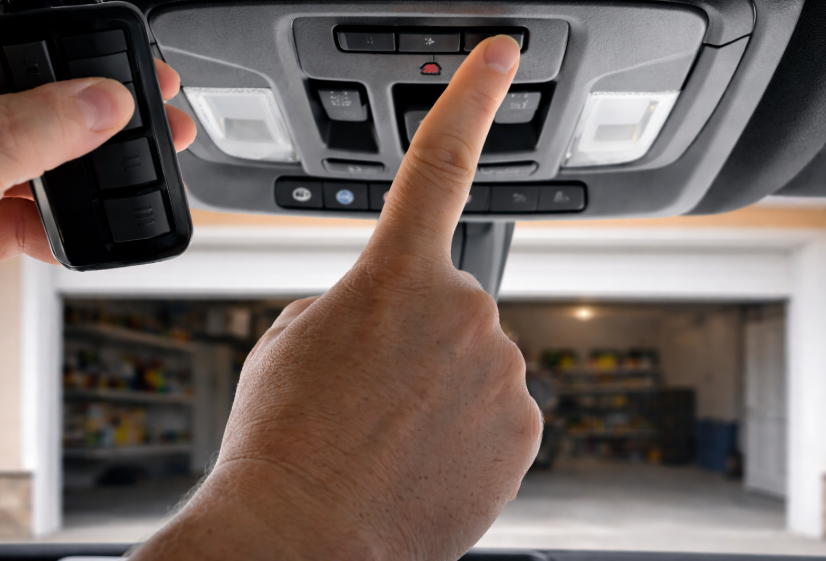
If your GMC has three programmable buttons near the rearview mirror or overhead console, this method applies.
What You Need Before You Start
Before programming your GMC garage door opener without a remote, make sure you have:
- Access to the garage door opener motor unit
- A ladder to reach the opener safely
- The vehicle parked outside the garage
- Ignition set to accessory or on position
Do not attempt programming while the vehicle is inside the garage.
Step-by-Step: Programming GMC Garage Door Opener Without Remote
Step 1: Clear Existing HomeLink Codes
Press and hold the first and third HomeLink buttons in your GMC for about 10 seconds until the indicator light flashes rapidly. This resets previous programming.
This step is optional but recommended if HomeLink was previously paired to another opener.
Step 2: Put the Garage Door Opener Into Learn Mode
Locate the learn button on the garage door opener motor. It is usually found:
- Near the antenna wire
- Under the light cover
- On the back or side of the motor housing
Press the learn button once. The indicator light on the opener will turn on or begin blinking. This puts the opener into pairing mode.
You typically have 30 seconds to complete the next step.
Step 3: Program HomeLink From the Vehicle
Return to your GMC and press the HomeLink button you want to use. Hold it for 2–3 seconds, release, and repeat if necessary.
The garage door opener light or the garage door itself will move to confirm successful programming.
If the Garage Door Does Not Respond
If nothing happens:
- Repeat Step 3 within the learn mode time window
- Try holding the HomeLink button slightly longer
- Confirm the opener supports HomeLink compatibility
Some openers require pressing the HomeLink button multiple times before syncing.
Programming Specific GMC Models Without a Remote
While the steps are identical, some models differ slightly in indicator behavior or button placement.
| GMC Model | Notes |
|---|---|
| GMC Sierra | HomeLink usually located on mirror or overhead console |
| GMC Yukon | Often requires two presses during final pairing |
| GMC Acadia | Learn mode timing is more sensitive |
| GMC Terrain | Shorter HomeLink press cycles recommended |
| GMC Canyon | Similar behavior to Sierra models |
If programming fails repeatedly, try resetting HomeLink again and restarting the process.
Common Issues and Fixes
Garage Door Opener Does Not Enter Learn Mode
Check the opener manual or remove the light cover to locate the correct button. Some models have multiple buttons.
HomeLink Light Blinks But Door Does Not Move
This usually indicates frequency mismatch or incomplete pairing. Try re-entering learn mode and repeat the final step.
Programming Works but Stops Later
This can be caused by:
- Weak opener logic board
- Interference
- Battery issues in backup power systems
Can You Program a GMC Garage Door Opener Without Any Access to the Opener?
No.
If you cannot access the garage door opener motor unit and do not have a working remote, programming is not possible. HomeLink requires at least one of these to sync securely.
Safety Notes
Always keep people and vehicles clear of the garage door during programming. If the door moves unexpectedly, release the HomeLink button immediately.
Final Thoughts
Programming a GMC garage door opener without a remote is straightforward once you understand how HomeLink communicates with the opener. As long as you can access the opener’s learn button, you can complete the setup in minutes.
If this method does not work, the next step is checking opener compatibility or replacing the wall control or logic board.
