Shark watches are popular for surfing, sports, and everyday wear. Most models are digital watches designed by Freestyle, known for their durable construction and easy-to-use controls.
While Shark watches come in different styles such as the Shark Classic, Shark Clip, and Shark Leash, the basic process for setting the time is very similar across most models.
If you are wondering how to set the time on a Shark watch, the steps below will help you adjust the time in just a few seconds.
- How to Set Time on a Shark Watch
- Step 1 – Enter Time Setting Mode
- Step 2 – Adjust the Seconds
- Step 3 – Set the Hour
- Step 4 – Set the Minutes
- Step 5 – Save the Time
- How to Set Time on a Freestyle Shark Watch
- Steps
- How to Set Time on a Shark Watch
- Step 1 – Enter Time Setting Mode
- Step 2 – Adjust the Seconds
- Step 3 – Set the Hour
- Step 4 – Set the Minutes
- Step 5 – Save the Time
- How to Set Time on a Freestyle Shark Watch
- Steps
- How to Set Time on a Shark Clip Watch
- How to Set Time on a Shark Leash Watch
- Shark Watch Button Functions
- Common Problems When Setting Time on a Shark Watch
- The numbers do not flash
- The watch shows the wrong hour
- Buttons do not work
- Popular Shark Watch Models and Time Adjustment
- Final Thoughts
- How to Set Time on a Shark Clip Watch
- How to Set Time on a Shark Leash Watch
- Shark Watch Button Functions
- Common Problems When Setting Time on a Shark Watch
- The numbers do not flash
- The watch shows the wrong hour
- Buttons do not work
- Popular Shark Watch Models and Time Adjustment
- Final Thoughts
- Author
How to Set Time on a Shark Watch
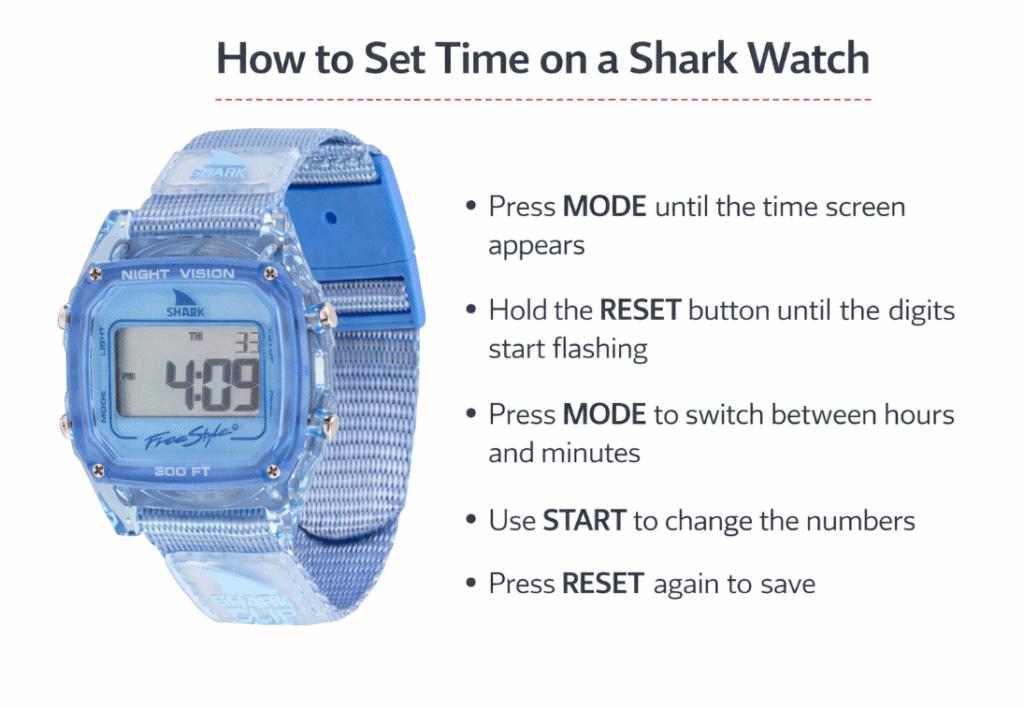
Most Shark watches use a four-button layout.
The buttons are usually labeled:
- MODE
- RESET
- START
- LIGHT
These buttons allow you to switch modes and adjust the time.
Step 1 – Enter Time Setting Mode
Press and hold the RESET button for about two seconds until the seconds start flashing on the display.
Flashing numbers indicate that the watch is now in time adjustment mode.
Step 2 – Adjust the Seconds
Press the START button to reset the seconds to zero.
This helps synchronize the watch with the current minute.
Step 3 – Set the Hour
Press the MODE button once.
The hour digits will start flashing.
Press the START button repeatedly until the correct hour appears.
Step 4 – Set the Minutes
Press the MODE button again to move to minutes.
Use the START button to adjust the minutes.
Step 5 – Save the Time
Press the RESET button again to confirm the settings.
Your Shark watch will return to normal time display.
How to Set Time on a Freestyle Shark Watch
Freestyle Shark watches follow the same digital layout but may include additional features like a stopwatch, alarm, and countdown timer.
Steps
- Press MODE until the time screen appears
- Hold the RESET button until the digits start flashing
- Press MODE to switch between hours and minutes
- Use START to change the numbers
- Press RESET again to save
How Do You Set the Time on a Shark Watch
Shark watches are popular for surfing, sports, and everyday wear. Most models are digital watches designed by Freestyle, known for their durable construction and easy-to-use controls.
While Shark watches come in different styles such as the Shark Classic, Shark Clip, and Shark Leash, the basic process for setting the time is very similar across most models.
If you are wondering how to set the time on a Shark watch, the steps below will help you adjust the time in just a few seconds.
How to Set Time on a Shark Watch
Most Shark watches use a four-button layout.
The buttons are usually labeled:
- MODE
- RESET
- START
- LIGHT
These buttons allow you to switch modes and adjust the time.
Step 1 – Enter Time Setting Mode
Press and hold the RESET button for about two seconds until the seconds start flashing on the display.
Flashing numbers indicate that the watch is now in time adjustment mode.
Step 2 – Adjust the Seconds
Press the START button to reset the seconds to zero.
This helps synchronize the watch with the current minute.
Step 3 – Set the Hour
Press the MODE button once.
The hour digits will start flashing.
Press the START button repeatedly until the correct hour appears.
Step 4 – Set the Minutes
Press the MODE button again to move to minutes.
Use the START button to adjust the minutes.
Step 5 – Save the Time
Press the RESET button again to confirm the settings.
Your Shark watch will return to normal time display.
How to Set Time on a Freestyle Shark Watch
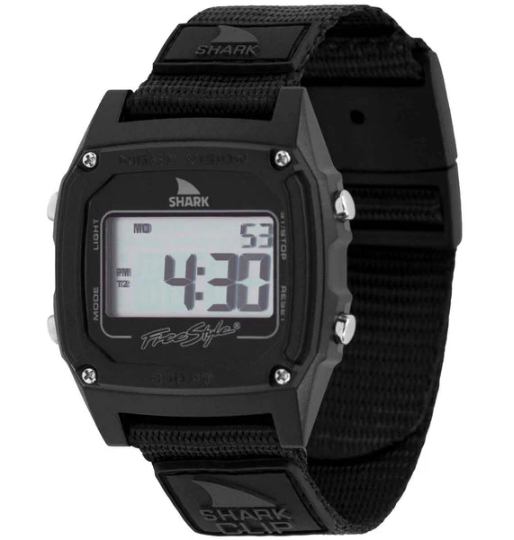
Freestyle Shark watches follow the same digital layout but may include additional features like a stopwatch, alarm, and countdown timer.
Steps
- Press MODE until the time screen appears
- Hold the RESET button until the digits start flashing
- Press MODE to switch between hours and minutes
- Use START to change the numbers
- Press RESET again to save
This method works for most Freestyle Shark watches, including Shark Classic models.
How to Set Time on a Shark Clip Watch
The Shark Clip watch uses a clip strap instead of a buckle but the internal functions remain the same.
To set the time:
- Hold the RESET button until the numbers flash
- Press MODE to move through settings
- Use START to change the values
- Press RESET to confirm
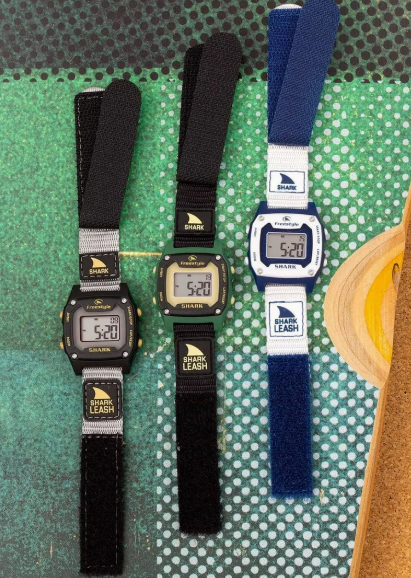
How to Set Time on a Shark Leash Watch
The Shark Leash model uses the same digital interface.
Follow the same steps:
- Hold RESET
- Use MODE to move between settings
- Adjust values with START
- Press RESET to save
Shark Watch Button Functions
Understanding the button layout makes it easier to adjust time and other features.
| Button | Function |
|---|---|
| MODE | Switch between time, alarm, stopwatch |
| RESET | Enter or exit settings |
| START | Adjust numbers |
| LIGHT | Activate backlight |
Most Shark watches use this same system.
Common Problems When Setting Time on a Shark Watch
The numbers do not flash
Make sure you hold the RESET button long enough to activate the settings.
The watch shows the wrong hour
The watch may be in 12-hour format. Continue adjusting the hour until the correct AM or PM appears.
Buttons do not work
The watch may be in stopwatch mode. Press MODE until the main time screen appears.
Popular Shark Watch Models and Time Adjustment
| Model | Type | Time Setting Method |
|---|---|---|
| Shark Classic | Digital surf watch | Reset + Mode buttons |
| Shark Clip | Digital | Standard button adjustment |
| Shark Leash | Surf watch | Mode + Start buttons |
| Freestyle Shark | Digital sports watch | Button-based time setting |
Final Thoughts
Setting the time on a Shark watch is quick once you understand the button layout. Most Shark watches use a simple digital interface where the RESET button activates the setting mode and the START button changes the numbers.
Whether you own a Shark Classic, Shark Clip, or Shark Leash, the basic process remains the same.
How to Set Time on a Shark Clip Watch
The Shark Clip watch uses a clip strap instead of a buckle but the internal functions remain the same.
To set the time:
- Hold the RESET button until the numbers flash
- Press MODE to move through settings
- Use START to change the values
- Press RESET to confirm
How to Set Time on a Shark Leash Watch
The Shark Leash model uses the same digital interface.
Follow the same steps:
- Hold RESET
- Use MODE to move between settings
- Adjust values with START
- Press RESET to save
Shark Watch Button Functions
Understanding the button layout makes it easier to adjust time and other features.
| Button | Function |
|---|---|
| MODE | Switch between time, alarm, stopwatch |
| RESET | Enter or exit settings |
| START | Adjust numbers |
| LIGHT | Activate backlight |
Most Shark watches use this same system.
Common Problems When Setting Time on a Shark Watch
The numbers do not flash
Make sure you hold the RESET button long enough to activate the settings.
The watch shows the wrong hour
The watch may be in 12-hour format. Continue adjusting the hour until the correct AM or PM appears.
Buttons do not work
The watch may be in stopwatch mode. Press MODE until the main time screen appears.
Popular Shark Watch Models and Time Adjustment
| Model | Type | Time Setting Method |
|---|---|---|
| Shark Classic | Digital surf watch | Reset + Mode buttons |
| Shark Clip | Digital | Standard button adjustment |
| Shark Leash | Surf watch | Mode + Start buttons |
| Freestyle Shark | Digital sports watch | Button-based time setting |
Final Thoughts
Setting the time on a Shark watch is quick once you understand the button layout. Most Shark watches use a simple digital interface where the RESET button activates the setting mode and the START button changes the numbers.
Whether you own a Shark Classic, Shark Clip, or Shark Leash, the basic process remains the same.
