This page answers one practical question about Nissan Altima Car Key Battery Replacement first, then explains only the checks that can change that answer.
If your Nissan Altima key fob has stopped working properly, the battery is often the first thing to check. A weak battery can cause reduced range, delayed response, or a complete failure to lock, unlock, or start the car with the push button. In most cases, replacing the battery takes only a few minutes and does not require special tools.
For Nissan Altima owners, the most common key fob batteries are CR2025 and CR2032, depending on the model year and the key fob design. That is why it is important to check the old battery inside your remote before buying a replacement. Some years may have more than one key style.
This guide covers Nissan Altima key fob battery replacement, including common battery types, year-specific notes, replacement steps, and the most common mistakes to avoid.
- The Replacement Path for This Key Housing
- How to Replace a Nissan Altima Key Fob Battery
- Step 1: Remove the emergency key
- Step 2: Open the key fob case
- Step 3: Take out the old battery
- Step 4: Install the new battery
- Step 5: Snap the key fob back together
- Step 6: Reinsert the emergency key
- Step 7: Test the key
- Nissan Altima Smart Key Battery Replacement
- 2007 Nissan Altima Key Battery Replacement
- 2017 Nissan Altima Key Battery Replacement
- 2019 Nissan Altima Key Battery Replacement
- 2020 Nissan Altima Key Battery Replacement
- Common Mistakes During Car Key Battery Replacement for Nissan Altima
- Installing the wrong battery size
- Putting the battery in upside down
- Damaging the plastic clips
- Touching or bending the battery contacts
- Assuming all Altima years use the same battery
- Keep This Reference With the Device
- How the Opener Confirms Success
- Quick Answer
- What to Do if the Nissan Altima Key Fob Still Does Not Work
- Match the Case, Module, or Generation First: Nissan Altima Car Key Battery Replacement
- Find the Control That Actually Saves the Setting
- Author
The Replacement Path for This Key Housing
How to Replace a Nissan Altima Key Fob Battery
Replacing the battery in a Nissan Altima key fob is usually simple. You only need a small flat tool, a plastic pry tool, or a small flathead screwdriver and a fresh battery.
Step 1: Remove the emergency key
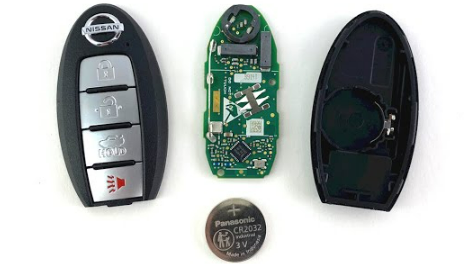
Most Nissan Altima smart keys have a small release latch on the back. Slide the latch and pull out the emergency metal key.
Step 2: Open the key fob case
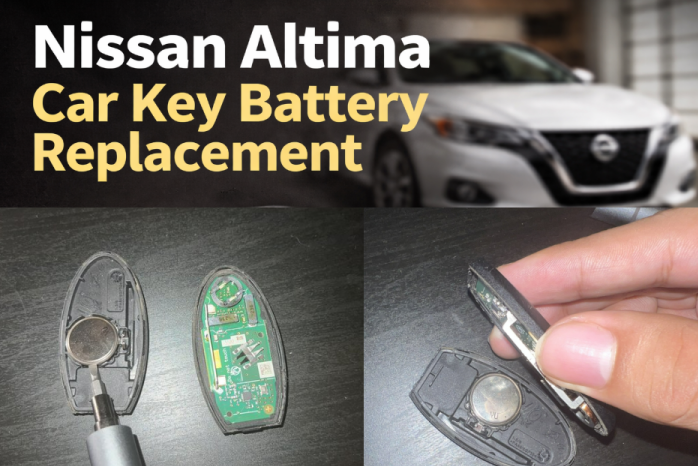
After removing the emergency key, look for the slot where the key came out or a small seam around the case. Carefully insert a flat tool and twist gently to separate the two halves.
Do not force it too hard. Nissan key fob plastic clips can crack if you pry too aggressively.
Step 3: Take out the old battery
Once open, remove the old coin battery carefully. Pay attention to how it sits in the tray. The positive side usually faces upward, but you should match the exact position of the old battery before inserting the new one.
Step 4: Install the new battery
Insert the new CR2025 or CR2032 battery into the holder. Make sure it sits flat and firmly in place. Avoid touching the battery surfaces too much with sweaty or dirty fingers.
Step 5: Snap the key fob back together
Line up both halves of the case and press them together until they click shut.
Step 6: Reinsert the emergency key
Slide the mechanical key back into the fob until it locks into place.
Step 7: Test the key
Stand near the car and test lock, unlock, trunk release, and push-button start if your Altima uses an intelligent key system.
Nissan Altima Smart Key Battery Replacement
Many drivers search specifically for Nissan Altima smart key battery replacement because modern Altima models use intelligent keys rather than traditional remotes. The process is almost the same, but newer smart keys are often slimmer and more sensitive to rough handling.
For newer models like the 2019 Nissan Altima key battery replacement or 2020 Nissan Altima key battery replacement, CR2032 is a common battery choice. However, it is still best to confirm before buying because key shell design can vary.
If your Altima has push-button start, you almost certainly have a smart key rather than a basic remote. In that case, open the fob carefully and inspect the battery label before installing a new one.
2007 Nissan Altima Key Battery Replacement
The 2007 Nissan Altima was one of the early model years where intelligent key systems became more common. Because of this, 2007 Nissan Altima key battery replacement may depend on the specific key style you have.
Some 2007 Altima owners will find a CR2025 battery, while others may see a different coin battery depending on the remote version. This is one of those years where checking the actual battery is especially important instead of relying only on general fitment charts.
2017 Nissan Altima Key Battery Replacement
The 2017 Nissan Altima key battery replacement process is similar to nearby model years. Some 2017 fobs use CR2025, while some owners report a slightly different battery depending on trim or replacement key style.
That is why battery confirmation matters more than assumptions. Open the fob, check the installed cell, and then replace it with the exact same type unless the manufacturer states otherwise.
2019 Nissan Altima Key Battery Replacement
The 2019 redesign changed many things about the Altima, including the style of the smart key for many trims. In many cases, the 2019 Nissan Altima key battery replacement uses a CR2032 battery.
These newer fobs are still easy to open, but you should be careful with the plastic tabs and the battery contacts. A poor fit can make the key work inconsistently even with a brand-new battery.
2020 Nissan Altima Key Battery Replacement
For 2020 Nissan Altima key battery replacement, CR2032 is a common fit for many smart keys. If your car gives a warning that the key battery is low or the push-button start becomes less responsive, changing the battery is a good first step.
After replacement, test all functions right away. If the fob still does not work, the issue may be with the battery orientation, dirty contacts, or damage inside the case.
Common Mistakes During Car Key Battery Replacement for Nissan Altima
Even though this job is easy, a few small mistakes can cause problems.
Installing the wrong battery size
CR2025 and CR2032 look similar, but they are not the same thickness. Using the wrong one can lead to poor contact or case closing issues.
Putting the battery in upside down
Always check the orientation before removing the old battery. Incorrect polarity is one of the most common reasons a key fob still does not work after battery replacement.
Damaging the plastic clips
Do not jam a screwdriver too hard into the case. Open the fob slowly and carefully.
Touching or bending the battery contacts
If the metal contacts get bent, the new battery may not connect properly.
Assuming all Altima years use the same battery
This is a very common mistake. Nissan Altima key fob battery replacement can vary by generation and key style.
Keep This Reference With the Device
| Nissan Altima Model Year | Key Type | Common Battery Type | Notes |
|---|---|---|---|
| 2007 Nissan Altima | Smart key or remote key fob | CR2025 or CR2032 | Verify battery inside the fob before purchase |
| 2008-2012 Nissan Altima | Key fob / intelligent key | CR2025 | Common on many Altima smart keys from this period |
| 2013-2015 Nissan Altima | Smart key battery | CR2025 | 2015 Nissan Altima key battery replacement often uses CR2025 |
| 2016-2018 Nissan Altima | Intelligent key | CR2032 or CR2025 | Some design differences may exist |
| 2019 Nissan Altima | Smart key fob | CR2032 | 2019 Nissan Altima key battery replacement often uses newer fob design |
| 2020 Nissan Altima | Smart key fob | CR2032 | 2020 Nissan Altima key battery replacement commonly uses CR2032 |
| 2021 and newer | Smart key fob | Usually CR2032 | Always confirm battery marking in your fob |
This table is a practical guide, but Nissan sometimes used different fob styles within similar production years, trim levels, or markets. The safest method is still to open the fob and check the installed battery.
How the Opener Confirms Success
Quick Answer
For most Nissan Altima key fob battery replacement jobs, you will usually need either a CR2025 or CR2032 coin battery. Older Altima remotes and newer smart keys may use different battery sizes, so always open the fob and confirm the number printed on the old battery before installing a new one.
What to Do if the Nissan Altima Key Fob Still Does Not Work
If you replaced the battery and nothing changed, check these things:
- Make sure the battery is brand new
- Confirm the battery type matches the old one
- Recheck the positive and negative orientation
- Inspect the battery contacts for dirt or bending
- Make sure the key fob case snapped together properly
- Try a second fresh battery from a reliable brand
If the key still does not work, the issue may be with the fob itself rather than the battery. Internal wear, water damage, or a damaged circuit board can prevent the remote from working.
Match the Case, Module, or Generation First: Nissan Altima Car Key Battery Replacement
For many vehicles from this model year, 2015 Nissan Altima key battery replacement commonly uses a CR2025 battery. This generation often came with a familiar Nissan intelligent key design that opens easily once the emergency key is removed.
If your 2015 Altima key fob suddenly has weak range or inconsistent unlocking, replacing the battery is often the quickest and cheapest fix.
Find the Control That Actually Saves the Setting
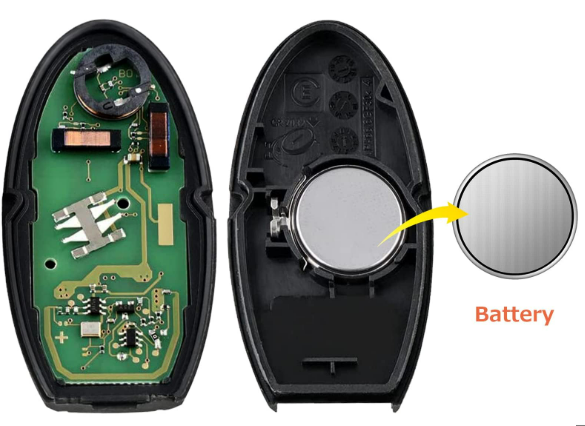
A weak Nissan Altima key fob battery does not always fail all at once. Usually, you will notice small signs first:
- The remote only works from a shorter distance
- You need to press the buttons more than once
- Lock and unlock response becomes delayed
- Push-button start struggles to detect the key
- A low key battery warning appears on the dashboard
If you notice any of these symptoms, replacing the battery early can save you from being stuck with a dead remote.
A technician handoff for Nissan Altima Car Key Battery Replacement is worthwhile when the correct part and procedure do not change the symptom, because the remaining fault is no longer a routine user adjustment.
