If your Nissan Sentra key fob has stopped working or shows a weak signal, the most common reason is a dead battery. The good news is that Nissan Sentra key fob battery replacement is quick, inexpensive, and something you can easily do yourself in a few minutes.
Most Nissan Sentra models use a small coin battery like CR2025 or CR2032, depending on the year and key type. However, even within the same model year, there can be different key fob designs, so it is always best to open the fob and check the exact battery type before replacing it.
This guide covers Nissan Sentra car key battery replacement by year, explains how to change the battery step by step, and helps you avoid common mistakes.
- Quick Answer
- Nissan Sentra Key Fob Battery by Year
- How to Replace a Nissan Sentra Key Fob Battery
- Step 1: Remove the emergency key
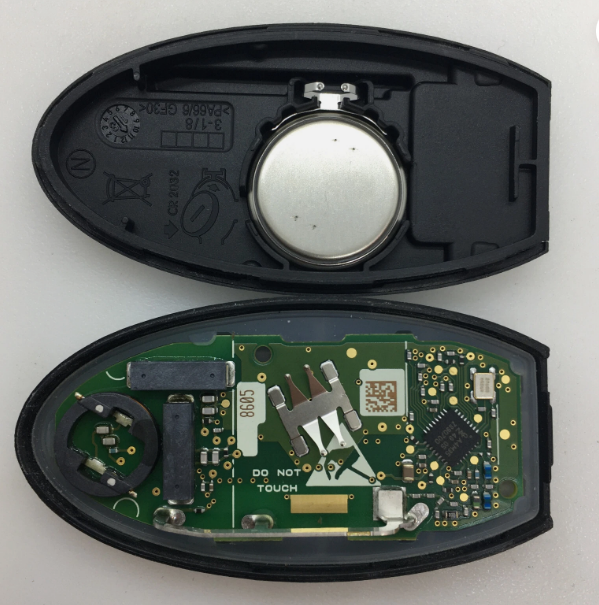
- Step 2: Open the key fob
- Step 3: Remove the old battery
- Step 4: Insert the new battery
- Step 5: Reassemble the key
- Step 6: Test the key
- What Battery Does Nissan Sentra Key Use?
- Nissan Sentra Key Battery Low – What It Means
- Nissan Sentra Key Battery Dead – What to Do
- Nissan Sentra Key Battery Size
- Common Mistakes During Nissan Sentra Car Key Battery Replacement
- Using the wrong battery
- Installing battery incorrectly
- Damaging the key fob
- Not checking battery contacts
- Assuming all years use the same battery
- Nissan Sentra Key Battery Change Tips
- FAQ
- What battery does a Nissan Sentra key fob use?
- How do I know my Nissan Sentra key battery size?
- Do I need to reprogram the key after battery replacement?
- Why is my Nissan Sentra key fob not working after battery replacement?
- How long does a Nissan Sentra key battery last?
- Final Thoughts
- Author
Quick Answer
For most Nissan Sentra key battery replacement jobs:
- Older models commonly use CR2025
- Newer smart keys often use CR2032
The safest way is to open your key fob and check the battery number printed on it.

Nissan Sentra Key Fob Battery by Year
| Year | Key Type | Battery Type | Notes |
|---|---|---|---|
| 2013 Nissan Sentra | Remote key / smart key | CR2025 | Early intelligent key systems |
| 2014 Nissan Sentra car key battery | Smart key | CR2025 | Common battery for this generation |
| 2015 Nissan Sentra car key battery | Smart key | CR2025 | 2015 Nissan Sentra car key battery often CR2025 |
| 2016 Nissan Sentra car key battery | Smart key | CR2025 | Same platform, similar key design |
| 2017 Nissan Sentra car key battery | Smart key | CR2025 or CR2032 | Some variations depending on key version |
| 2017 Nissan Sentra SV car key battery | Smart key | CR2025 | SV trim typically uses CR2025 |
| 2018 Nissan Sentra car key battery | Smart key | CR2025 or CR2032 | Verify before replacing |
| 2019 Nissan Sentra car key battery | Smart key | CR2032 | Newer key design more common |
| 2020 Nissan Sentra car key battery | Smart key | CR2032 | Updated generation |
| 2021 Nissan Sentra car key battery | Smart key | CR2032 | Consistent with newer models |
| 2022 Nissan Sentra car key battery | Smart key | CR2032 | Same smart key platform |
| 2023 Nissan Sentra car key battery | Smart key | CR2032 | Latest models |
| 2024 Nissan Sentra car key battery | Smart key | CR2032 | Same smart key platform |
| 2025 Nissan Sentra car key battery | Smart key | CR2032 | Same smart key platform |
How to Replace a Nissan Sentra Key Fob Battery
Nissan Sentra key battery change is simple and requires only a few minutes.
Step 1: Remove the emergency key
Locate the small latch on the back of your key fob. Slide it and pull out the metal emergency key.
Step 2: Open the key fob
Use the slot where the key was removed or a small seam on the side. Insert a flat tool and gently twist to open the case.
Be careful not to force it, as the plastic clips can break.
Step 3: Remove the old battery
Take out the old coin battery and note its position. Pay attention to which side is facing up.
Step 4: Insert the new battery
Place the new CR2025 or CR2032 battery in the same orientation. Make sure it sits firmly in place.
Step 5: Reassemble the key
Snap the two halves back together until they click.
Step 6: Test the key
Check lock, unlock, trunk, and push-button start if your car has it.
What Battery Does Nissan Sentra Key Use?
One of the most common questions is: what battery does Nissan Sentra key use?
The answer depends on the key type:
- CR2025 – very common in 2013-2017 models
- CR2032 – more common in newer Sentra smart keys (2019+)
Because both batteries look similar, many people install the wrong one. Always match the number printed on your old battery.
Nissan Sentra Key Battery Low – What It Means
If you see a warning like Nissan Sentra key battery low, it means the battery is almost dead and should be replaced soon.
Common symptoms include:
- Reduced remote range
- Delayed response when locking or unlocking
- Push start not detecting the key reliably
- Warning message on dashboard
Replacing the battery early prevents complete failure.
Nissan Sentra Key Battery Dead – What to Do
If your Nissan Sentra key battery is completely dead:
- Use the emergency key to unlock the door
- Hold the key fob close to the start button (for push start models)
- Replace the battery as soon as possible
Even with a dead battery, most Nissan vehicles still allow starting the car using the backup method.
Nissan Sentra Key Battery Size
The most common Nissan Sentra key battery size options are:
- CR2025 (thinner)
- CR2032 (slightly thicker)
They are not interchangeable in all cases. Using the wrong thickness can cause poor contact or prevent the case from closing properly.
Common Mistakes During Nissan Sentra Car Key Battery Replacement
Even though the process is simple, mistakes happen.
Using the wrong battery
CR2025 and CR2032 look similar but are different in thickness.
Installing battery incorrectly
If polarity is wrong, the key will not work.
Damaging the key fob
Opening the case too aggressively can break clips.
Not checking battery contacts
Bent or dirty contacts can prevent proper connection.
Assuming all years use the same battery
This is one of the most common errors. Always verify.
Nissan Sentra Key Battery Change Tips
- Always use a fresh, high-quality battery
- Avoid touching battery surfaces too much
- Keep the inside of the fob clean
- Test the key immediately after replacement
FAQ
What battery does a Nissan Sentra key fob use?
Most use CR2025 or CR2032 depending on the year and key design.
How do I know my Nissan Sentra key battery size?
Open the key fob and check the number on the battery.
Do I need to reprogram the key after battery replacement?
No, in most cases reprogramming is not required.
Why is my Nissan Sentra key fob not working after battery replacement?
Possible reasons include wrong battery type, incorrect installation, or damaged contacts.
How long does a Nissan Sentra key battery last?
Usually between 2 to 4 years depending on usage.
Final Thoughts
Nissan Sentra key fob battery replacement is one of the easiest maintenance tasks you can do yourself. Whether you are dealing with a Nissan Sentra key battery low warning or a completely dead key, replacing the battery is usually all it takes to restore full functionality.
The key thing to remember is not to rely only on model year assumptions. Always open the key, check the battery type, and replace it carefully. That small step will save time, money, and frustration.
