The expensive mistake with Casio A158W Battery is following a procedure for a similar-looking version. The model, generation, control layout, or radio system decides which steps apply.
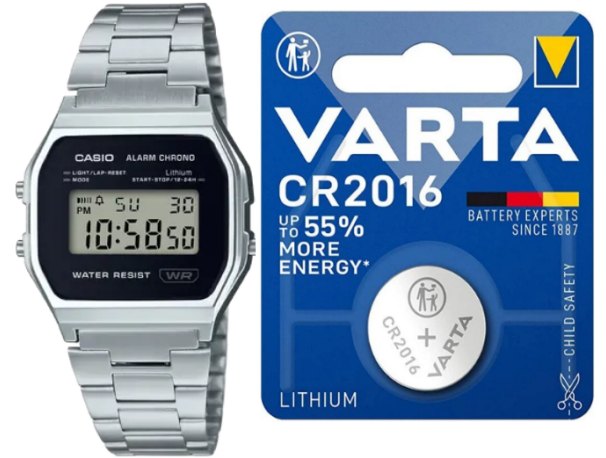
The A158W runs on a CR2016 lithium coin cell — the same battery used across several other classic Casio digitals, including the F-91W family. It’s a small, simple watch without any power-hungry features, so that battery tends to last a genuinely long time: around seven years under normal use.
If your A158W’s display has started fading, the light feels weaker than it used to, the alarm sounds quieter, or the watch has simply stopped, the battery is almost always the first thing worth checking.
- The Battery Change From Case Back to AC Reset
- What This Costs
- Should You Do This Yourself?
- Check These Failure Points in Order
- The Numbers Worth Writing Down
- Value Beyond the Sticker Price
- Settings to Verify After the Case Is Closed
- The Control Layout Determines the Method
- What the Rating Means in Practice
- Test the Result Before Closing Up
- Author
The Battery Change From Case Back to AC Reset
What This Costs
CR2016 is a common, inexpensive battery, which keeps this repair cheap either way you go:
The gap between a $3 battery and a $15 shop replacement reflects labor and careful handling of small parts, not markup on the battery itself. If your A158W is otherwise in good shape, replacing the battery is clearly the better value than buying a new one. If the bracelet, case, or buttons have taken a beating over the years, a new watch may honestly make more sense than continuing to service a tired one.
Should You Do This Yourself?
The case in favor is straightforward: the battery itself is cheap, the watch has no complex sensors to complicate things, a decent replacement cell will last years, and the screw-back case is genuinely manageable with basic tools. The trade-offs are equally worth naming — the screws are small and easy to lose track of, a poorly seated gasket can quietly cost you water resistance, some units need that AC reset to come back to life properly, and the chrome-style case is easy to scratch while it’s open on the bench. None of these are reasons to avoid doing it yourself — they’re just the details worth slowing down for.
Check These Failure Points in Order
The single most common one is assuming every Casio uses the same battery — the A158W takes a CR2016, but plenty of other Casio models run on a CR2025, CR2032, SR626SW, or something else entirely. Beyond that, a handful of small errors account for most post-replacement problems: installing the battery upside down (the display simply won’t come on), losing track of the gasket or pinching it during reassembly (both reduce water resistance), handling the module more than necessary (oils and static don’t help it), skipping the AC reset when the module actually needs one, and overtightening the case-back screws.
The Numbers Worth Writing Down
The A158W’s screw-back case makes this a genuinely manageable DIY job — nothing here demands special skill, just a bit of care with the small screws, the gasket, and the battery contact.
What you’ll want on hand:
- A small Phillips screwdriver, for the case-back screws
- A fresh CR2016 battery
- Plastic tweezers (safer than metal ones around the contacts)
- A soft cloth to rest the watch face-down on
- A small tray to keep the tiny screws from rolling away
- Optional: a touch of gasket grease to help preserve the seal
The process:
- Lay the watch face-down on the soft cloth.
- Remove the small case-back screws.
- Lift the case back off carefully.
- Note exactly how the rubber gasket sits before you disturb it.
- Remove the old CR2016.
- Install the new CR2016 with correct polarity.
- Confirm the battery contact is seated properly.
- Perform an AC reset if the display doesn’t respond normally (details below).
- Check the display, alarm, and light all work.
- Reseat the gasket exactly as it was.
- Refit the case back and tighten the screws evenly — not one fully before the others.
One thing worth flagging clearly: don’t overtighten those screws. The A158W’s case is small, and forcing them risks stripping the threads or cracking the case back — an easy mistake to avoid just by not rushing this last step.
Value Beyond the Sticker Price
Worth noting up front: this CR2016 answer is specific to the A158W family and its close relatives. Not every Casio watch shares it — more on that further down.
Settings to Verify After the Case Is Closed
Seven years is a reasonable average, but real-world life shifts depending on how the watch gets used. Frequent backlight and alarm use tends to shorten it somewhat, while a watch worn mostly for basic timekeeping often reaches or slightly exceeds that figure. A cheap, no-name replacement cell can also underperform compared to a battery from an established brand, and — as with most watches that sit on shelves before being sold — a factory-fresh A158W may already have a battery that’s a year or two into its life by the time it reaches you.
For context across the wider Casio lineup: simple digitals like the A158W and F-91W typically land around seven years, some larger digital models are rated closer to ten, analog quartz Casios tend to run shorter at two to three years, G-Shocks vary considerably by model, and solar Casios don’t use disposable batteries at all — they run on rechargeable cells instead.
The Control Layout Determines the Method
Some Casio digital modules need this step after a battery change before they’ll behave normally — if the display stays blank, shows strange characters, or the buttons act oddly right after reassembly, this is usually why. An AC reset briefly connects the module’s AC point to the battery’s positive side. If you’re not confident locating that point on your specific module, it’s genuinely not worth guessing — a basic watch repair shop can handle this step safely in a couple of minutes.
What the Rating Means in Practice
The A158W carries basic water resistance — fine for light rain or the odd splash, but it was never built as a swimming watch, and showering or submerging it is asking for trouble regardless of how well the last battery change went. Whether that basic resistance survives a DIY battery swap comes down almost entirely to the gasket: if it’s dry, dirty, stretched, or pinched during reassembly, water resistance drops noticeably even though the watch looks fine from the outside. It’s a small detail, but it’s the one place a rushed battery change on an otherwise simple vintage Casio can bite you later.
Test the Result Before Closing Up
Worth being explicit about, since it’s the source of most wrong orders: the correct battery always depends on the exact model and module, not the “Casio” name alone.
If you’re checking a different Casio model than the A158W, always confirm the exact reference rather than assuming it matches — a Casio watch and a Casio calculator, for instance, can take entirely different batteries despite sharing a brand name.