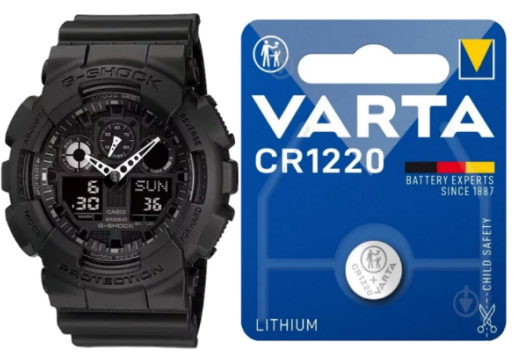
The Casio GA100 battery is a CR1220 lithium coin cell. This applies to many Casio G-Shock GA-100 models using Module 5081. The expected battery life is about 2 years, depending on how often you use the LED light, alarms, stopwatch and other functions.
If your GA-100 display is fading, the light is weak, the watch resets, or the analog-digital functions behave strangely, the battery may be near the end of its life.
- Casio GA-100 Battery Type and Quick Specs
- Casio GA100 Battery Life
- Casio G-Shock GA-100 Battery Replacement
- AC Reset and Hand Alignment After Battery Change
- Casio GA-100 Battery Replacement Cost
- Common Mistakes During GA-100 Battery Replacement
- Module 5081 Battery Notes
- What Battery Does a Casio Watch Take?
- Pros and Cons of Replacing the GA-100 Battery Yourself
- Final Verdict
- FAQ
- Author
Casio GA-100 Battery Type and Quick Specs
| Question | Answer |
|---|---|
| Watch model | Casio G-Shock GA-100 |
| Common module | Module 5081 |
| Battery type | CR1220 |
| Battery voltage | 3V |
| Battery chemistry | Lithium coin cell |
| Approx. battery life | About 2 years |
| Watch type | Analog-digital G-Shock |
| Water resistance | 200 meters |
| Solar? | No, standard GA-100 models are battery-powered |
| Bluetooth? | No, standard GA-100 models do not use Bluetooth |
Short answer: the correct Casio GA-100 battery type for Module 5081 is CR1220.
Do not confuse it with CR2016, CR2025 or CR2032. Those batteries are common in other Casio watches, but they are not the correct battery for most GA-100 Module 5081 watches.
Casio GA100 Battery Life
The usual Casio GA100 battery life is about 2 years. This is normal for an analog-digital G-Shock with LED light, multiple alarms, stopwatch, countdown timer and world time.
| Usage pattern | Expected result |
|---|---|
| Light use, rare illumination | May last close to 2 years or slightly longer |
| Normal daily use | Around 2 years |
| Frequent LED light use | Battery may drain faster |
| Frequent alarms and hourly signal | Can reduce battery life |
| Heavy stopwatch/timer use | May shorten battery life slightly |
| Old stock watch | Battery may already be partly used |
| Moisture or internal damage | Can cause early battery drain |
How long do Casio batteries last?
It depends on the watch. Simple digital models can last 7-10 years, while many analog-digital G-Shock watches last around 2-5 years. The GA-100 is usually in the shorter range because it has more functions and an analog-digital module.
Casio G-Shock GA-100 Battery Replacement
A Casio G-Shock GA 100 battery replacement is possible at home, but it requires care. The GA-100 is a 200-meter water-resistant G-Shock, so the gasket and case back seal are important.
Tools you need:
| Tool | Why you need it |
|---|---|
| Small Phillips screwdriver | To remove the case back screws |
| CR1220 battery | Correct replacement battery |
| Plastic tweezers | Safer for handling the battery |
| Soft cloth | Protects the watch face |
| Small tray | Keeps screws from getting lost |
| Gasket grease | Helps preserve the rubber seal |
| Optional pressure test | Best way to confirm water resistance |
Basic replacement steps:
- Place the watch face down on a soft cloth.
- Remove the case back screws.
- Lift the case back carefully.
- Check the gasket and remember its position.
- Remove the old CR1220 battery.
- Insert the new CR1220 battery with the correct polarity.
- Make sure the battery contact is seated correctly.
- Perform an AC reset if needed.
- Check the digital display.
- Check the LED light, alarm and buttons.
- Check analog hand alignment.
- Put the gasket back correctly.
- Close the case back and tighten screws evenly.
Important: if you swim with the watch or rely on its 200-meter water resistance, professional replacement is safer. A poorly seated gasket can reduce water protection even if the watch works normally after the battery change.
AC Reset and Hand Alignment After Battery Change
After replacing the Casio GA100 battery, the module may need an AC reset. This is common with many Casio digital and analog-digital watches.
When AC reset may be needed:
| Symptom | Possible reason |
|---|---|
| Blank display after new battery | Battery contact issue or reset needed |
| Strange digits | Module did not restart correctly |
| Buttons behave oddly | Reset may be required |
| Alarm or light acts strange | Module may need reset |
| Analog hands do not match digital time | Hand alignment correction may be needed |
The GA-100 has analog hands and digital displays. If the digital time is correct but the hands are wrong, do not keep changing the main time repeatedly. Use the hand alignment correction function from the Module 5081 instructions.
After battery replacement, check:
| Check | Why it matters |
|---|---|
| Digital time | Confirms the module is running |
| Analog hands | Must match the digital time |
| Home city | Affects world time and local time |
| DST setting | Can make the watch one hour off |
| Alarm | Confirms sound works |
| Light | Confirms battery and button function |
| Stopwatch/timer | Confirms mode buttons work |
| Gasket | Protects water resistance |
Casio GA-100 Battery Replacement Cost
The battery itself is inexpensive. The main cost is labor, resealing and possible water resistance testing.
| Option | Approx. US cost |
|---|---|
| CR1220 battery only | About $2-5 |
| DIY battery replacement | About $2-10 if you already have tools |
| Local watch shop replacement | About $10-30 |
| G-Shock replacement with gasket check | About $20-40 |
| Authorized service / pressure test | Often $30-60+ depending on location |
If you use the watch only casually, a local watch shop may be enough. If you use it for swimming or water exposure, ask for gasket inspection and pressure testing.
Common Mistakes During GA-100 Battery Replacement
| Mistake | Why it matters |
|---|---|
| Using the wrong battery | The watch may not work or the battery may not fit |
| Installing the CR1220 upside down | Display will stay blank |
| Forgetting AC reset | Module may behave strangely |
| Ignoring hand alignment | Analog hands may show the wrong time |
| Losing or pinching the gasket | Water resistance can be reduced |
| Touching the module too much | Oils, dust or static can cause problems |
| Overtightening screws | Can damage the case or threads |
| Assuming all G-Shocks use the same battery | Different G-Shock models use different batteries |
The biggest practical mistake is treating every G-Shock the same. A GA-100 Module 5081 uses CR1220, while other models may use CR2016, CR2025, CR2032, SR726W or a rechargeable solar cell.
Module 5081 Battery Notes
The Module 5081 GA-100 is an analog-digital quartz G-Shock. It uses one CR1220 battery and has a shorter battery estimate than many simple digital Casio watches because it runs more functions.
| Module | Watch family | Battery |
|---|---|---|
| 5081 | Casio G-Shock GA-100 | CR1220 |
Module 5081 is commonly associated with GA-100 models such as black, white, red, blue, gold-tone and limited color variants. The color version does not usually change the battery type, but it is still smart to check the case back or manual before buying a replacement battery.
What Battery Does a Casio Watch Take?
There is no single battery for every Casio watch. The correct battery depends on the exact model and module.
| Casio model type | Common battery examples |
|---|---|
| Casio GA-100 Module 5081 | CR1220 |
| Casio F-91W | CR2016 |
| Casio A158 / A168 | Often CR2016 |
| Casio MQ-24 | SR626SW |
| Casio GA-2100 | SR726W x 2 |
| Casio DW-9052 | CR2016 |
| Casio GBD-200 | CR2032 |
| Casio solar watches | Rechargeable solar cell |
If you are not sure, search by both the watch model and module number. For this topic, Casio GA-100 Module 5081 battery is the safest search phrase.
Pros and Cons of Replacing the GA-100 Battery Yourself
| Details | |
|---|---|
| ✅ Cheap battery | A CR1220 battery costs only a few dollars. |
| ✅ Possible at home | The case back uses screws, so it can be opened with small tools. |
| ✅ Good if you already repair watches | A careful DIY job can save money. |
| ✅ No need to replace the whole watch | A new battery can keep the GA-100 running for years. |
| ⚠️ Water resistance risk | Poor gasket placement can reduce the 200m rating. |
| ⚠️ AC reset may be needed | The module may not restart correctly without reset. |
| ⚠️ Hand alignment may need correction | Analog hands may not match digital time after replacement. |
| ⚠️ Small screws and contacts | Easy to lose or damage if you rush. |
| ⚠️ Shop service is safer | Especially if you use the watch around water. |
Final Verdict
The Casio GA100 battery is a CR1220 3V lithium coin cell. For most GA-100 watches using Module 5081, the expected battery life is about 2 years.
A Casio G-Shock GA 100 battery replacement is possible at home, but it needs care because the watch is a 200-meter water-resistant analog-digital G-Shock. If you open it yourself, use the correct CR1220 battery, protect the gasket, perform an AC reset if needed and check both the digital display and analog hand alignment afterward.
If you swim with the watch or want to preserve water resistance, a watch shop or authorized service is the better option.
FAQ
What battery does the Casio GA-100 use?
The Casio GA-100 with Module 5081 usually uses a CR1220 lithium coin cell battery.
What is the Casio GA-100 battery type?
The battery type is CR1220.
How long does the Casio GA100 battery last?
The expected battery life is about 2 years, depending on light, alarm, timer and general use.
Can I replace the Casio G-Shock GA-100 battery myself?
Yes, but be careful with the gasket, small screws, AC reset and hand alignment. If you use the watch around water, professional service is safer.
What is the battery for Casio Module 5081?
Casio Module 5081 uses a CR1220 battery.
How much does Casio GA-100 battery replacement cost?
A CR1220 battery usually costs a few dollars. A shop replacement often costs around $10-30, while pressure testing or authorized service can cost more.
Does the GA-100 need an AC reset after battery replacement?
It may. If the display is blank or strange after installing the new battery, an AC reset may be needed.
Why are the analog hands wrong after battery replacement?
The hands may need hand alignment correction. Set the digital time first, then align the hands using the module settings.
Is the Casio GA-100 solar?
No. Standard GA-100 models are battery-powered and use a CR1220 battery.
Is the GA-100 battery the same as GA-2100?
No. GA-100 Module 5081 usually uses CR1220, while GA-2100 usually uses two SR726W batteries.