A part can fit Casio GBD-200 Battery physically and still be electrically or electronically incompatible. Confirm the number, polarity, generation, or receiver system before installation.
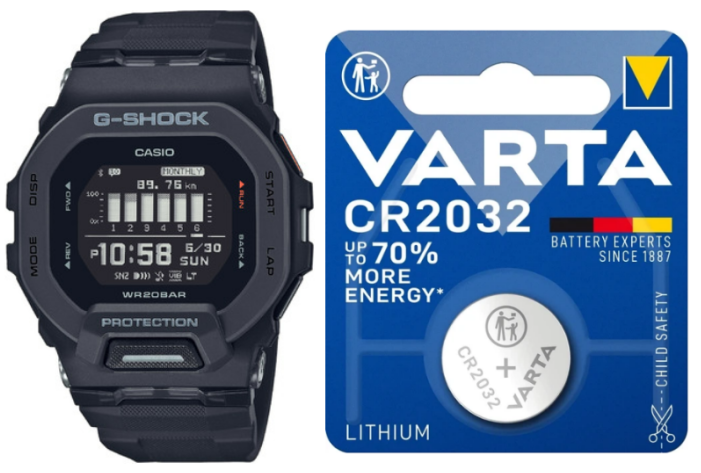
f you came here because a low-battery warning popped up, the display started glitching, or Bluetooth just won’t stay connected anymore — the battery is almost always where to start looking. The GBD-200 runs on a single CR2032 lithium coin cell, and Casio rates it for about two years. That number surprises a lot of people coming from older G-Shocks that can go five years or more on a battery, and the reason for the gap is worth understanding before you even think about opening the case.
- The Answer Before You Open Anything
- The Model Detail That Changes the Answer
- The Battery Change From Case Back to AC Reset
- The Reset Step That Is Easy to Miss
- A New Battery Is Not Always the Whole Fix
- Manuals, Modules, and Verification
- Start With the Failure You Can Observe
- The Signal That Tells You It Worked
- The replacement itself
- Seeing the time come back isn’t the finish line
- What to Take to the Parts Counter
- Where the Money Goes
- Author
The Answer Before You Open Anything
A basic digital Casio spends nearly its entire life doing one thing: showing the time. The GBD-200 is doing considerably more than that even when you’re not actively looking at it — tracking steps, staying paired to your phone, watching for notifications, and driving a MIP display that’s sharper and easier to read outdoors than a standard LCD. All of that pulls power in the background, all day, whether you’re checking it or not.
Casio’s two-year figure assumes a specific pattern: daily Bluetooth, occasional vibration alerts, regular step tracking, the odd workout session. Push any of those harder and the number moves.
- Mostly worn as a plain watch, notifications minimal → close to two years, sometimes a bit more
- Daily Bluetooth with moderate notification volume → roughly matches Casio’s estimate
- Frequent workouts and vibration alerts → often closer to 18 months
- Heavy notification traffic all day → sometimes down near a year
One thing that catches people off guard with a brand-new watch: the battery inside wasn’t installed the day you bought it. Casio tests every unit at the factory, and from there it can sit in storage or on a shelf for months before it reaches a customer. If your first battery underperforms the two-year estimate, that’s not necessarily a sign anything’s wrong with the watch.
The Model Detail That Changes the Answer
It’s tempting to blame the Bluetooth radio itself, but in my experience notifications are usually the bigger factor. Picture the watch buzzing every time someone reacts to a message, a work chat pings, or an app sends a promo alert — each one is tiny, but dozens a day adds up fast over months of use.
The easiest fix isn’t turning Bluetooth off entirely — it’s trimming what’s allowed to vibrate the watch in the first place. Leaving calls and texts enabled while cutting Slack, Teams, and any app you don’t actually need alerts from tends to make a real difference without making the watch feel less connected.
The Battery Change From Case Back to AC Reset
Work through the obvious possibilities before suspecting the module itself: is it genuinely a fresh CR2032, installed the right way round, fully engaged under the retaining clip, reset if the module requires it, and has the watch been re-paired to your phone? Actual module failure is far less common than a battery or installation issue — most “it’s still broken” cases trace back to one of those five things.
The Reset Step That Is Easy to Miss
Most guides jump straight to tools. I’d start somewhere else: buy the battery first, and don’t grab the cheapest unbranded CR2032 you can find. No-name cells sometimes sit in storage for years before they’re sold, which defeats the entire point of doing this job in the first place. Panasonic, Energizer, Maxell, Sony, or Duracell cost a little more and give you a much better starting point.
Once you’ve got a good battery in hand, clear a proper workspace — not a kitchen table with the window open, where dust and pet hair have free rein over an open watch case. A microfiber cloth, plastic tweezers, and a small tray for the screws cover everything you actually need. This isn’t a job that calls for a full watchmaker’s kit.
A New Battery Is Not Always the Whole Fix
Swapping a CR2032 isn’t technically hard — keeping the watch properly sealed afterward is where things actually go wrong. Four screws hold the case back on, and once it’s off, you’re looking at the rubber gasket that keeps water and dust out. That gasket is also the easiest thing in the whole job to damage without realizing it: a slight twist, a speck of dirt underneath, or one screw tightened much more than the others can all compromise the seal.
None of that means DIY is a bad idea — plenty of owners do this at home without any issues. It really comes down to how the watch gets used. Something that mostly sees rain and hand-washing is fine for a home replacement or a trusted local watchmaker. Something that goes in the pool or the ocean regularly is worth handing to a professional who’ll inspect the gasket and pressure test the case afterward — preserving that factory 200m rating matters more than the money saved doing it yourself.
Manuals, Modules, and Verification
Turning off every smart feature defeats the purpose of owning this watch — the better move is cutting what you don’t actually use. Trimming unnecessary vibration alerts tends to move the needle more than anything else. Beyond that: disable notifications from apps you rarely check, use the backlight only when you need it, actually end workout sessions instead of leaving them running in the background, and keep the Casio Watches app and Bluetooth firmware current. None of this doubles your battery life on its own, but together it adds up to a real difference.
Start With the Failure You Can Observe
This watch rarely goes from perfectly fine to completely dead overnight. Bluetooth that occasionally won’t reconnect, vibration that feels a bit softer than it used to, or odd behavior right after a burst of notifications are usually the first hints. Module 3506 also has a built-in low-battery indicator — once that shows up, it’s worth planning the replacement rather than trying to stretch a few more months out of it.
Not every connection hiccup means the battery is failing, though. Before you assume the worst, check that the Casio Watches app is still paired properly, that Bluetooth permissions haven’t been reset by a phone update, and that Airplane Mode isn’t quietly switched on. These have a way of mimicking battery symptoms almost perfectly.
The Signal That Tells You It Worked
The replacement itself
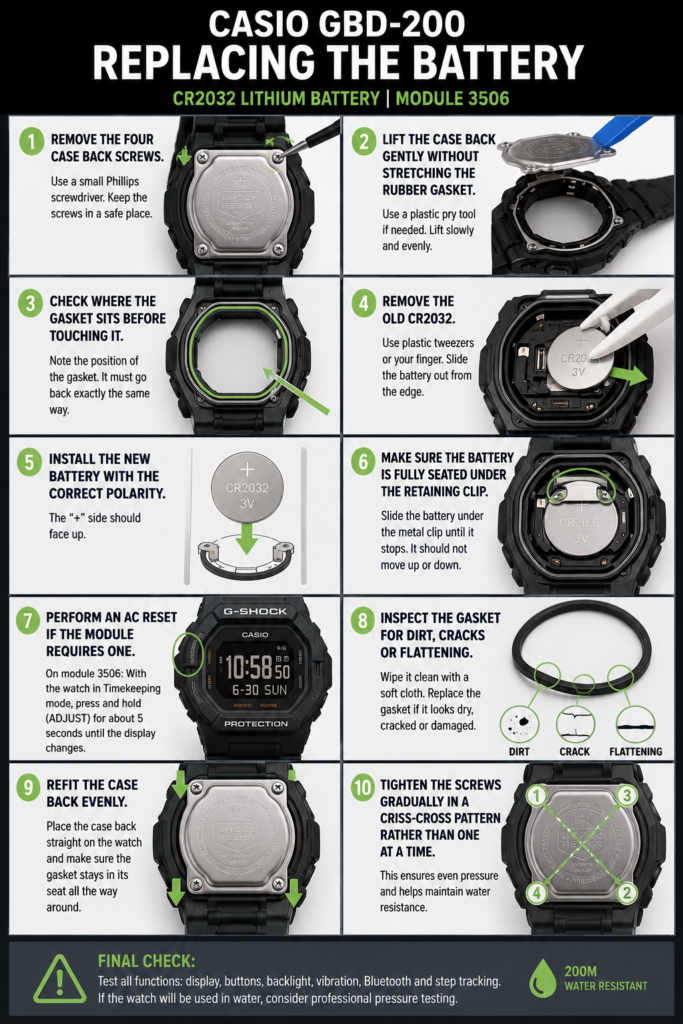
- Remove the four case-back screws
- Lift the case back gently, without stretching the gasket
- Note exactly where the gasket sits before disturbing it
- Remove the old CR2032
- Install the new battery with correct polarity
- Confirm it’s fully seated under the retaining clip
- Run an AC reset if the module calls for one
- Check the gasket for dirt, cracking, or flattening
- Refit the case back evenly
- Tighten the screws gradually in a crisscross pattern — not one at a time
That last step gets skipped in a lot of online tutorials, and it’s worth doing properly. Fully tightening one screw before the others uneven-loads the case back. It probably won’t cause a problem on its own, but there’s no reason to add stress to the seal for no benefit.
Seeing the time come back isn’t the finish line
The display lighting up only confirms one thing: the watch has power. Before calling the job done, spend a couple of minutes actually checking:
If something on that list doesn’t behave right away, don’t jump to “bad battery.” A loose contact, an incomplete reset, or a simple Bluetooth pairing hiccup is usually the more likely explanation.
What to Take to the Parts Counter
The battery itself is the cheapest line on the whole invoice — usually $2–5. A DIY job with tools already on hand runs about the same, maybe up to $10. A local shop typically charges $10–30 for the battery swap alone, more like $20–40 if you want a gasket inspection thrown in, and an authorized Casio center with full pressure testing lands around $30–60 or more. If the watch spends its life in the office or the gym, a local watchmaker is plenty. If you swim with it regularly, one question is worth asking before you leave it with anyone: will they pressure test it after closing the case back up? The answer tells you more than the price does.
Where the Money Goes
Worth checking before you order parts, since the naming gets confusing fast:
- GBD-200 → CR2032
- GBD-100 → CR2032
- GBX-100 → CR2032
- GBD-800 → usually CR2025
- GBD-H2000 → rechargeable, not a coin cell at all
That last one trips people up constantly because of how close the model name looks to the GBD-200 — despite both belonging to the same G-Squad family, the power systems have nothing in common.
Your next step with Casio GBD-200 Battery is to verify the identifying number, then follow only the branch of this guide that matches it.