Use the lookup first. Find the model, module, caliber, or device number for Casio Manuals Finder, then confirm the result against the marking on the old cell or the official manual.
- Selecting Casio English watch instructions by module name
- We have collected for you all existing manuals for these watch models:
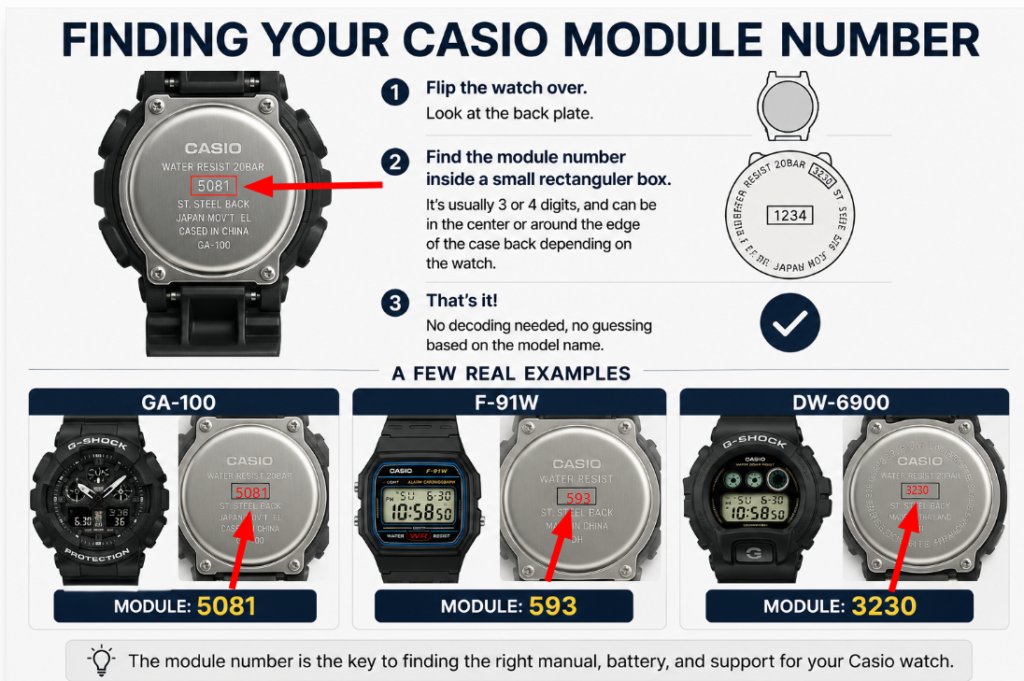
- Finding Your CASIO Module Number
- Using the Finder
- What You’ll Actually Get From These Manuals
- Common Reasons People End Up With the Wrong Manual
- FAQ
- How to Verify a Casio Manuals Finder Result
- Author
Selecting Casio English watch instructions by module name
Watch Manual Archives
Enter the 4-digit (or 3-digit) Module Number shown enclosed in rectangular box on the back of the watch (back plate), either in the center or around the circumference. Then press Ctrl + F, paste your module number, and press Enter — you’ll quickly find your watch’s module.
| Module | Range | Manual (PDF) |
|---|
We have collected for you all existing manuals for these watch models:
- Casio G‑Shock manual
- Baby‑G Casio manual
- Manual Casio Tough Solar
- Casio Illuminator manual
- Casio ProTrek user manual
- Manual Casio Twin Sensor
- Manual Casio Vibration Alarm
For older models not listed, visit support.casio.com to search by module number.
See also: Сasio Watch Battery Finder 🔋
If you do not find your watch module, write in the comments the number of the watch module and we will add it soon.
Finding Your CASIO Module Number
Flip the watch over. On the back plate, you’re looking for a number enclosed in a small rectangular box — usually 3 or 4 digits, sometimes positioned in the center of the case back, sometimes running around its edge depending on the watch’s design. That’s it. No decoding needed, no guessing based on the model name at all.
A few real examples to show how disconnected the module number can be from the name you’d search for:
- GA-100 → module 5081
- F-91W → module 593
- DW-6900 → module 3230
Notice none of those numbers resemble the model name in any way. That’s exactly why searching by model name so often turns up the wrong PDF, and why this finder is built around the module number instead.
Using the Finder
Once you’ve got the number off the case back, type it into the search box above, or use Ctrl + F to jump straight to it in the full table if you’re scanning manually. Matching against the exact module number, rather than a partial model name, is what gets you the correct manual on the first try instead of the third.
If your exact number isn’t listed, it’s worth checking neighboring numbers in the same range — Casio frequently issues near-identical modules a few digits apart for regional variants or minor revisions, and the core functions (and often the entire manual) are usually shared across them.
What You’ll Actually Get From These Manuals
Every PDF here is Casio’s own official English-language instruction manual, hosted directly from Casio’s manual archive — not a third-party rewrite or a summarized version. That matters more than it might seem: button functions, alarm-setting sequences, and world-time city codes are things you want straight from the source, not paraphrased by someone guessing at what a button does from a photo.
Expect coverage of the basics every module shares — setting the time and date, using the stopwatch and alarms — plus whatever is specific to your particular module, whether that’s world time city codes, a countdown timer, or (for the more advanced modules) Bluetooth pairing and app connectivity steps.
Common Reasons People End Up With the Wrong Manual
A few patterns come up constantly:
Searching by model name alone. As covered above, this is the single biggest source of mismatched manuals. The model name printed on the dial or the box tells you almost nothing about which internal module you’re actually holding.
Assuming color variants share a manual with the “main” version. They usually do — but not always. If your case back number doesn’t match the one you assumed, trust the number.
Buying secondhand and assuming the seller’s listed model is accurate. Secondhand listings get model numbers wrong often enough that checking the case back yourself, rather than trusting the listing, is worth the ten seconds it takes.
Confusing similarly-named watches from different families entirely. Casio’s naming conventions overlap across very different watch lines — a few characters of difference in a model name can point to an entirely unrelated module with a completely different manual.
FAQ
Why can’t I just search for my watch’s model name directly? Because Casio has reused model names across multiple different internal modules over the years. The model name tells you what the watch is marketed as; the module number tells you what’s actually inside it and which manual matches.
Where exactly is the module number located? Look at the case back — the metal plate on the underside of the watch. It’s printed inside a small rectangular outline, either centered or wrapped around the edge, depending on the specific watch’s back-plate design.
What if my module number isn’t in the table? Try checking numbers immediately before and after yours — regional variants and minor revisions are often assigned adjacent numbers and frequently share the same manual. If nothing close matches, the module may simply not have a manual hosted in Casio’s public archive yet.
Are these the same manuals Casio provides on its own site? Yes — every PDF links directly to Casio’s own official manual archive. Nothing here is a paraphrase or a third-party summary; it’s the manufacturer’s original English documentation.
My watch has extra features not covered in the manual I found — what happened? That’s usually a sign the module number was misread, or the watch is actually a slightly different variant. Double-check the exact digits on the case back — a single misread character is enough to land you on a manual for the wrong module.
How to Verify a Casio Manuals Finder Result
Use the model, module, or caliber marking as the primary key. If the lookup and the installed part disagree, stop and confirm the official manual before substituting an equivalent.