A Kwikset smart lock battery change is one of the most common maintenance tasks for electronic deadbolts. If the lock starts beeping, flashes red, responds slowly, or stops unlocking from the keypad, the batteries are the first thing to check.
In most cases, the job takes only a few minutes. The key is to use the right batteries, install them correctly, and know what to do if the lock still acts up after replacement.
This guide explains how to change batteries on a Kwikset smart lock, what battery type is usually used, how to deal with low battery warnings, and what to try if the lock is not working after a battery change.
- What battery does a Kwikset smart lock use?
- Kwikset smart lock battery table
- How to change battery in Kwikset smart lock
- Tips for a smooth Kwikset smart lock battery change
- Signs the battery is low
- Kwikset smart lock battery life
- Kwikset smart lock not working after battery change
- Kwikset smart lock beeping after battery change
- What to do if batteries keep dying
- How to open a Kwikset smart lock when the battery is dead
- Battery cover and holder problems
- Do you need to reset the lock after changing batteries?
- Author
What battery does a Kwikset smart lock use?
Most Kwikset electronic and smart deadbolts use 4 AA batteries. For the best results, it is smart to use a fresh matched set of alkaline batteries and replace all of them at the same time.
If you are checking the Kwikset smart lock battery type before buying replacements, the answer for most popular models is simple.
Kwikset smart lock battery table
| Model or series | Typical battery setup | Notes |
|---|---|---|
| Kwikset Halo | 4 AA batteries | Common Wi-Fi model, may use power faster than basic keypad locks |
| Kwikset Aura | 4 AA batteries | Bluetooth smart lock with similar battery replacement process |
| Kwikset SmartCode 888 | 4 AA batteries | Interior cover removal and simple battery holder access |
| Kwikset SmartCode 909 | 4 AA batteries | Standard electronic deadbolt battery layout |
| Kwikset SmartCode 910 | 4 AA batteries | Common keypad lock with familiar battery tray design |
| Kwikset SmartCode 913 | 4 AA batteries | Often searched as kwikset smart lock 913 battery replacement |
| Kwikset SmartCode 914 | 4 AA batteries | Frequently called kwikset 914 smart door lock battery |
| Kwikset SmartCode 916 | 4 AA batteries | Touchscreen model, battery changes are done from the interior side |
| Kwikset SmartCode 260 | 4 AA batteries | Process is similar to other residential keypad deadbolts |
| Kwikset SmartCode 892 | 4 AA batteries | Battery access is usually behind the inside cover |
| Kwikset Home Connect 620 | 4 AA batteries | Often searched under kwikset home connect 620 smart lock battery replacement |
| Vivint Kwikset lock variants | 4 AA batteries | Battery swap is usually the same as the matching Kwikset base model |
That table covers the most common search intent without forcing models into random sections. In practice, the battery replacement method is very similar across many Kwikset locks.
How to change battery in Kwikset smart lock
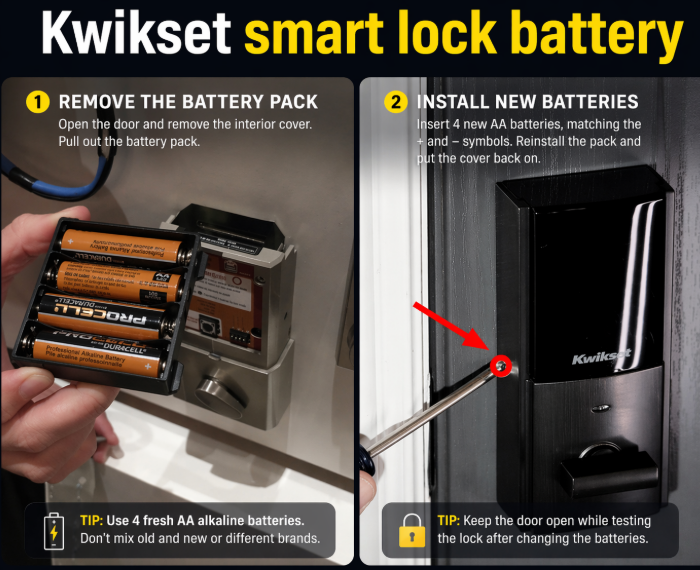
If you want to know how to change batteries on a Kwikset smart lock, the process is usually straightforward.
Basic battery replacement steps
- Open the door and keep it open during the entire process.
- Go to the interior side of the lock.
- Remove the inside cover.
- Take out the battery pack or remove the old batteries from the holder.
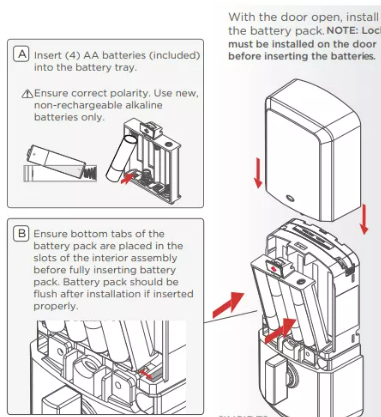
- Insert 4 new AA batteries, matching the polarity marks.
- Reinstall the battery holder securely.
- Put the cover back on.
- Test the lock before closing the door.
This is the usual method for queries like how to change battery in Kwikset smart lock, how to replace batteries in Kwikset smart lock, and change battery on Kwikset smart lock.
Tips for a smooth Kwikset smart lock battery change
A battery swap is simple, but a few mistakes can create problems right away. During a Kwikset smart lock battery change, make sure that:
- all batteries are new and from the same pack
- the battery direction is correct
- the battery holder sits firmly in place
- the cover is not pressing awkwardly on the pack
- the lock is tested with the door open
Many post-replacement problems are caused by installation issues rather than bad lock hardware.
Signs the battery is low
A Kwikset smart lock low battery warning can show up in a few different ways. Depending on the model, you may notice:
- beeping
- flashing red light
- slow motor movement
- delayed keypad response
- inconsistent locking and unlocking
- reduced app or keypad response
If the Kwikset smart lock battery died completely, the lock may stop responding from the keypad even though the hardware itself is still fine.
Kwikset smart lock battery life
Kwikset smart lock battery life depends on several factors:
- how often the door is used
- whether the lock has Wi-Fi or Bluetooth features
- door alignment
- cold weather
- battery quality
A basic electronic deadbolt often lasts longer than a connected smart model. A Kwikset Halo smart lock battery may drain faster than a simpler keypad lock because it handles more communication and smart features.
If you are dealing with a Kwikset smart lock battery dies quickly issue, battery quality and door alignment are the first two things to check.
Kwikset smart lock not working after battery change
A Kwikset smart lock not working after battery change problem is common enough that it deserves its own section. If the lock powers on but does not work properly, go through these checks one by one.
Check battery direction
Even one reversed battery can stop the lock from working correctly.
Reinstall the battery holder
A loose Kwikset smart lock battery pack or a misaligned holder can interrupt power.
Remove and reinstall the batteries
Take them out, wait a short moment, then insert them again carefully.
Test with the door open
Always test the lock while the door is open. That prevents accidental lockouts and makes it easier to see how the bolt moves.
Watch for bolt resistance
If the bolt rubs against the strike plate, the motor may struggle even with fresh batteries.
This section also covers searches like Kwikset smart lock battery change not working, Kwikset smart lock not turning on, and Kwikset smart lock battery reset.
Kwikset smart lock beeping after battery change
If the lock keeps making sounds after you replace the batteries, there is usually still an error somewhere. Kwikset smart lock beeping after battery change complaints often come down to one of these issues:
- weak or mixed batteries
- battery holder not fully seated
- incorrect battery orientation
- door handing issue
- bolt resistance
- interrupted restart after battery install
The same logic applies to searches like Kwikset smart lock keeps beeping after battery change and Kwikset smart lock blinking red after battery change.
What to do if batteries keep dying
If your Kwikset smart lock batteries keep dying, the lock may be working harder than it should. Common reasons include:
Poor door alignment
When the deadbolt does not slide smoothly, the motor uses more energy every time the lock operates.
Heavy smart feature use
A connected lock, especially one with remote access, can use more power than a basic electronic deadbolt.
Cheap batteries
Low-quality batteries often fail early or create unstable performance.
Loose contacts
A worn battery holder or damaged contact can create irregular power flow and mimic battery drain.
This also helps cover search intent around Kwikset smart lock draining battery fast, Kwikset smart lock battery drain, and Kwikset Halo smart lock battery drain.
How to open a Kwikset smart lock when the battery is dead
If you are searching how to open Kwikset smart lock when battery is dead, the usual answer is to use the physical key. Most Kwikset electronic deadbolts still include a keyway for exactly this reason.
Once you get inside, replace the batteries from the interior side of the lock. If a Kwikset smart lock battery dead locked out situation has happened once, it is worth changing batteries earlier next time instead of waiting for total failure.
Battery cover and holder problems
Sometimes the issue is not the battery itself. A cracked cover, weak holder, or poor contact point can cause random shutdowns or failed starts.
If the lock works only when you press on the battery area, inspect the Kwikset smart lock battery cover, battery holder, and battery pack fitment carefully. Replacing batteries alone will not fix a damaged holder.
Do you need to reset the lock after changing batteries?
Usually not. A normal Kwikset door lock battery replacement does not require a full reset. In many cases, the lock starts working normally as soon as the fresh batteries are installed correctly.
A reset is only worth considering if:
- the lock powers on but behaves unpredictably
- the keypad is unresponsive
- the app connection is lost and will not recover
- the handing or lock direction is wrong after replacement
If you do reset the lock, remember that some settings, codes, or smart connections may need to be set up again.
Final thoughts
A Kwikset smart lock battery replacement is usually quick, but doing it carefully matters. Most models use 4 AA batteries, and the main goal is to install them correctly, secure the battery holder, and test the lock before closing the door.
If the lock still beeps, flashes red, or refuses to work after fresh batteries are installed, the real issue is often a loose battery pack, poor contact, or door alignment rather than the batteries themselves.
For most homeowners, that means the battery swap is the easy part. The real fix is making sure the lock can operate smoothly once the new batteries are in.
