A part can fit SimpliSafe smart lock battery – keypad battery replacement, lock battery changes, and fixes when it stops responding physically and still be electrically or electronically incompatible. Confirm the number, polarity, generation, or receiver system before installation.
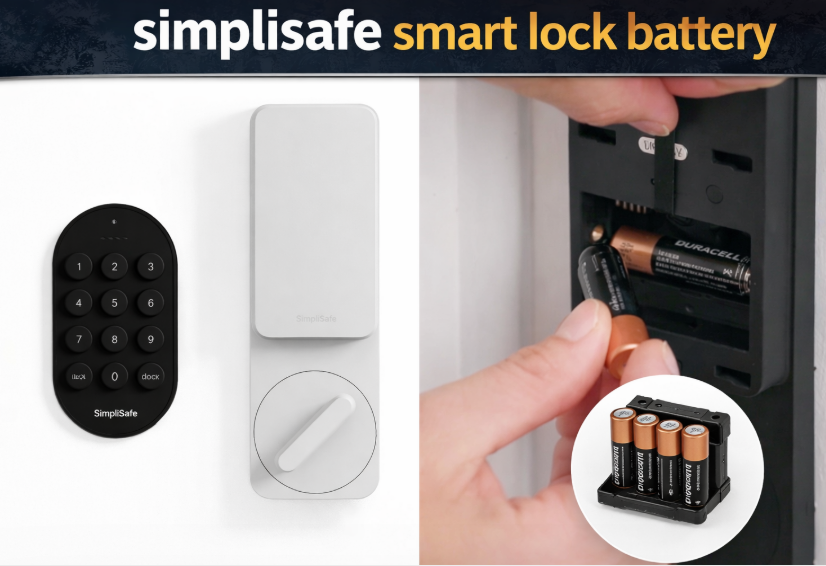
A SimpliSafe smart lock battery issue usually starts with small warning signs. The keypad may react slowly, the lock may fail to respond on the first try, or the pin pad may stop waking up when you touch it. In many cases, the fix is simple – replace the battery in the correct part of the system before the lock goes fully unresponsive.
That matters because people often mix up two different things: the battery inside the smart lock itself and the battery inside the keypad or pin pad. If you are searching for SimpliSafe smart lock battery replacement, SimpliSafe door lock keypad battery replacement, or SimpliSafe smart lock pin pad battery replacement, the first step is figuring out which part is actually causing the problem.
This guide explains how battery replacement usually works, what to check when the lock is not responding, and what to do if the lock still does not work after a battery change.
- What the Device Is Telling You
- SimpliSafe smart lock battery vs keypad battery
- Signs the battery is getting low
- Service the Battery Compartment in This Order
- How to change SimpliSafe smart lock battery
- How to change battery in SimpliSafe smart lock keypad
- SimpliSafe smart lock not responding
- SimpliSafe smart lock not responding after battery change
- SimpliSafe smart lock pin pad battery replacement tips
- SimpliSafe door lock battery cover problems
- Does battery replacement erase settings?
- Keep This Reference With the Device
- Installation Details That Affect Reliable Power
- Author
What the Device Is Telling You
SimpliSafe smart lock battery vs keypad battery
With SimpliSafe, battery questions often fall into two categories.
The first is the battery in the interior smart lock hardware. The second is the battery in the keypad or pin pad used for entry. That is why searches like SimpliSafe door lock keypad battery and SimpliSafe smart lock batteries often describe different problems.
If the lock motor sounds weak or the inside hardware seems dead, the issue is usually the lock battery. If the outside keypad does not light up or accept input, the problem is more likely the keypad battery.
Signs the battery is getting low
A weak battery does not always mean the lock stops instantly. Most of the time, it gives you clues first.
Common warning signs include:
- keypad takes longer to respond
- lock works on the second try instead of the first
- motor sounds weak
- outside pin pad does not wake up consistently
- app commands feel delayed
- the lock becomes intermittent rather than fully dead
If you notice those signs, replacing the battery early is much better than waiting until the lock becomes fully unresponsive.
Service the Battery Compartment in This Order
How to change SimpliSafe smart lock battery
A SimpliSafe smart lock battery change is usually done from the inside part of the door.
- Open the door and keep it open during the whole process.
- Go to the interior side of the lock.
- Remove the battery cover.
- Take out the old batteries.
- Insert the new batteries in the correct direction.
- Reattach the cover securely.
- Test the lock before closing the door.
That basic process covers SimpliSafe smart lock battery replacement, SimpliSafe door lock battery replacement, SimpliSafe door lock battery change, and how to change SimpliSafe smart lock battery.
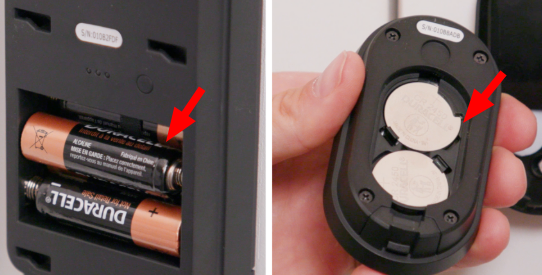
How to change battery in SimpliSafe smart lock keypad
If the outside keypad or pin pad is the problem, the battery replacement process is usually separate from the lock itself. That is why many searches focus specifically on the keypad.
The general idea is simple:
- Remove or open the keypad cover.
- Take out the old keypad battery.
- Insert the new battery in the correct orientation.
- Close the cover securely.
- Test keypad response before relying on it.
This section supports searches such as how to change battery in SimpliSafe smart lock keypad, how to change battery on SimpliSafe smart lock keypad, how to change SimpliSafe smart lock keypad battery, SimpliSafe door lock keypad battery replacement, and SimpliSafe smart lock pin pad battery replacement.
SimpliSafe smart lock not responding
If your SimpliSafe smart lock not responding problem just started, battery condition is the first thing to check. In many homes, the lock is not actually broken – it just no longer has stable power.
Start with the simplest checks:
Replace the battery in the correct component. Make sure you are changing the battery in the lock if the lock hardware is failing, or the keypad battery if the outside pin pad is dead.
Check battery direction. One reversed battery can stop the system from working.
Reinstall the cover firmly. A loose cover can cause weak or inconsistent contact.
Test with the door open. This prevents lockouts while troubleshooting.
Check the deadbolt movement. If the bolt binds against the strike plate, the lock may seem dead when the real problem is resistance.
This section also naturally supports SimpliSafe lock not working and SimpliSafe smart lock not responding after battery change.
SimpliSafe smart lock not responding after battery change
If the lock still does not work after fresh batteries are installed, the problem is usually one of a few simple things.
Battery contact is weak. The cover or battery terminals may not be pressing firmly enough.
The wrong part was serviced. Sometimes the lock battery was replaced when the keypad battery was actually dead, or vice versa.
The batteries were not seated fully. Slight misalignment can interrupt power.
The bolt is under pressure. If the door is pushing against the lock, the motor may fail even with new batteries.
The system needs a clean restart. Removing the batteries and reinstalling them carefully can sometimes solve odd behavior after replacement.
In many cases, the lock comes back to life once the batteries are reinstalled carefully and the door is tested open.
SimpliSafe smart lock pin pad battery replacement tips
The outside pin pad deserves a separate mention because many people assume the entire lock is dead when only the keypad battery is the problem.
A good SimpliSafe smart lock pin pad battery replacement goes more smoothly when you:
- open the correct battery compartment
- match the battery orientation exactly
- close the cover firmly
- test the keypad immediately
- keep the door open during testing
If the lock itself still works from the inside but the outside keypad does not respond, the pin pad battery is the most likely place to look first.
SimpliSafe door lock battery cover problems
Sometimes the battery is not the real issue. A damaged or loose SimpliSafe door lock battery cover replacement may be needed if the cover no longer holds the batteries firmly in place.
A weak cover can cause:
- random shutdowns
- intermittent keypad wake-up
- battery contact loss
- the lock working only when pressed or touched a certain way
If new batteries do not solve the problem, inspect the cover and the battery compartment fit before assuming there is a bigger hardware fault.
Does battery replacement erase settings?
Usually no. A normal battery swap should not wipe out your everyday lock settings. In most cases, the system starts working again once stable power is restored.
Still, after any battery change, it is smart to test:
- keypad wake-up
- lock and unlock action
- app response
- PIN entry
- auto-lock if enabled
That quick test catches small problems early and helps confirm whether the issue was really just battery-related.
Keep This Reference With the Device
That layout keeps the battery article practical without overcomplicating it.
Installation Details That Affect Reliable Power
If the lock or keypad keeps losing power too quickly, there is usually a reason.
Heavy daily use. A front door used many times each day naturally drains batteries faster.
Poor-quality batteries. Cheap cells often create unstable behavior.
Loose cover or poor contact. Intermittent contact can look like battery failure.
Door misalignment. A motor that fights resistance uses more power.
Cold conditions. Batteries often feel weaker in colder weather.
This is often the real reason behind repeated battery complaints, even when the system seems fine at first.
If SimpliSafe smart lock battery – keypad battery replacement, lock battery changes, and fixes when it stops responding still behaves the same after the matching test and a known-good power source, stop repeating the replacement and diagnose the device or receiver instead.
