The expensive mistake with Weiser smart lock battery – how to change batteries and fix common lock issues is following a procedure for a similar-looking version. The model, generation, control layout, or radio system decides which steps apply.
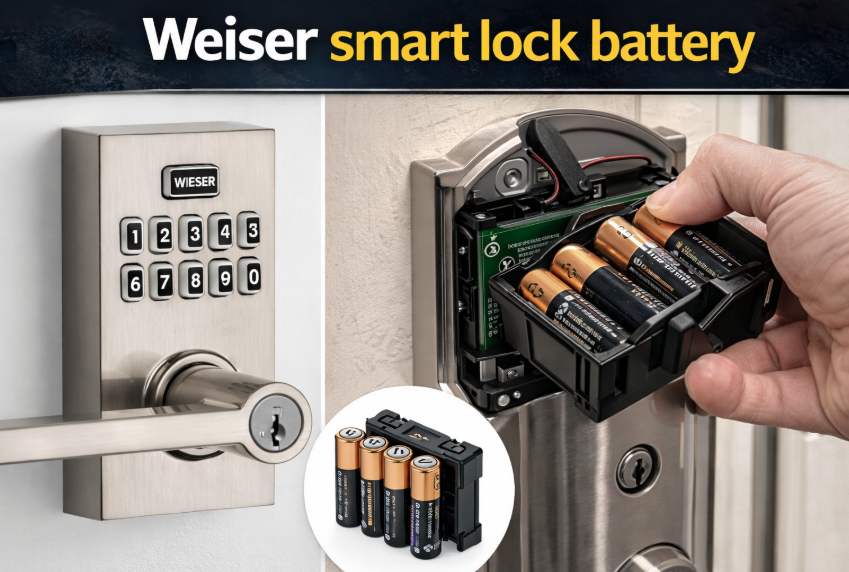
A Weiser smart lock battery problem usually starts with small signs. The keypad may respond slower than usual, the lock may beep, the motor may sound weaker, or the deadbolt may stop moving smoothly. In many cases, the solution is simple – replace the batteries before the lock goes fully dead.
Most people searching for Weiser lock batteries or Weiser lock battery change want a clear answer to three questions: what battery the lock uses, how to replace it, and what to do if the lock still does not work after the battery swap. This guide covers all three, along with a few related issues like programming, installation, and lock behavior after a battery change.
- The Useful Answer in One Place
- Replace or Recharge the Power Source
- How to change the batteries on a Weiser lock
- Weiser smart lock not working after battery change
- Do you need to reprogram the lock after changing batteries?
- Weiser smart lock installation and battery setup
- What Battery Life Looks Like in Real Use
- Where This Usually Goes Wrong
- What You Can Check Safely
- The Numbers Worth Writing Down
- Start With the Failure You Can Observe
- Weiser smart lock low battery signs
- Weiser smart lock won’t unlock
- What Must Be Reinitialized
- Author
The Useful Answer in One Place
For many Weiser electronic and smart deadbolts, the battery setup is usually 4 AA batteries. That is the most common answer behind searches such as Weiser smart lock batteries, Weiser smart lock battery type, and Weiser door lock battery replacement.
Battery design can vary a little by model, but in everyday use the replacement process is usually similar: remove the inside cover, pull out the battery holder, insert fresh batteries, and test the lock before closing the door.
Replace or Recharge the Power Source
How to change the batteries on a Weiser lock
A Weiser smart lock battery change is usually quick and straightforward.
- Open the door and keep it open during the whole process.
- Go to the inside part of the lock.
- Remove the interior cover.
- Pull out the battery holder or battery pack.
- Remove the old batteries.
- Insert 4 fresh AA batteries, matching the polarity marks.
- Reinstall the battery holder securely.
- Put the cover back on.
- Test the lock while the door is still open.
That basic process covers searches like how to change the batteries on a Weiser lock, changing batteries on Weiser door lock, how to change battery on Weiser smart lock keypad, and how to change the battery in a Weiser smart lock.
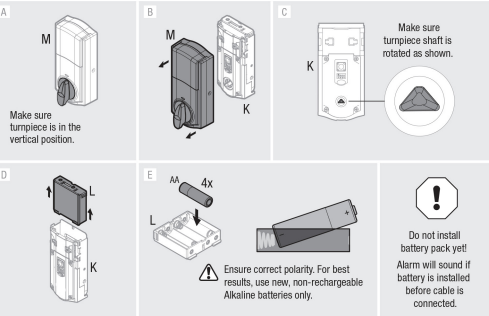
Weiser smart lock not working after battery change
If your Weiser smart lock not working after battery change problem appears right away, the lock is not necessarily broken. In many cases, the issue comes from something simple.
Check the battery direction. One battery installed backward is enough to stop the lock.
Reinstall the battery holder. It may not be seated all the way.
Remove and reinsert the batteries. A quick reinstall often fixes contact issues.
Test the lock with the door open. That makes it easier to see if the deadbolt is moving correctly.
Check for bolt resistance. If the bolt binds against the frame, the lock may look faulty even with new batteries.
This also helps cover search intent around Weiser smart lock troubleshooting and Weiser smart lock problems.
Do you need to reprogram the lock after changing batteries?
Usually no. A normal Weiser smart lock battery replacement should not force you to set everything up again. In most cases, user codes and basic settings stay in place after a standard battery swap.
However, if the lock behaves unpredictably after the batteries are changed, you may need to recheck some basic settings or run through simple Weiser smart lock programming steps. That is also where people often connect battery issues with searches like Weiser smart lock change code, Weiser smart lock programming, or Weiser smart lock instructions.
Battery replacement itself normally does not mean you must change the code, but it is common for users to review codes and settings while they are already working on the lock.
Weiser smart lock installation and battery setup
Battery issues can sometimes trace back to installation. During Weiser smart lock installation, the lock should sit square on the door and the deadbolt should move freely. If the lock was installed under tension or slightly misaligned, battery life may be shorter because the motor has to work harder on every cycle.
That is why installation and battery performance often go together, even if the user first notices the problem only when replacing batteries.
What Battery Life Looks Like in Real Use
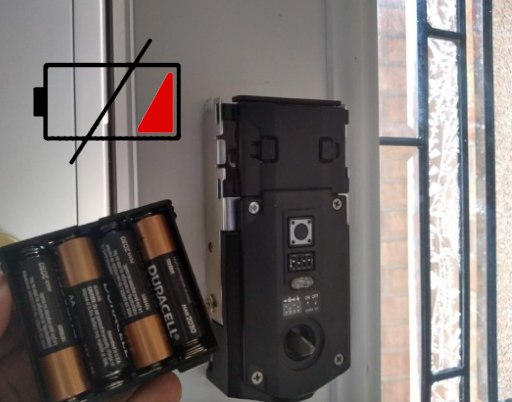
Weiser smart lock battery life depends on several factors:
- how often the lock is used
- battery quality
- door alignment
- temperature
- whether the lock uses connected smart features
A lock used many times a day will naturally drain batteries faster than one used only occasionally. Smart features can also shorten battery life compared with a basic electronic keypad lock.
If you are looking into Weiser Halo smart lock battery life or general Weiser smart lock battery life, the real answer usually depends more on daily usage and door alignment than on the brand name alone.
Where This Usually Goes Wrong
A simple battery swap can still cause problems if a few details are missed.
Use a full fresh set. Do not mix old and new batteries.
Check battery direction carefully. One reversed battery can stop the lock from working.
Seat the battery holder fully. A loose holder can interrupt power.
Test before closing the door. This avoids lockouts and makes troubleshooting easier.
Use decent batteries. Weak or cheap batteries often create unstable behavior.
These small steps help prevent many common issues after a Weiser lock battery change.
What You Can Check Safely
If your Weiser lock battery drain seems excessive, there is usually a practical reason.
Poor door alignment. If the deadbolt rubs against the strike plate, the motor works harder every time.
Heavy daily use. A busy front door naturally uses more battery power.
Cheap batteries. Low-quality batteries often lose voltage faster.
Loose battery holder or poor contact. Power may cut in and out even when the batteries are still good.
Connected features. Some smart lock functions increase battery use over time.
This section naturally helps with searches around Weiser lock battery drain and low battery performance without forcing the wording.
The Numbers Worth Writing Down
This table keeps the model-level search terms useful without forcing them into awkward places in the article.
Start With the Failure You Can Observe
Weiser smart lock low battery signs
A Weiser smart lock low battery problem usually shows up before the lock stops working completely. Typical signs include:
- delayed keypad response
- weaker motor sound
- occasional beeping
- slower locking and unlocking
- inconsistent keypad behavior
- the lock failing on the first try
If you notice any of these, it is better to replace the batteries early instead of waiting for a full battery failure.
Weiser smart lock won’t unlock
If the lock powers on but will not unlock, the battery may not be the only cause.
Deadbolt pressure. If the door is pressing against the bolt, the motor may struggle.
Weak battery contact. The lock may have just enough power to light up but not enough to move the bolt properly.
Partial setup issue. Some locks need to complete a proper handing or setup process after battery removal.
Worn keypad response. If some keys are not registering, unlocking may fail even though the lock itself still has power.
If your Weiser smart lock won’t unlock after a fresh battery install, start with alignment and battery fit before assuming a bigger hardware fault.
What Must Be Reinitialized
If the lock is acting strangely after power loss, some users look for a Weiser smart lock key reset or code reset. A reset can help in certain situations, but it should not be the first thing you try.
Before resetting, check:
- battery direction
- battery holder fit
- door alignment
- keypad response
- whether the lock is working with the door open
If the lock still behaves oddly after that, then reviewing programming steps or changing the code may make sense. That keeps the battery article relevant to people who land here from code-related searches without turning the whole piece into a programming guide.
Record the model, module, battery, or receiver information you confirmed for Weiser smart lock battery – how to change batteries and fix common lock issues; that note will make the next service faster than repeating the lookup.
