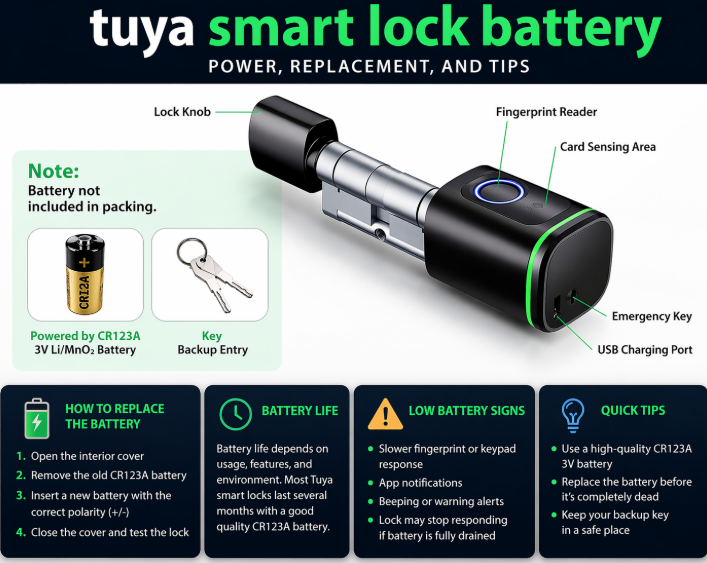
A Tuya smart lock battery problem usually shows up before the lock stops working completely. The fingerprint reader may react more slowly, the keypad may lag, the motor may sound weaker, or the lock may start showing a low battery warning. In most cases, the fix is simple – replace or recharge the battery before the lock goes fully dead.
The tricky part is that Tuya is a platform used across many different lock brands and models. That means the battery setup is not always identical. Some Tuya smart door locks use replaceable batteries, while others use rechargeable battery packs. That is why people search for everything from Tuya smart lock battery replacement to how to charge Tuya smart lock battery.
This guide explains how battery replacement usually works, what to do when the battery is dead, and how to get better Tuya smart lock battery life.
- What battery does a Tuya smart lock use?
- Tuya smart lock battery table
- How to replace a Tuya smart lock battery
- How to change battery in Tuya smart lock
- How to charge a Tuya smart lock battery
- How to charge Tuya smart lock without battery
- Tuya smart lock battery life
- Why Tuya batteries drain faster than expected
- Tuya smart lock battery dead – what to do first
- Tuya fingerprint door lock battery replacement
- Tuya smart lock battery replacement manual – what matters most
- Does battery replacement affect Alexa or app features?
- Final thoughts
- Author
What battery does a Tuya smart lock use?
The Tuya smart door lock battery type depends on the exact model. In everyday use, most locks fall into one of two categories:
- replaceable battery models
- rechargeable battery models
If you are looking for battery for Tuya smart lock, the first step is to open the inside battery compartment and confirm whether your lock uses a removable battery tray, standard batteries, or a rechargeable pack.
Because Tuya locks come from many manufacturers, it is better to check the real battery compartment than assume every model uses the same setup.
Tuya smart lock battery table
| Lock type | Typical battery setup | Notes |
|---|---|---|
| Tuya smart door lock standard models | Replaceable batteries | Common fit for Tuya smart lock battery replacement |
| Tuya fingerprint door lock | Replaceable or rechargeable battery | Depends on the model and lock body |
| Tuya smart lock with app control | Model-dependent battery setup | Smart features can affect battery life |
| Tuya smart door lock with keypad | Replaceable batteries in many cases | Interior battery compartment is usually easy to access |
| Tuya smart lock with camera or WiFi | Often higher power use | Battery life may be shorter than basic models |
| Tuya rechargeable lock models | Rechargeable battery pack | Relevant for how to charge Tuya smart lock battery |
This keeps the article useful without forcing one exact battery type onto every Tuya lock.
How to replace a Tuya smart lock battery
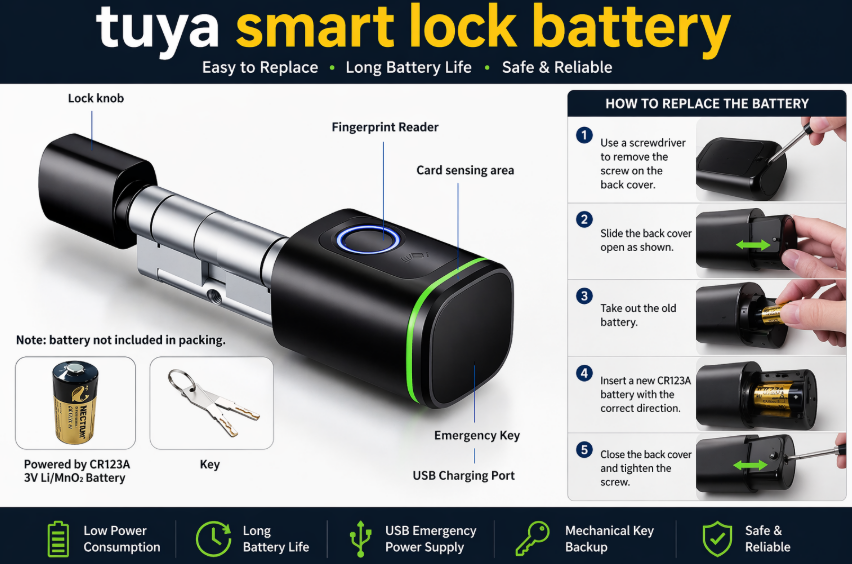
A Tuya smart lock battery replacement is usually done from the indoor side of the door.
- Open the door and keep it open during the whole process.
- Go to the inside part of the lock.
- Remove the battery cover.
- Take out the old batteries or battery pack.
- Insert the new batteries in the correct direction, or install the charged battery pack.
- Reattach the cover securely.
- Test the lock before closing the door.
That basic process covers Tuya smart lock battery replacement, Tuya smart door lock battery replacement, Tuya smart lock battery change, and how to replace Tuya smart lock battery.
How to change battery in Tuya smart lock
If you are specifically searching how to change battery in Tuya smart lock or how to change battery on Tuya smart lock, the most important detail is not the removal itself but using the correct battery style for your exact model.
A good battery change usually means:
Replace the full set. Do not mix old and new batteries on models that use multiple cells.
Check polarity carefully. One reversed battery can stop the lock from working.
Make sure the cover sits firmly. Weak battery contact can cause random shutdowns.
Test with the door open. This avoids lockouts and makes troubleshooting easier.
These simple steps solve many issues right away.
How to charge a Tuya smart lock battery
Some models use a rechargeable battery pack instead of standard replaceable batteries. In those cases, the main question becomes how to charge Tuya smart lock battery.
The process is usually straightforward:
- remove the battery pack or connect the charger as your model requires
- use the correct charging cable or power input
- let the battery charge fully before reinstalling or testing
- confirm the lock responds normally after charging
If your lock uses a rechargeable setup, short partial charges can sometimes make battery performance feel worse than it really is. A full proper charge usually gives better day-to-day results.
How to charge Tuya smart lock without battery
This search usually comes from users who mean one of two things: either the battery is completely flat and the lock will not respond, or they are trying to power the lock temporarily to get back inside.
If your Tuya smart lock battery dead situation happens, the exact backup method depends on the model. Some locks have an emergency power input on the outside. Others rely on a mechanical key backup. Some rechargeable models need the battery pack charged before normal operation returns.
So if you are trying to figure out how to charge Tuya smart lock without battery, the real answer is to check whether your model supports temporary emergency power or whether you need to remove and recharge the battery pack directly.
Tuya smart lock battery life
Tuya smart lock battery life depends on several real-world factors:
- exact lock model
- how often the door is used
- whether the lock uses WiFi, Bluetooth, or app features
- fingerprint reader usage
- camera or video functions, if present
- door alignment
- battery quality
- weather and temperature
A basic keypad lock usually lasts longer than a Tuya smart door lock with constant app activity or extra connected features. That is why Tuya smart door lock battery life can vary a lot from one product to another.
Why Tuya batteries drain faster than expected
If your Tuya smart lock battery life feels too short, there is usually a practical reason.
Poor door alignment. If the deadbolt rubs against the strike plate, the motor works harder every time.
Heavy daily use. A busy front door naturally drains batteries faster.
Low-quality batteries. Cheap batteries often drop voltage early.
Smart features. WiFi, app access, alerts, and connected controls can increase power use.
Loose battery contact. If the cover or tray does not hold the batteries firmly, the lock may behave like the batteries are failing.
This also helps cover the real intent behind Tuya smart door lock low battery and general battery complaints.
Tuya smart lock battery dead – what to do first
If the lock is completely unresponsive, do not assume it is broken right away. Go through the basics first.
Check the correct battery compartment. Make sure you are working with the actual power source for the lock.
Reinstall the batteries carefully. A second clean install often fixes contact issues.
Use a full fresh set or full charge. Weak batteries can make the lock seem dead even when it still has partial power.
Test with the door open. This makes it easier to see whether the bolt is binding.
Look for a backup entry method. Some Tuya locks include a physical key or emergency power option.
This naturally supports Tuya smart lock battery dead and Tuya smart door lock low battery without overstuffing the phrases.
Tuya fingerprint door lock battery replacement
A Tuya fingerprint door lock battery replacement follows the same logic as other Tuya locks, but fingerprint models often use more power because the sensor is active during frequent entry attempts.
If your fingerprint lock feels inconsistent, battery level is one of the first things to check. Once the voltage drops, the lock may still partially work but become slower or less reliable.
For fingerprint models, it is especially smart to replace the battery early rather than wait for full failure.
Tuya smart lock battery replacement manual – what matters most
Users often look for a Tuya smart lock battery replacement manual because Tuya locks can vary by manufacturer. Even without a model-specific manual in front of you, the most useful checks are usually the same:
- confirm battery type from the compartment
- replace the full set if using replaceable batteries
- charge fully if using a rechargeable pack
- make sure the cover closes firmly
- test the lock before closing the door
- check door alignment if the motor sounds strained
Those basics solve most everyday battery issues.
Does battery replacement affect Alexa or app features?
Sometimes people land on battery questions while also using smart features like voice control or app unlocking. If your Tuya smart lock Alexa setup or app connection seems unstable, low battery can absolutely be part of the problem.
A weak battery can make the lock seem like it has a connectivity issue when the real problem is simply unstable power. That is why battery health should always be checked before troubleshooting deeper smart home issues.
Final thoughts
A Tuya smart lock battery replacement is usually simple once you know whether your model uses replaceable batteries or a rechargeable pack. The most important things are using the correct battery type, installing it properly, and testing the lock before closing the door.
If the lock still behaves oddly after a battery change, the cause is often something small like poor battery contact, weak batteries, incomplete charging, or door alignment – not a major lock failure.
