The headline specification tells only part of the story with Schlage smart lock battery – how to replace batteries and fix common problems; the version and the way it is used often matter more than the label on the front.
A Schlage smart lock battery issue usually starts with small warning signs. The keypad may respond slower than usual, the lock may flash a low battery alert, or the motor may sound weak when locking and unlocking. In most cases, the fix is simple – replace the batteries before the lock goes fully dead.
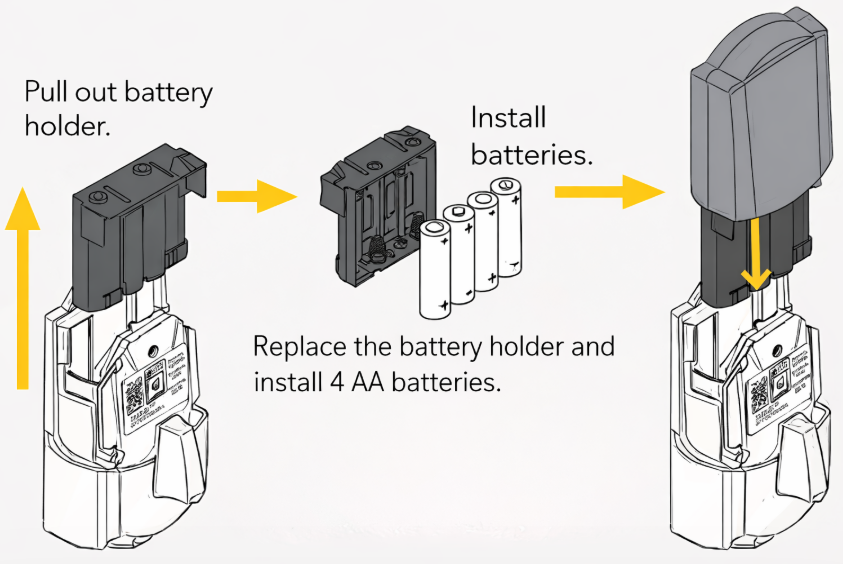
The exact battery setup depends on the Schlage model. Some Schlage smart locks use 4 AA batteries, while many keypad locks use a 9V battery. That is why people often get confused when searching for the Schlage keypad lock battery type or batteries for Schlage lock.
This guide covers battery replacement, battery type differences, low battery warnings, dead battery situations, and what to do if the lock stops working after a battery change.
- The Answer Before You Open Anything
- Replace or Recharge the Power Source
- Schlage smart lock battery table
- How to change battery on Schlage smart lock
- Schlage keypad lock battery change
- Schlage smart lock not working after battery change
- Schlage smart lock battery dead – how to open it
- The Battery-Life Clue Worth Watching
- Schlage smart lock battery life
- Why Schlage batteries keep dying
- Emergency Access When the Batteries Are Dead
- If the First Attempt Does Not Work
- Read the Symptom Before Replacing Parts
- Do Not Transfer Battery Advice Between Models
- Author
The Answer Before You Open Anything
The Schlage smart lock battery type depends on the lock series. In simple terms, many smart deadbolts use 4 AA batteries, while several keypad deadbolts and lever locks use a 9V battery.
If you are checking the Schlage door lock battery type before buying replacements, do not assume every Schlage lock uses the same setup. Battery size depends on whether you have a connected smart deadbolt, a touchscreen lock, or a simpler keypad lock.
Replace or Recharge the Power Source
Schlage smart lock battery table
This table helps separate Schlage keypad lock battery replacement searches from Schlage smart deadbolt battery searches, which are not always the same thing.
How to change battery on Schlage smart lock
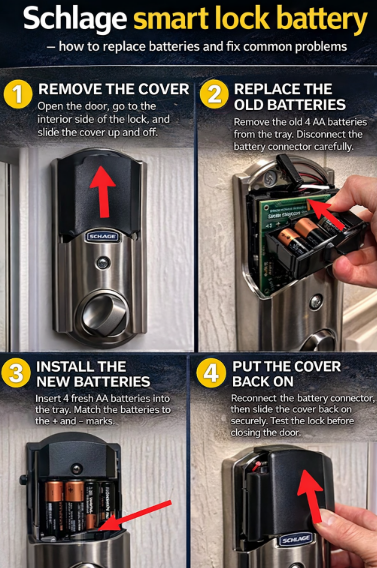
A Schlage smart lock battery change is usually quick and easy.
- Open the door and keep it open during the whole process.
- Go to the inside part of the lock.
- Remove the battery cover.
- Take out the old battery or battery tray.
- Insert the new batteries in the correct direction.
- Reinstall the tray or connect the battery properly.
- Put the cover back on.
- Test the lock before closing the door.
That basic process covers searches like how to change battery on Schlage smart lock, how do you change the batteries on a Schlage lock, and change battery on Schlage smart lock.
Schlage keypad lock battery change
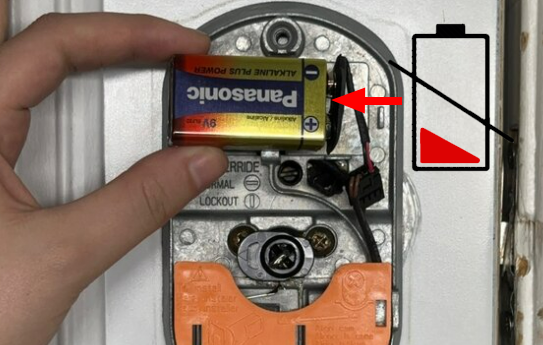
For many common keypad models, the Schlage keypad lock battery replacement process is a little different from a smart deadbolt. Instead of 4 AA batteries, these locks often use a single 9V battery behind the inside cover.
That is why searches such as Schlage keypad lock battery change, Schlage keypad lock battery replacement, and Schlage keypad lock battery type often point to a different answer than Schlage Encode smart lock battery replacement.
If you have a keypad-only lock, check the battery compartment carefully before buying batteries. The right battery matters more than people expect.
Schlage smart lock not working after battery change
A Schlage smart lock not working after battery change problem is frustrating, but it usually comes down to something simple.
Check battery direction. One battery installed backward is enough to stop the lock.
Reinstall the battery tray. A loose tray or poor connection can interrupt power.
Use a full fresh set. Mixed batteries often cause unstable behavior.
Test with the door open. This helps you see whether the bolt is moving correctly without risking a lockout.
Check the deadbolt movement. If it binds against the frame, the lock may look faulty even with new batteries.
This naturally covers Schlage smart lock not working after battery change, Schlage smart lock won’t turn on, and Schlage smart lock battery not working.
Schlage smart lock battery dead – how to open it
If the Schlage smart lock battery dead problem happens at the wrong time, the next question is how to get inside.
If your lock has a physical key cylinder, use the key and then replace the batteries from the interior side. That is the easiest answer for searches like Schlage smart lock battery dead how to open and Schlage door lock battery dead.
Some users search Schlage keypad lock battery dead no key or Schlage smart lock dead battery no key because they assume there is no backup option. In reality, the exact answer depends on the model. Some Schlage locks still provide a key override, while others rely more heavily on battery-powered entry.
Because of that, it is smart to know your backup entry method before the battery gets low.
The Battery-Life Clue Worth Watching
Schlage smart lock battery life
Schlage smart lock battery life depends on the model, how often the lock is used, the quality of the batteries, temperature, and door alignment. A connected smart deadbolt usually uses power differently than a basic keypad lock, so battery life can vary a lot across the Schlage lineup.
If you are dealing with Schlage smart lock battery life concerns, or Schlage keypad lock battery life seems shorter than expected, the cause is often not only the battery itself. The door and lock setup also matter.
Why Schlage batteries keep dying
If your Schlage smart lock batteries keep dying, there is usually a practical reason behind it.
Poor door alignment. If the deadbolt rubs against the strike plate, the motor needs more power every time it moves.
Wrong battery type. A keypad lock that needs a 9V battery will not be helped by guessing or using the wrong replacement approach.
Cheap batteries. Low-quality batteries may lose power faster or behave unpredictably.
Heavy use. A front door lock used all day will naturally drain faster than a lock used only a few times.
Connected features. Wi-Fi and smart functions can increase power use on some models.
This section also helps cover Schlage smart lock battery drain, Schlage smart lock battery draining fast, Schlage keypad lock eating batteries, and Schlage door lock battery keeps dying.
Emergency Access When the Batteries Are Dead
When a Schlage keypad lock battery dead issue appears, many people first think the keypad itself is broken. In reality, the lock may simply need a new battery and a quick restart.
If the keypad no longer lights up, start with the battery first. For many keypad locks, replacing the 9V battery solves the problem immediately.
If the keypad still stays dead after replacement, check the battery connection and make sure the inside cover is seated correctly.
If the First Attempt Does Not Work
Sometimes the problem is not the battery itself. A loose Schlage smart lock battery holder, a damaged contact, or a worn battery compartment can cause random shutdowns or failed starts.
If the lock works only when you press on the battery area, inspect the holder carefully. This also helps cover search terms like Schlage smart lock battery holder, Schlage door lock battery holder, and Schlage smart lock battery holder replacement.
Read the Symptom Before Replacing Parts
A Schlage smart lock low battery warning may show up as a flashing light, warning icon, beeping, or reduced keypad response. In daily use, the warning often appears before the lock becomes completely unusable.
Common low battery signs include:
- slower keypad response
- weaker motor sound
- warning light or flashing indicator
- delayed locking or unlocking
- inconsistent operation
- app alerts on connected models
This also covers search intent around Schlage smart lock low battery, Schlage smart lock low battery warning, Schlage keypad lock low battery warning, and Schlage keypad lock low battery indicator.
Do Not Transfer Battery Advice Between Models
Some users look for a Schlage smart lock rechargeable battery option, but rechargeable batteries are not always the best fit for electronic locks. Many smart locks behave more reliably with standard alkaline batteries because the voltage pattern is more stable.
If you decide to try rechargeables, monitor performance closely. If the lock starts showing early low battery warnings or inconsistent motor operation, switching back to alkaline batteries is often the better choice.
Stop work on Schlage smart lock battery – how to replace batteries and fix common problems if the next check requires live electrical access, defeated safety equipment, forced covers, or an unverified wiring change.
